Factory Reset Protection (FRP) is Google’s anti-theft feature built into every Android device running 5.1 Lollipop or later. After a factory reset, the device demands the previously linked Google account credentials before it can be set up again. That is great for security — until you forget your password, buy a second-hand phone that is still locked, or need to service a device in a repair shop.
This guide consolidates everything worth knowing about the most popular FRP bypass tools and APKs into one place: PC-based software, on-device APKs, and Samsung-specific utilities. Each entry includes honest pros and cons, compatibility notes, and whether the tool is still actively maintained.
Looking for method-specific walkthroughs instead? See how to bypass FRP with a PC or how to bypass FRP without a computer.
#Quick Comparison Table
| Tool | Type | Price | Platform | Supported Brands | Android Versions | Rating |
|---|---|---|---|---|---|---|
| DroidKit | PC software | From $49.99/yr | Win, Mac | Samsung, Xiaomi, Oppo, Huawei, Vivo, LG, and more | 5.1–14 | ★★★★★ |
| Tenorshare 4uKey for Android | PC software | From $35.95/yr | Win, Mac | Samsung (primary), Xiaomi, Redmi, Vivo, OPPO | 5.1–14 | ★★★★½ |
| iToolab UnlockGo | PC software | From $35.95/yr | Win, Mac | Samsung (primary), Motorola, some Xiaomi | 5.1–13 | ★★★★ |
| Dr.Fone Screen Unlock | PC software | From $39.95/yr | Win, Mac | Samsung, Xiaomi, Oppo, Vivo, Huawei | 5.1–13 | ★★★★ |
| GSM Flasher ADB | PC (free) | Free | Win | Samsung, LG, various | 5.1–9 | ★★★ |
| Pangu FRP Bypass APK | APK | Free | Android | Samsung, LG, Huawei, Motorola, Lenovo | 5.1–12 | ★★★★ |
| Easy Flashing FRP Bypass | APK | Free | Android | Most Android brands | 5.1–11 | ★★★½ |
| FRP Bypass APK (generic) | APK | Free | Android | Most Android brands | 5.1–10 | ★★★ |
| FastUnlocker | APK | Free | Android | Samsung, Xiaomi, OnePlus | 5.1–11 | ★★★½ |
| FRP Hijacker | PC (free) | Free | Win | Samsung only | 5.1–10 | ★★★½ |
| Samsung FRP Helper | PC (free) | Free | Win | Samsung only | 5.1–7.1.1 | ★★ |
| RootJunky FRP | APK / OTG | Free | Android | Samsung (primary), some others | 5.1–10 | ★★★ |
#PC-Based FRP Bypass Tools
PC tools generally offer higher success rates because they can push ADB commands, flash firmware patches, and interact with the device at a deeper level than an on-device APK. The trade-off is that you need a computer and a USB cable.
#DroidKit by iMobie — Best Overall
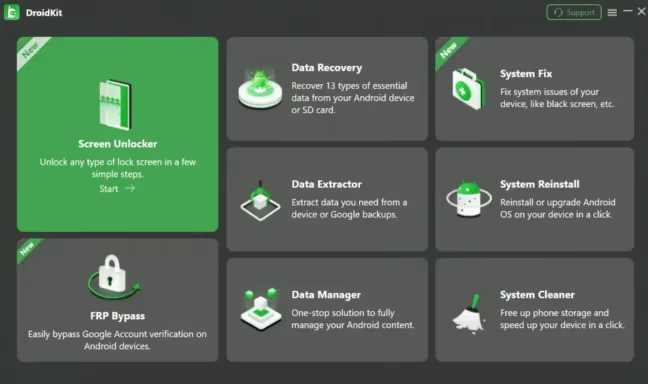
DroidKit is a full-featured Android toolkit that goes well beyond FRP bypass. It covers screen lock removal, data recovery, and system repair — but its FRP bypass module is the reason most people land on this page.
What it does well:
- Supports the widest range of brands (Samsung, Xiaomi, Oppo, Huawei, Vivo, LG, Motorola, and more)
- Walks you through every step with on-screen instructions
- Works on both Windows and Mac
- Regularly updated to cover new Android versions and security patches
- Includes additional utilities (data recovery, system fix) that add value to the license
Where it falls short:
- Not free — annual license starts around $49.99
- Large download size compared to lightweight free tools
- Some older or niche devices may still fail
Best for: Users who need a reliable, brand-agnostic tool and do not mind paying for software.
#Tenorshare 4uKey for Android — Best for Samsung
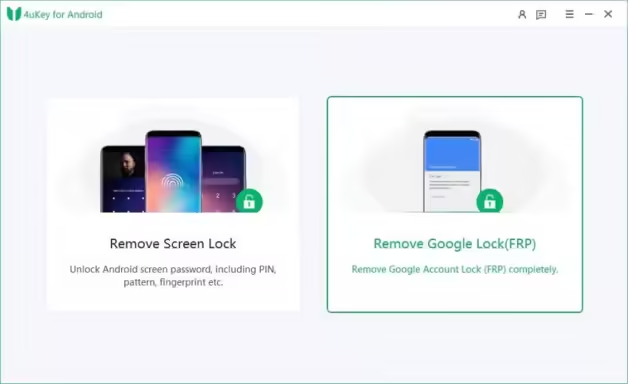
4uKey for Android has a strong reputation specifically in the Samsung ecosystem, though it also supports Xiaomi, Vivo, and OPPO devices for certain operations.
What it does well:
- High success rate on Samsung Galaxy devices, including recent models
- Simple three-step process: connect, detect, bypass
- Also removes PIN, pattern, password, and fingerprint locks
- Frequent updates to support the latest Samsung security patches
Where it falls short:
- Samsung support is significantly stronger than other brands — non-Samsung results vary
- Requires a paid license (starting around $35.95/year)
- Mac version occasionally lags behind Windows in update cadence
Best for: Samsung device owners who want a streamlined, well-supported tool.
#iToolab UnlockGo
iToolab UnlockGo targets Samsung and Motorola devices primarily. It offers a clean interface and guided process similar to the tools above.
Pros: Competitive pricing, decent Samsung support, clear UI. Cons: Narrower brand support than DroidKit or 4uKey; less frequent updates; limited community discussion online for troubleshooting.
#Dr.Fone Screen Unlock by Wondershare
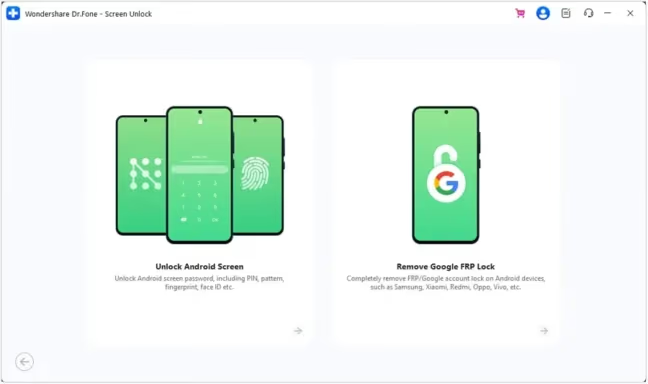
Dr.Fone is one of the longest-running names in mobile toolkit software. Its Screen Unlock module handles FRP bypass alongside pattern/PIN/password removal.
Pros: Mature software with a large knowledge base; supports many brands; bundled with other useful Wondershare tools. Cons: The full Wondershare suite is expensive; the FRP module alone does not justify the price for many users; can feel bloated if you only need FRP bypass.
#GSM Flasher ADB Bypass Tool (Free)
GSM Flasher is a lightweight, free Windows utility that sends ADB commands to remove the Google account from a connected device.
Pros: Completely free; no installation required — runs as a portable executable; straightforward for anyone comfortable with ADB. Cons: Requires USB debugging to be enabled (which is not always possible on FRP-locked devices); limited to older Android versions (roughly up to Android 9); no graphical wizard — you need to know what you are doing; not actively maintained.
Best for: Tech-savvy users with older devices who want a zero-cost option.
#APK-Based Tools (No PC Needed)
APK tools are installed directly on the locked device, usually via an OTG USB drive, a file manager exploit in the setup wizard, or by sideloading through a browser shortcut. They are convenient when you do not have access to a computer, but success rates tend to be lower and the process often requires creative workarounds to get the APK onto the device in the first place.
For general methods, see the full guide on bypassing FRP without a computer.
#Pangu FRP Bypass APK — Best Free APK
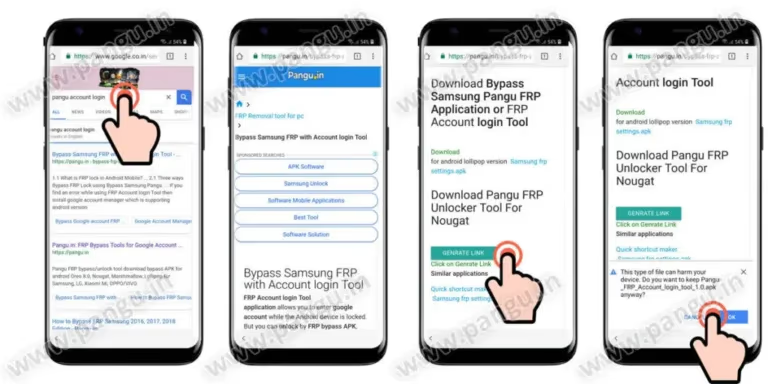
Pangu FRP Bypass was developed by a team originally known for iOS jailbreaking. It has become one of the most widely referenced free FRP tools for Android.
What it does well:
- Supports a wide range of brands: Samsung, LG, Huawei, Motorola, Lenovo, ZTE
- Works on Android 5.0 through 12 (with varying success on newer patches)
- Completely free
- Relatively fast process — bypass can complete in minutes
Where it falls short:
- Requires sideloading, which can be tricky on a locked device (OTG drive or browser exploit needed)
- Success varies significantly by device model and security patch level
- Interface is not as polished as paid tools
- Newer Android 13/14 devices are largely unsupported
Best for: Users who want a free, no-PC solution and have a way to load the APK onto their device.
#Easy Flashing FRP Bypass APK
Easy Flashing FRP Bypass is another free APK option. It works by temporarily disabling security protocols during the setup wizard.
Pros: Free; supports Android 5.1 and above; lightweight file size; receives occasional updates. Cons: Documentation is sparse; requires “Unknown Sources” to be enabled (not always straightforward on a locked device); limited effectiveness on recent security patches.
#FRP Bypass APK (Generic)
The term “FRP Bypass APK” refers to a family of generic APK tools circulated across forums and download sites. These typically exploit the Android setup wizard to open a browser or settings menu, then disable or remove the Google account.
Pros: Free; widely available; simple concept. Cons: Quality and safety vary wildly between versions — always scan for malware before installing; most versions target Android 5.1 through 10 and fail on newer devices; no official developer or update schedule; high risk of downloading a modified APK bundled with adware.
#FastUnlocker FRP Bypass APK
FastUnlocker is a lightweight (around 47 KB) free APK that targets Samsung, Xiaomi, and OnePlus devices.
Pros: Extremely small file size; free; supports Android 5.1–11; straightforward process. Cons: Limited brand coverage compared to Pangu; no official website — must be sourced carefully; not updated for Android 12+.
#Samsung-Specific Tools
Samsung devices are the most common targets for FRP bypass, partly because of Samsung’s massive market share and partly because Samsung-specific exploits have been well-documented over the years.
#FRP Hijacker (Samsung Only)
FRP Hijacker was developed by a programmer known as Hagard. It is a Windows-based tool that uses ADB, Odin, or dial-pad exploits to bypass FRP on Samsung devices.
Pros: Free; supports multiple bypass modes (ADB, Odin, Dial Pad); well-known in the Samsung community; effective on older Samsung models. Cons: Samsung-only — does not work with other brands; requires a PC and USB connection; limited effectiveness on devices running Android 11 or later; not regularly updated.
#Samsung FRP Helper
Samsung FRP Helper is a free, portable Windows utility (around 2 MB) that uses ADB commands to remove the Google account from Samsung devices.
Pros: Free; no installation needed; lightweight; offers both ADB and Call bypass methods. Cons: Only supports Android 7.1.1 (Nougat) and earlier — this makes it effectively obsolete for any Samsung device released after 2018; requires USB debugging to be enabled; no longer maintained.
Note: Samsung FRP Helper is included here for completeness, but it is outdated. If you have a Samsung device running Android 8 or later, use 4uKey, DroidKit, or FRP Hijacker instead.
#RootJunky FRP Bypass
RootJunky FRP works primarily on Samsung devices, though some methods extend to Huawei, Oppo, and Nokia. It exploits vulnerabilities in the Android setup process to create a new user account or bypass the FRP check.
Pros: Free; available as an APK or via OTG method; strong community support with YouTube tutorials; Samsung focus with broad model coverage. Cons: Exploits get patched with security updates, so effectiveness decreases over time; requires patience and sometimes multiple attempts; newer Samsung devices with recent patches often resist RootJunky methods.
#How to Choose the Right Tool
Choosing a tool depends on three factors: what device you have, whether you have a computer available, and how much you are willing to spend.
Start here:
-
Do you have a PC or Mac available?
- Yes → Go to step 2.
- No → Your options are Pangu FRP Bypass APK, Easy Flashing, FastUnlocker, or RootJunky (via OTG). See the APK section above.
-
Is your device Samsung?
- Yes → 4uKey for Android is the strongest choice for Samsung. FRP Hijacker is a free alternative for older models.
- No → Go to step 3.
-
What brand is your device?
- Xiaomi, Oppo, Huawei, Vivo, LG, Motorola, or other → DroidKit has the widest brand support among paid tools. For Motorola specifically, see the dedicated Motorola FRP bypass guide.
-
Are you comfortable with ADB and command-line tools?
- Yes → GSM Flasher ADB (free, PC) may work for older Android versions.
- No → Stick with a guided tool like DroidKit or 4uKey.
-
Is your device running Android 12 or later?
- Yes → Free tools have low success rates on recent Android versions. A paid, regularly updated tool (DroidKit or 4uKey) is the most reliable path.
- No → Free APKs like Pangu or RootJunky are worth trying first.
#Safety and Legal Considerations
FRP exists to protect device owners from theft. Before using any bypass tool, keep these points in mind:
- Only bypass FRP on devices you own or have explicit authorization to unlock. Using these tools on stolen devices is illegal in most jurisdictions.
- Bypassing FRP may void your warranty or violate the manufacturer’s terms of service.
- Free APKs carry malware risk. Only download from sources you trust, and scan every APK with antivirus software before installing. Avoid sites that require extra downloads or personal information.
- No tool guarantees 100% success. Success depends on the device model, Android version, security patch level, and the specific tool being used. Have a backup plan.
- Back up any accessible data before attempting a bypass, especially if the process involves flashing firmware or wiping partitions.
#FAQs
Q: What is the most reliable FRP bypass tool overall? A: For broad device support and consistent updates, DroidKit is the strongest option. For Samsung-specific needs, Tenorshare 4uKey for Android is a close second.
Q: Can I bypass FRP without a computer? A: Yes. APK-based tools like Pangu FRP Bypass and Easy Flashing can work without a PC, though you will need a way to load the APK onto the locked device (typically via OTG USB drive or a browser exploit during setup). See the full guide on bypassing FRP without a computer.
Q: Are free FRP bypass tools safe? A: Some are, but caution is essential. Stick to well-known tools (Pangu, RootJunky, FRP Hijacker) from sources referenced in community forums. Always scan APK files for malware before installing them.
Q: Do FRP bypass tools work on Android 14? A: Paid tools like DroidKit and 4uKey are regularly updated and claim support for Android 14 on compatible devices. Free APKs generally stop working reliably around Android 11–12 because Google patches the exploits they rely on.
Q: Is it legal to bypass FRP? A: Bypassing FRP on your own device is generally legal. Using these tools on a device you do not own may violate local theft or computer fraud laws. When in doubt, consult the laws in your jurisdiction.
Q: What should I do if the bypass fails? A: Try a different tool or method — what fails with one tool may succeed with another. If you have a PC, switch from an APK method to a PC-based tool. As a last resort, contact the device manufacturer with proof of purchase to request an official unlock.
Q: Does bypassing FRP erase my data? A: In most cases, the factory reset that triggered FRP has already erased the data. The bypass itself typically does not cause additional data loss, but some methods (especially those involving firmware flashing) may wipe the device again.
Q: Which tool works best for Motorola devices? A: DroidKit supports Motorola among its multi-brand lineup. For dedicated Motorola methods, see the Motorola FRP bypass tool guide.