Visual Certification Exam (VCE) files are widely used for IT certification exam preparation. However, these files often need to be converted to PDF format for easier access, sharing, and long-term preservation. This comprehensive guide will walk you through the process of converting VCE files to PDF, exploring various methods, tools, and considerations.
#1. Introduction to VCE Files and the Need for Conversion
#What are VCE files?
VCE files are digital exam formats created using the Visual CertExam Suite. They contain questions, answers, and explanations for certification exams, particularly in the IT field. VCE files are designed to simulate real exam conditions, providing an interactive platform for exam preparation.

#Why convert VCE to PDF?
Converting VCE files to PDF offers several advantages:
- Increased accessibility: PDF files can be opened on almost any device without special software.
- Easier sharing: PDFs are universally compatible, making them simple to distribute and share.
- Long-term preservation: PDF is a stable format for archiving important exam materials.
- Enhanced security: PDFs can be password-protected to safeguard sensitive exam content.
#2. Methods for Converting VCE to PDF
There are two primary methods for converting VCE files to PDF: using desktop software and utilizing online conversion tools.
#2.1 Using Desktop Software
#VCE Designer + PDF printer method
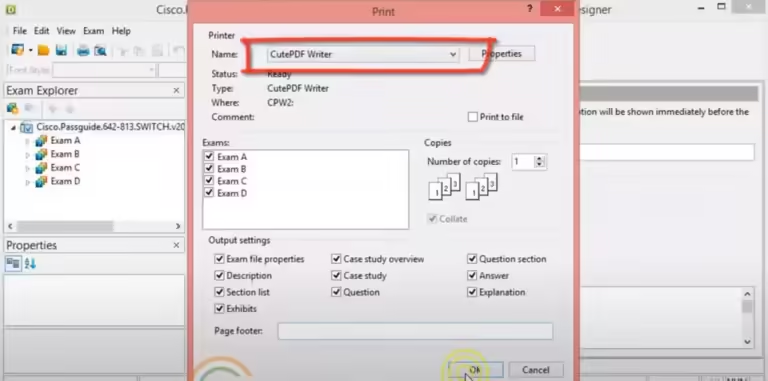
This method involves using VCE Designer to open the VCE file and then “printing” it to a PDF using a virtual PDF printer like CutePDF or doPDF.
#VCE Exam Simulator method
Some VCE exam simulation software, like VCE Exam Simulator, offer built-in options to export or print VCE files directly to PDF format.
#2.2 Online Conversion Tools
Several online services offer VCE to PDF conversion, including:
Pros of online converters:
- No software installation required
- Often free for basic use
- Accessible from any device with internet
Cons of online converters:
- May have file size limitations
- Potential privacy concerns when uploading exam content
- Sometimes slower than desktop methods
#3. Step-by-Step Guide to Convert VCE to PDF
#3.1 Using VCE Designer and PDF Printer
- Install VCE Designer and a virtual PDF printer (e.g., CutePDF or doPDF).
- Open your VCE file in VCE Designer.
- Go to File > Print.
- Select your PDF printer from the list of available printers.
- Adjust any print settings as needed.
- Click “Print” or “OK” to start the conversion.
- Choose a location to save your new PDF file.
#3.2 Using Online Conversion Tools
- Visit a VCE to PDF conversion website (e.g., pdfFiller, DocHub).
- Click the upload button and select your VCE file.
- Wait for the file to upload and convert.
- Download the converted PDF file.
#4. Free Software Options for VCE to PDF Conversion
Several free tools can help you convert VCE files to PDF:
- PDFElement: A comprehensive PDF solution that offers a virtual printer function for converting various file types to PDF, including VCE files.
- doPDF: Another free virtual PDF printer with a simple installation process.
These tools are generally compatible with Windows operating systems and require a simple download and installation process.
#5. Tips for Successful VCE to PDF Conversion
- Ensure your VCE file is compatible with the conversion software you’re using.
- Adjust print settings (e.g., page size, orientation) to maintain the original layout.
- Always create a backup of your original VCE file before conversion.
- Keep your conversion tools updated to avoid compatibility issues.
- If using online tools, be cautious about uploading sensitive exam content.
#6. Legal Considerations When Converting VCE Files
When converting VCE files to PDF, it’s crucial to consider the legal implications:
- Check the copyright status of the VCE files before conversion.
- Converting official exam papers may violate copyright laws.
- Use converted PDFs for personal study only, not for distribution.
- If in doubt about the legality of converting specific VCE files, consult legal advice.
#7. Advantages of Converting VCE to PDF
- Universal accessibility: PDFs can be opened on virtually any device or operating system.
- Improved sharing capabilities: Easily share exam materials with study groups or instructors.
- Enhanced security options: Protect sensitive exam content with password encryption. If you forget your PDF password, there are methods to recover it.
- Better for long-term storage: PDFs are a stable format for archiving important materials.
- Printing flexibility: PDFs are optimized for printing, allowing for easy creation of hard copies.
#8. Additional PDF Conversions and Manipulations
Once you’ve converted your VCE files to PDF, you might find the need to perform other PDF-related tasks:
- Convert ODT to PDF: If you have OpenDocument Text files, you can convert ODT to PDF for better compatibility.
- Insert PDF into Word: You can insert PDF files into Word documents for creating comprehensive study materials.
- Remove signatures from PDF: If needed, you can remove signatures from PDF files for privacy or editing purposes.
- Convert PDF to ODT: For editing in OpenOffice or LibreOffice, you might need to convert PDF files back to ODT format.
- Convert TIFF to PDF: If you have exam materials in TIFF format, you can convert TIFF to PDF for better compatibility and smaller file sizes.
- Convert INDD to PDF: For those working with Adobe InDesign files, converting INDD to PDF can be useful for sharing layouts.
#Conclusion
Converting VCE files to PDF format offers numerous benefits for those preparing for IT certification exams. By following the methods outlined in this guide, you can easily transform your VCE files into more accessible and versatile PDF documents. Remember to consider the legal aspects of file conversion and always use the converted materials responsibly.
#FAQs
- Can I convert VCE files to PDF for free? Yes, there are several free options available, including CutePDF, doPDF, and online converters like VCEPlus.
- Is it safe to use online VCE to PDF converters? While many online converters are safe, be cautious about uploading sensitive exam content. Always check the site’s privacy policy before use.
- Do I lose any information when I convert VCE to PDF? The conversion process should retain all text and images, but interactive elements may not function in PDF format.
- Can I convert a PDF back to VCE? Converting PDF back to VCE is more complex and may not be possible with standard tools. It’s best to keep your original VCE files.
- Why is my converted PDF file not opening? This could be due to a corrupted file or an outdated PDF reader. Try updating your PDF reader or re-converting the VCE file.
By following this guide, you’ll be well-equipped to convert your VCE files to PDF format, enhancing your exam preparation process and making your study materials more accessible and shareable.