Do you want to know how to remove the TikTok profile picture? Read our article to know more.
#Why It’s Not Easy to Delete TikTok Profile Picture?
If you have been looking for how to remove the TikTok profile picture, you must already know that it’s not an easy process.
This means the platform doesn’t let you remove or delete your profile picture as easily as some of the other platforms. Regardless, there are still a few workarounds that we will discuss in this article, so keep on reading.
Profile pictures are a big deal. No matter which platform we are talking about, your profile picture is the first thing that anyone notices when they visit your profile. So, it must be eye-catching and must resonate with your content.
For some, profile pictures aren’t that big a deal, and they keep the same photo for months, if not years.
But, when it comes to TikTok, the majority of the demographic is Gen-Z. And so users wish to change or remove their profile picture often, especially because they wish to keep up with the trends.
Thus, in this article, we will talk about how to delete a TikTok profile picture.
Also read: how to remove Zoom profile picture?
#The TikTok World
Before we dive straight into how you can remove your profile picture on TikTok, let us briefly discuss the world of TikTok.

Every social media platform is more or less about pictures, but TikTok primarily rules the video department. That being said, your profile picture still matters a lot, especially if you make regular content and want to attract followers.
Over the last few years, TikTok has become a pop culture phenomenon. It has revolutionized short-form video content and has become the go-to platform for Gen-Z and the young demographic.
For some, TikTok is easy to navigate through, and they dive right into it. For others, it can be a little intimidating.
Once you step foot in the app, you immediately get sucked into an overwhelming amount of content. Lipsyncing videos, dance videos, comedy videos, skits, and fashion videos. The platform is filled with all kinds of content you can possibly imagine.
With all that said, you might think that profile pictures hardly matter in this sea of videos. But they definitely do matter. Still, there are times when you might not want to keep any profile picture.
Perhaps you don’t have a good picture to keep as a display picture. Or, maybe you simply don’t feel like keeping any pictures at all.
Either way, there is one thing that you should know when learning how to remove a TikTok profile picture. That is, the app doesn’t allow you to completely remove it or keep it blank.
Thus, here, we’ll show you how to delete your TikTok profile picture using some workarounds.
Besides, this article will show you how to unfollow on TikTok easily, unfollow someone or everyone, and everything else you need to know about it.
#How to Remove TikTok Profile Picture**?**
As mentioned, you cannot remove your profile picture or keep it as blank on TikTok as you can on other platforms. That can be a bummer when you don’t feel like keeping any photo as your DP. So, what do you do in such cases?

In the following sections, we will show you numerous ways how to delete a TikTok profile picture.
Also, here, let’s learn all you are expected to know about how to delete videos on Tiktok and explain how to remove other types of content through TikTok.
#Downloading Blank Photo
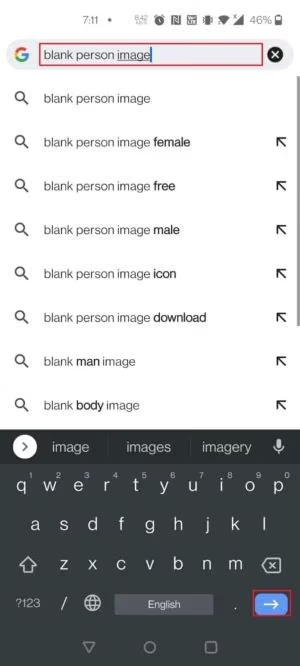
1: First, go to Google Chrome or any other browser that you have on your phone. Look up “blank person image” and download any photo of your choice.
2: Go to the TikTok app on your phone and go to your profile by tapping on Me at the bottom of the screen.
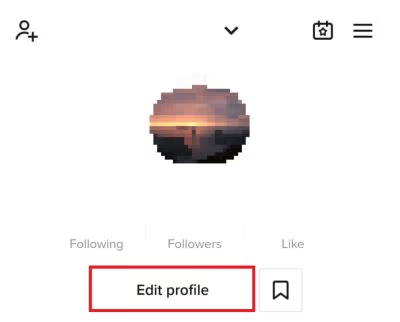
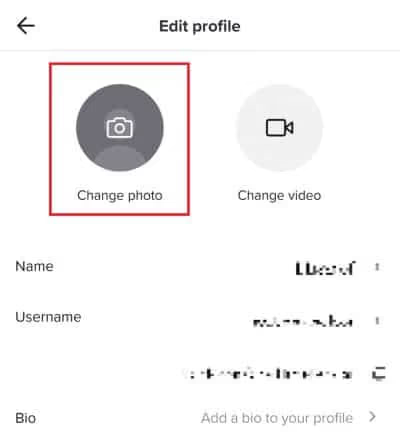
3: On your profile, tap on Edit Profile. Next, tap on Change Photo.
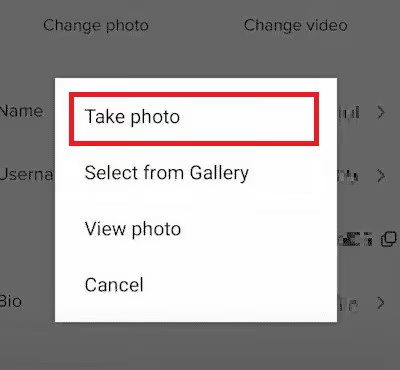
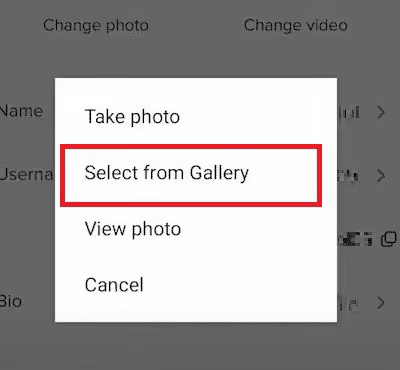
4: Next, you will get a menu stating a couple of options. From there, tap on Select from Gallery and select the photo you just downloaded.
5: Click on Save, and you are done.
Wasn’t that easy? Even though you cannot keep your profile picture empty like you can on Instagram or Facebook, you can just download a picture of your choice and put it up.
Let’s see what else you can do to learn how to delete a TikTok profile picture.
#Put Up a Black Picture
1: Go to the TikTok app on your phone and go to your profile by tapping on Me at the bottom of the screen.
2: On your profile, tap on Edit Profile. Next, tap on Change Photo.
3: Next, you will get a menu stating a couple of options. From there, tap on Take Photo.
4: Now, the camera will open. Click a completely black picture. For that, you can keep your finger on the camera and shield it to get a black picture. Or, you can turn off the lights in your room and click a picture.
5: Once you are done clicking the picture, click on Confirm and then on Save, and that’s it!
This is yet another easy way to remove the profile picture without actually removing it. But what if you wish to make your profile picture a little more interesting yet not put up your own picture? Let’s see what else you can do to learn how to remove the TikTok profile picture.
#Use Pinterest
1: First, go to Pinterest and search “Profile Picture TikTok” or “Profile Picture TikTok aesthetic.” You will come across several images of cats, dogs, cartoons, and pretty much all things. Download the picture you like the most.
2: Now, go to the TikTok app on your phone and go to your profile by tapping on Me at the bottom of the screen.
3: On your profile, tap on Edit Profile. Next, tap on Change Photo.
4: Next, you will get a menu stating a couple of options. From there, tap on Select from Gallery and select the photo you just saved from Pinterest.
5: Click on Save, and you are done.
Now you are aware of how to remove the TikTok profile picture. Pinterest is a great place for finding aesthetic pictures. Using Pinterest, you can spice up your TikTok profile picture even when you don’t wish to keep your own photo as the display picture.
Alternatively, you can also use apps like Canva or PicsArt, or even photoshop to make creative profile pictures on your own.
For instance, you wish to change your profile picture as per the season. Maybe it’s Christmas, and you want to put a little Santa hat on the profile picture to make your profile look more festive. No matter your wish, you have the complete liberty to be creative using such apps.
#Why Am I Unable to Change My Profile Picture on TikTok?
Now that you know how to remove the TikTok profile picture, you should also know that you might sometimes face problems when doing so.
Users often wish to change their profile picture whenever they feel like it. It all really depends on their mood. The great thing about apps like TikTok or Instagram is that a new profile picture doesn’t mean a new post altogether.
This means that you can change your profile picture as many times as you like without bombarding anyone’s feed with your pictures.
Yet, sometimes users have difficulty changing their TikTok profile picture. That can be due to several reasons:
- It might be a server issue on TikTok, which is preventing you from changing your profile picture.
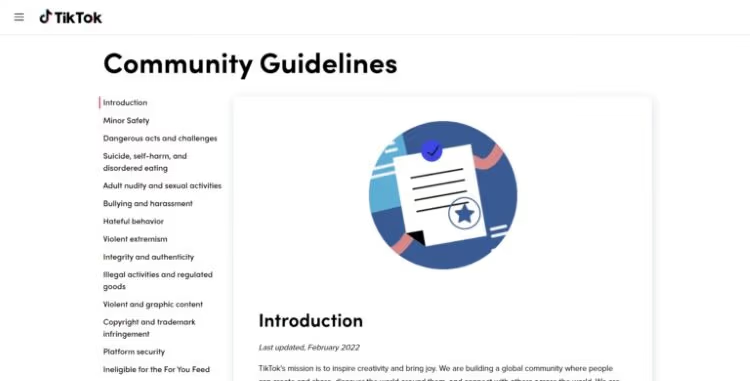
- If by any chance, you have committed any kind of violation of the TikTok Community Guidelines, you will fail to change your display picture.
- You will also be unable to change your display picture if there have been several reports against your profile picture. TikTok takes these measures to make sure you are aware of your actions. And that you are not putting up inappropriate pictures as your profile picture.
#Why is the TikTok App Strict About Profile Pictures?
Now you already know how to delete a TikTok Profile picture. TikTok doesn’t allow you to remove your profile picture entirely.
This means that you need to keep a profile picture at all times. This can be inconvenient for a lot of users. Yet, TikTok does this to prevent fake profiles.
Besides, putting up a profile picture helps other users to find your profile and know that it is really you. Sure, you can keep a blank profile picture when you don’t feel like having your own picture. But, if you’re an influencer and want other people to find your profile, it is best not to keep a blank profile picture.
By the way, let’s discover how to turn off active status on TikTok to boost your online privacy. By following our step-by-step guide, you can enjoy a more managed and customized TikTok journey.
#Tips for Managing Your TikTok Profile Picture
While removing your TikTok profile picture is a simple process, it’s important to consider a few tips for managing your profile picture effectively.
#1. Keep your profile picture up to date
Regularly updating your profile picture can keep your TikTok account fresh and engaging. Choose a picture that reflects your personality or the content you create on the platform.
#2. Choose an appropriate profile picture
When selecting a profile picture, make sure it aligns with the community guidelines and terms of service of TikTok. Avoid using copyrighted or explicit content that may lead to violations.
#3. Be mindful of privacy settings
Adjust your privacy settings to control who can see your TikTok profile picture. You can choose to make it visible to everyone, your followers only, or keep it private. Consider your privacy preferences while managing your profile picture.
#FAQs
#Q1. Can I remove my TikTok profile picture without replacing it?
Yes, you can remove your TikTok profile picture without immediately replacing it. Simply follow the steps mentioned in this article, and your profile picture will be removed.
#Q2. How often should I update my TikTok profile picture?
There is no set frequency for updating your TikTok profile picture. It’s up to you to decide when you want to change it. However, updating it periodically can help keep your profile fresh and engaging.
#Q3. Can I use a GIF as my TikTok profile picture?
As of now, TikTok does not support using GIFs as profile pictures. You can upload a static image in common formats like JPG or PNG.
#Q4. Will removing my TikTok profile picture delete it permanently?
No, removing your TikTok profile picture will not delete it permanently. You can always add a new profile picture or revert to the previous one if needed.
#Q5. Can I change my TikTok profile picture from a computer?
Currently, TikTok primarily operates as a mobile app, and profile picture changes are more convenient through the mobile app. However, you can access TikTok through a web browser and make certain changes to your profile there.
#Final Thoughts
TikTok has taken the internet by storm with its massive popularity over the last couple of years. And its popularity is justified, thanks to the myriad of features that TikTok offers.
However, one bummer is that you cannot remove your profile picture completely. Thus, you have to come up with creative ways to change your profile picture at times, especially when you don’t want to keep your picture.
But don’t worry; in this article, we showed you how to delete a TikTok profile picture easily.