Quick Answer: For iPhone, go to icloud.com/find or use the Find My app on another Apple device. For Android, go to android.com/find or use the Google Find My Device app. Both services show your phone’s location on a map and let you play a sound, lock the device, or erase it remotely.
Key Takeaways
- Apple’s Find My and Google’s Find My Device are free, built-in, and the most reliable tracking tools
- Both services work even when the phone is offline (using Bluetooth and nearby device networks)
- You must enable Find My iPhone or Find My Device before losing your phone for it to work
- Playing a loud sound is the fastest way to find a phone lost nearby (even on silent mode)
- If your phone is stolen, lock it remotely and report it to police — don’t confront the thief
#Before You Lose Your Phone: Enable Tracking
These settings must be turned on before your phone goes missing. Take two minutes to verify them now.
#iPhone Setup
- Go to Settings > [Your Name] > Find My > Find My iPhone
- Enable Find My iPhone
- Enable Find My Network (allows offline finding using nearby Apple devices)
- Enable Send Last Location (sends location to Apple when battery is critically low)
#Android Setup
- Go to Settings > Security > Find My Device (or Settings > Google > Find My Device)
- Enable Find My Device
- Make sure Location is turned on in Settings > Location
- Ensure your Google account is signed in
#How to Find a Lost iPhone
#Method 1: Use iCloud.com
From any browser (computer, tablet, or someone else’s phone):
- Go to icloud.com/find
- Sign in with your Apple ID
- Select your missing device from the list
- The map shows your phone’s current or last known location
You can then:
- Play Sound — Plays a loud ping even if the phone is on silent. Best for finding a phone lost in your house or car.
- Mark As Lost — Locks the phone with a passcode and displays a message with your contact number on the lock screen.
- Erase iPhone — Remotely wipes all data. Use this only if you’re certain the phone is stolen and you won’t get it back.
#Method 2: Use the Find My App
If you have another Apple device (iPad, Mac, or a friend’s iPhone):
- Open the Find My app
- Tap Devices and select your missing iPhone
- View its location, play a sound, or activate Lost Mode
#Method 3: Ask Siri on Another Device
If you have a HomePod, Apple Watch, or another iPhone signed into the same Apple ID, say “Hey Siri, find my iPhone.” Your missing phone will play a sound.
#Offline Finding
Even if your iPhone is powered off or has no internet connection, Apple’s Find My Network can locate it. This works by using Bluetooth signals that nearby Apple devices detect anonymously. The location is encrypted and relayed to you through Apple’s servers. It’s less precise than GPS but can narrow the search to a general area.
#How to Find a Lost Android Phone
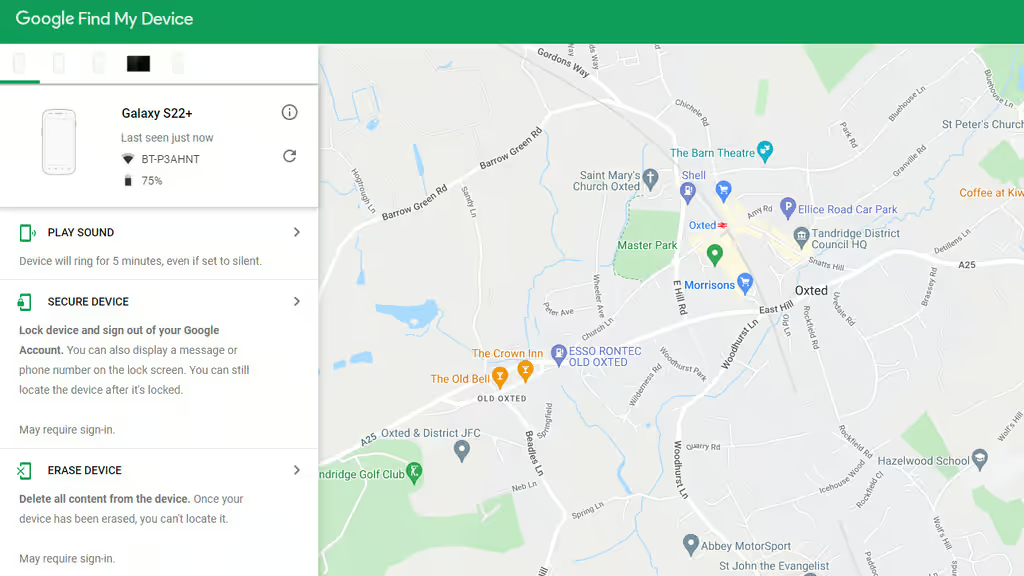
#Method 1: Use Google Find My Device
From any browser:
- Go to android.com/find
- Sign in with your Google account
- Select your missing phone from the device list
- The map shows the phone’s location
Available actions:
- Play Sound — Rings at full volume for 5 minutes, even if the phone is on silent or vibrate
- Secure Device — Locks the phone and displays a recovery message and phone number
- Erase Device — Permanently wipes all data
#Method 2: Use Google Find My Device App
Download the Find My Device app on another Android phone or tablet, sign in with your Google account, and locate your device.
#Method 3: Google Search
Simply Google “find my phone” while signed into the same Google account on any browser. Google displays a map with your phone’s location and an option to ring it directly from the search results.
#Offline Finding (Android 15+)
Google’s Find My Device network (similar to Apple’s) uses nearby Android devices to locate your phone even when it’s offline. This feature requires Android 15 or later and must be enabled in Settings > Google > Find My Device > Find My Device Network.
#Tracking with IMEI Number
Every phone has a unique IMEI (International Mobile Equipment Identity) number. You can find yours by:
- Dialing *#06# on your phone (do this now and save it)
- Checking Settings > General > About (iPhone) or Settings > About Phone (Android)
- Looking on the original box or purchase receipt
If your phone is stolen, provide the IMEI number to:
- Your carrier — They can blacklist the device so it can’t be activated on any network
- Police — Include it in your police report
- GSMA IMEI database — Report it stolen at imeidb.gsma.com
Note: The IMEI itself doesn’t let you track location in real time. Its primary value is in making the stolen phone unusable on cellular networks.
#Additional Tracking Methods
#Bluetooth Trackers
If you attached a Bluetooth tracker (AirTag, Tile, Chipolo) to your phone case, you can use that tracker’s app to find your phone even if the phone itself is dead. AirTags work through Apple’s Find My Network; Tile and Chipolo have their own community-based networks.
#Smart Home Devices
If you have a Google Home or Amazon Echo, you can say:
- “Hey Google, find my phone” (rings your phone)
- “Alexa, find my phone” (requires the Alexa app to be set up)
#Google Maps Timeline
If Location History is enabled on your Google account, you can check timeline.google.com to see where your phone has been. This can help you retrace your steps if you’re not sure where you lost it.
#What to Do If Your Phone Is Stolen
- Lock it remotely using Find My iPhone or Google Find My Device
- Don’t confront the thief — your safety is more important than a phone
- File a police report — Include the IMEI number, phone model, and last known location
- Contact your carrier — Report the theft and blacklist the IMEI
- Change your passwords — Email, banking, social media, and any accounts logged in on that phone
- Erase remotely if recovery seems unlikely — Protect your personal data
- Check your insurance — Many carrier plans and credit cards include phone theft coverage
#Bottom Line
Find My iPhone and Google Find My Device are your best tools — they’re free, built-in, and work even when the phone is offline. The critical step is enabling them before you lose your phone. If your phone is nearby, playing a sound at full volume is the fastest way to find it. If it’s stolen, lock it remotely, file a police report with the IMEI number, and erase it if recovery isn’t possible. Don’t risk your safety by confronting anyone over a phone.
#Frequently Asked Questions
#Can I track my phone if it’s turned off?
With Find My iPhone (iOS 15+) and Google Find My Device (Android 15+), your phone can be located even when powered off, using Bluetooth signals detected by nearby devices. The location is approximate, not as precise as GPS, but can narrow it to a building or block.
#Can I track my phone without Find My iPhone or Google Find My Device?
If you didn’t enable these services before losing your phone, your options are limited. Check Google Maps Timeline if Location History was on. Contact your carrier — some offer basic location services. For future prevention, enable Find My Device now on all your phones and tablets.
#Will a factory reset make my phone untraceable?
If someone factory resets your iPhone, Activation Lock (tied to your Apple ID) prevents them from setting it up without your credentials. On Android, Factory Reset Protection (FRP) does the same if your Google account was signed in. Your phone becomes a brick to the thief, even after a reset.
#Can police track a stolen phone?
Police can request location data from your carrier with a warrant, and some departments have tools for tracking stolen phones. File a police report and provide the IMEI number. Realistically, police prioritize these cases differently depending on jurisdiction — having the IMEI and last known location helps your case.
#Should I erase my phone or wait to see if I can recover it?
If you just lost it (at a restaurant, in a cab), wait and try tracking it first. Use Lost Mode to lock it and display a contact number. If it’s clearly stolen and the location shows it moving away, consider erasing it to protect your personal data. You can always restore from a backup on a new phone.
#Does tracking work if the SIM card is removed?
Yes, if the phone has Wi-Fi connectivity or offline finding is enabled. Find My iPhone and Google Find My Device don’t depend on the SIM card — they use Wi-Fi, Bluetooth, and the device’s connection to other nearby phones. However, cellular-based tracking (through your carrier) will stop working without the SIM.
#How accurate is phone tracking?
GPS accuracy is typically within 5-20 meters when the phone is outdoors with good signal. Indoor accuracy varies — Wi-Fi positioning is accurate to about 15-40 meters. Offline Bluetooth-based finding is the least precise, sometimes only narrowing the location to a city block. Playing a sound is the most reliable method for nearby searches.
#Can someone track my phone without my knowledge?
This article covers finding your own lost phone, which requires your own account credentials. If you’re concerned about someone else tracking your device, check our guide on how to detect spyware on iPhone or how to tell if your phone is being tracked.