Dive into our comprehensive guide that takes you through the steps on how to turn off active status on TikTok, enhancing your privacy and control on the platform.
We discuss the implications, benefits, and alternatives, offering a deep dive into the TikTok experience.
#Introduction
Welcome to the digital world of TikTok, where privacy settings have a key role to play!

You might be wondering, “How do I balance being active on TikTok while maintaining my privacy?”
Well, one of the ways to do that is by learning how to turn off active status on TikTok.
Besides, if you are wondering what is considered viral on TikTok and how to create viral TikTok videos, here, let us learn everything about it in this article.
#How to Turn Off Active Status on TikTok
This action may seem a bit technical, but trust me; it’s as easy as pie. To disable your active status on TikTok, you’ll have to follow these simple steps:
-
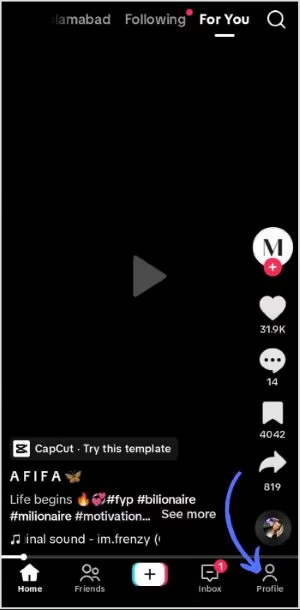
Launch the TikTok application and click on ‘Profile’, positioned at the bottom.
-
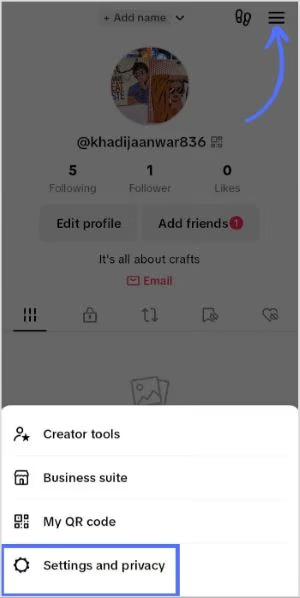
Click on the ‘Menu’ icon located at the top.
-
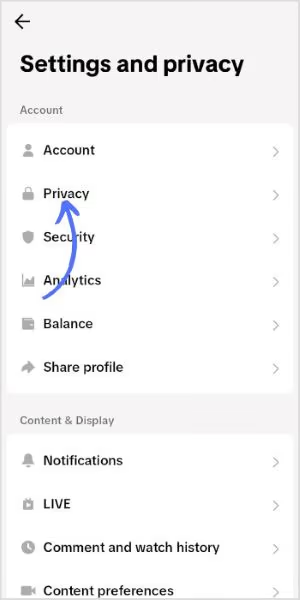
Navigate to ‘Settings and Privacy’, followed by selecting ‘Privacy’.
-
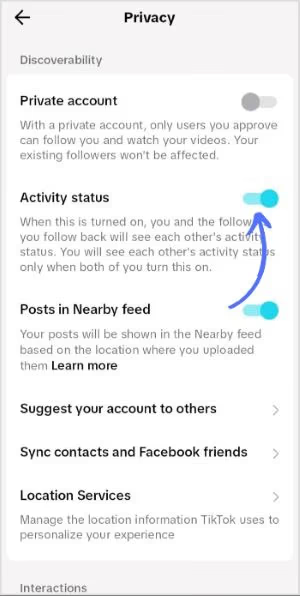
Here, you have the option to toggle the ‘Activity Status’ setting on or off. By default, this setting is switched off.
And voila! Your active status is off.
In addition, here, you will discover how to watch TikTok anonymously and maintain the privacy of your viewing tendencies. Follow these strategies to enjoy TikTok content without the need for an account or app installation.
#The Implications of Active Status
Turning off your active status might seem like a minor tweak, but it can significantly impact your TikTok experience.
It’s a matter of balancing between your visibility and privacy.
Disabling your active status means that you are no longer visible to your friends and followers when you’re online.
By the way, let’s discover TikTok Dark Mode on Android: An ultimate guide to its benefits, how to enable it, and frequently asked questions for a smooth TikTok experience.
#Advantages of Turning Off Active Status
You might be wondering, “What’s in it for me?” Well, here are some benefits you’ll enjoy once you know how to turn off active status on TikTok.
#Increased Privacy
First and foremost, it offers an added layer of privacy. Not everyone on your friends list needs to know when you’re online. After all, everyone needs a little “me time“, even on social media.
#Control Over Your Time
Knowing how to turn off your active status means you can control your time better. With the feature turned off, you’re less likely to be distracted by messages and notifications. This allows you to focus on creating great content or simply enjoying the latest viral videos.
#Alternatives to Turning Off Active Status
Suppose you still want to keep a certain level of visibility without your active status being completely off. In that case, there are alternatives to consider. Let’s delve into them.
#Only Friends Can See Your Active Status
Instead of making your online status invisible to everyone, you can make it visible only to your friends. This way, you can still connect with close contacts while maintaining a certain degree of privacy.
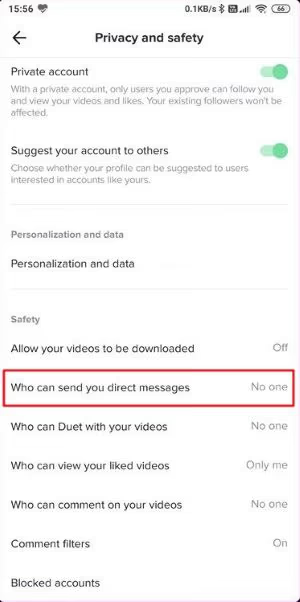
#Turning off Direct Messages
Another alternative to turning off your active status is turning off your direct messages. This method can help you control who can message you directly and when.
#Peeking into Someone’s Activity Status on TikTok
Curious about someone’s online presence on TikTok? Don’t worry; we’ve got your back. To check a user’s status, they need to have their activity status feature activated. However, the catch is if their latest activity was more than two days ago, their status will remain concealed.

When they are active, a green dot shows up on their profile picture. You can get a sneak peek into someone’s activity status in various places such as chat threads, the inbox, their profile, mutual followers list, and also in the user list when you’re sharing something on TikTok and wish to tag them.
In your inbox and message threads, you can even catch a glimpse of the most recent activity status of your pals and followers.
#Switching On and Off Your Activity Status on TikTok
In the world of TikTok, visibility is a two-way street. Both users and followers need to have the activity status feature activated to be visible to each other.
#Detecting if Someone is Engaged on TikTok
You can delve into other users’ TikTok activity categories when the feature is switched on. Activating this tool will give you a bird’s eye view of your followers’ and users’ most recent activities. It’s a reciprocal process – when you flip the switch on, TikTok users can also browse through details about your latest actions on the app.
But remember, both users and followers need to have the feature activated to be visible to each other. It’s intriguing to know that your activity status becomes invisible on the platform after two days.
Your activity status on TikTok is a window into your online activity, showing whether or not you were recently active with your mutual followers. So now that you’ve consumed this information-dense article, don’t hesitate to share it with your friends!
#FAQs
1. How to turn off active status on TikTok?
- Tap the ‘Menu’ icon at the top of your screen.
- Select ‘Settings and Privacy’, then choose ‘Privacy’.
- You’ll find an option to switch ‘Activity Status’ on or off. Just toggle it to the off position, and you’re all set!
2. What does turning off active status do?
Turning off your active status on TikTok makes it so that other users cannot see when you are online. This is a privacy feature that many users appreciate.
3. Can I limit my active status visibility to friends only?
Absolutely! You can choose ‘Friends‘ under the ‘Who can see your online status‘ option. This way, only your TikTok friends can see when you’re online.
4. How do I turn off direct messages on TikTok?
In the Privacy settings, tap on ‘Who can send you direct messages‘ and select ‘No One‘. This will disable direct messages for your account.
5. Can turning off my active status improve my TikTok experience?
Indeed! Turning off your active status can enhance your privacy and control over your time. It minimizes distractions, allowing you to focus more on your content.
6. Does turning off active status affect my TikTok algorithm?
No, turning off your active status does not influence the TikTok algorithm that curates yours For You Page.
7. What is the active status of TikTok, and why would I want to turn it off?
Active status on TikTok shows when you’re online or were last active. Turning it off enhances your privacy, as others can’t see your online status.
8. How do I navigate the settings to turn off my active status on TikTok?
To turn off your active status on TikTok, go to your profile, tap on the three-dot icon to access settings and privacy, then choose ‘No One‘ under the ‘Who can see your online status‘ option.
9. Can I still use TikTok with my active status turned off?
Yes, absolutely! You can still enjoy all the features of TikTok even with your active status turned off. This setting only affects the visibility of your online status.
10. Will turning off my active status on TikTok affect my visibility or interactions?
Turning off your active status only hides your online status. It doesn’t impact your visibility in terms of posting, liking, or commenting on videos, nor does it affect your interactions with other users.
11. How can I check if my active status is off or on in TikTok?
You can verify this in your settings. Under ‘Privacy and Settings‘, tap on ‘Personalization and data‘, then check the ‘Who can see your online status‘ option. Here, you can see and alter your active status settings.
#Conclusion
Understanding how to turn off active status on TikTok is a simple yet impactful way of enhancing your TikTok experience. It is about more than just an operational guide; it reflects on the larger discussion of online privacy, personal space, and control over your digital persona.
Remember, a well-curated digital experience can do wonders for your overall well-being. Don’t forget to strike that balance between connection and solitude, visibility, and privacy.
In the realm of TikTok or in any social media platform, your comfort and security should always be a priority. Learning to navigate these settings can significantly enhance your social media experience.
And with that, you’ve just learned how to turn off active status on TikTok, the pros and cons, and even some alternatives. So, go forth, and TikTok your way—on your terms.