Watching Hulu on Xbox One is an absolute possibility! Did you know that?
Well, if you are looking for a comprehensive guide to accomplish that, this is a must-read for you. If you are an Xbox One owner and expecting more from it, let’s get started.
#Hulu and Xbox One
Hulu is a well-known streaming platform that is available exclusively in the United States (as of this writing). It provides a diverse selection of original material that people find entertaining.
Over time, this subscription-based service has expanded to encompass a variety of devices, including this Xbox One.
In fact, this is a well-known gaming console in its own right. Audiences can now simply access this streaming platform on their Xbox Ones. And we’ll walk you through the process in just four simple steps.
However, if you are located outside of the United States, you will be unable to access Hulu. Moreover, you are likely to see an error message. It will say that you cannot watch Hulu from the current location you are in. So, what can you do if Hulu not working on Xbox One?
You’re encountering this error since Hulu has placed geo-restrictions for its service in locations other than the United States. Then you can use premium VPN services to circumvent the geo-restrictions. If you’re unfamiliar with VPNs, our guide on what a VPN is on iPhone explains the basics. You can also use proxy tools to unblock content in restricted regions.
#How to Watch Hulu on Xbox One with Easy Steps?
If you want to watch Hulu on Xbox One, you can go through the steps below. These steps are simplified so you can accomplish the task with ease. Before proceeding, you are supposed to download the latest version of Hulu.
- First, go to Xbox One’s Store to begin the process.
- Afterward, you should go to the interface’s search bar and enter the text “Hulu.”
- Then, you should select “Hulu” from the existing search results.
- After that, you can follow the instructions that are displayed on the screen.
- That will complete the installation, and you are good to go.
#Signing Up for Hulu Using an Xbox One
Below are the steps you should follow and sign up for a Hulu account on Xbox.
-
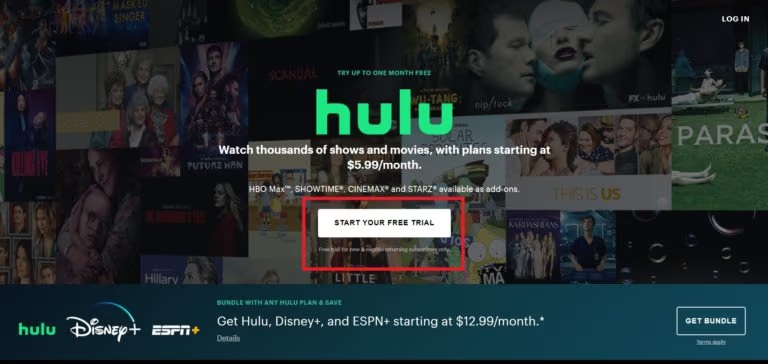
First, you should visit the Hulu website using a browser.
-
Now, you should tap on the option called “Start Your Free Trial” to proceed.
-
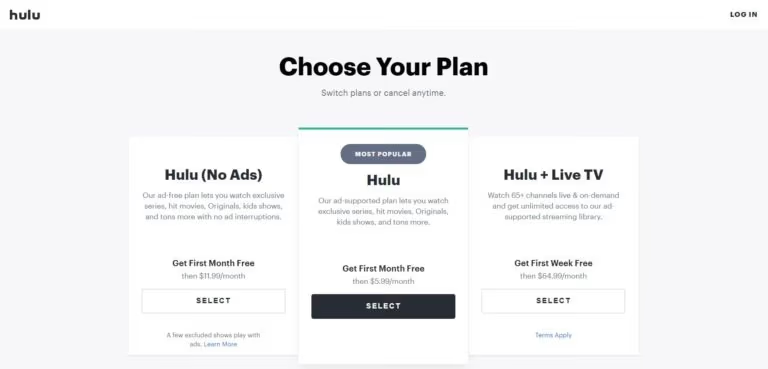
Select the plan that matches your purpose.
-
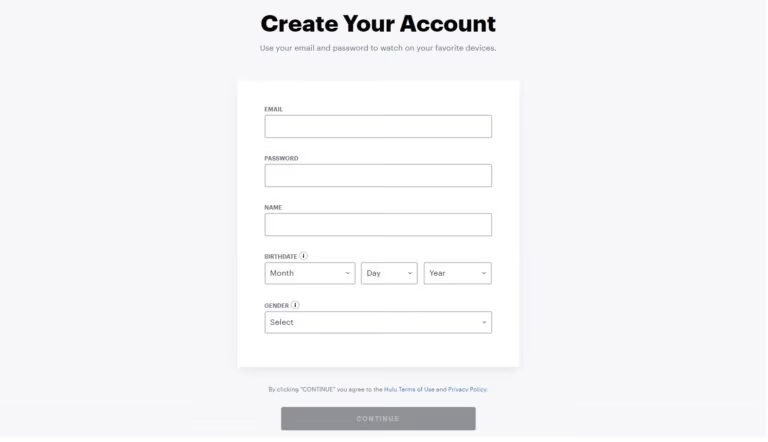
Enter the information that is required to create your new account.
-
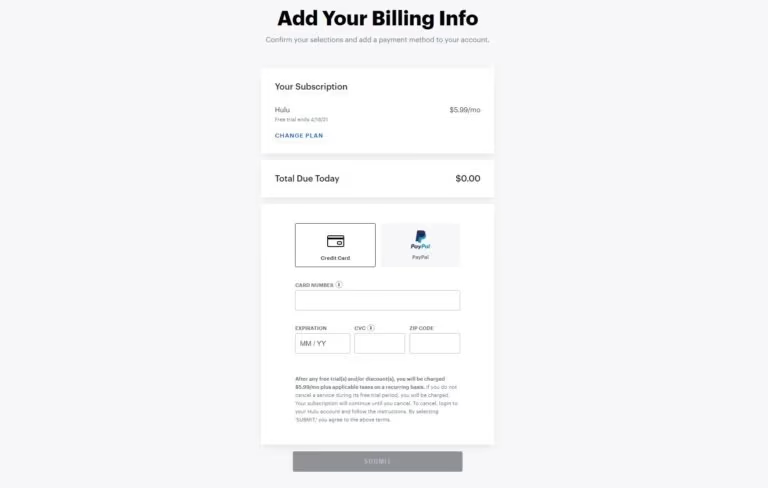
Now, you should enter the billing details and finish the process.
-
The best thing is that Hulu doesn’t incur any charge during the trial period. It is possible to cancel the subscription at any given time prior to the end of the trial.
#What Can You Do if Hulu Not Working on Xbox One in Your Country?
If geo-restrictions and Hulu are not working on Xbox One in your region, here’s what you can do.
Hulu is accessible through a built-in application on your Xbox One. But you should remember that Hulu cannot be accessible if you are outside of the United States.
With the aid of a SmartDNS, you may watch Hulu using Xbox in countries where the service is blocked. To configure a SmartDNS for the device, follow the procedures outlined below:
- Signup for a dependable virtual private network (VPN). There are many options you can consider when it comes to VPNs.
- To connect to the VPN, you must first launch it and provide your credentials.
- Select MediaStreamer from the drop-down menu under “My Account.”
- Make a note of the existing DNS address. This is required since it becomes useful to configure a proxy network on your Xbox One in the future.
#Configuration of the DNS on the Xbox One
In order to set up DNS on your Xbox One, follow the procedures outlined below.
-
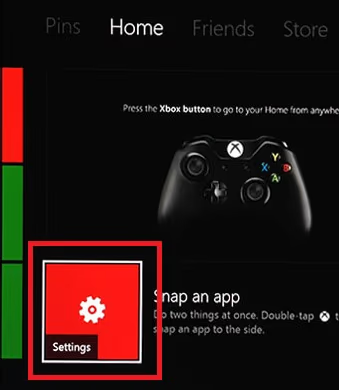
Go to the Settings menu on your Xbox One after launching it.
-
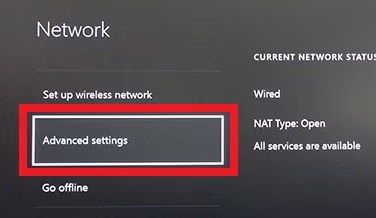
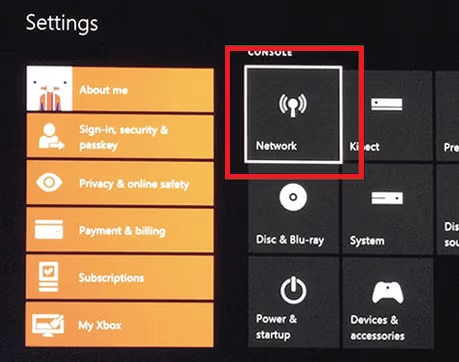
Select Network, and then select Network Settings from the drop-down menu.
-
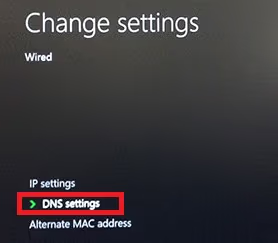
Pick Advanced Settings and then DNS settings from the drop-down menu.
-
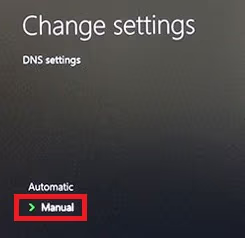
To specify a DNS address, select Manual from the drop-down menu.
-
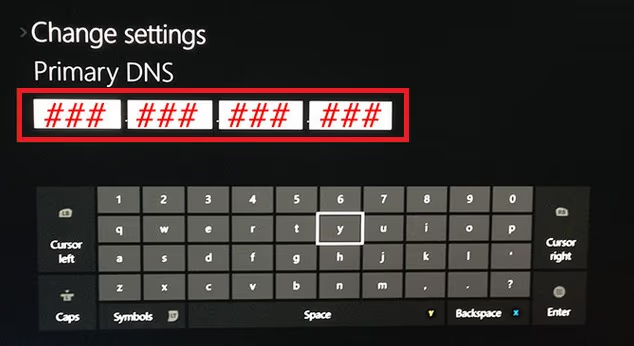
Fill in the blanks with the respective DNS address you have noted down.
-
Select the United States from the Language and Location options.
-
Restart the Xbox One console.
-
To access exclusive content, use the Hulu app and sign in using your account information.
#What if Hulu Not Working on Xbox One as Expected?
If Hulu does not work on your Xbox One, you may try the short-term solutions outlined below.
- Restart the Xbox One console.
- Please check the quality of your internet connection.
- Check the options for Language & Location on your computer.
- Check the status of your Hulu subscription.
- Reinstall Hulu’s app on your device.
- Upgrade your Xbox. If your console keeps shutting down unexpectedly, check out our guide on why your Xbox keeps turning off.
- Send a Complaint to Hulu
#Compatibility of Hulu App
Below is a list of devices perfectly compatible with the Hulu service.
- Apple TV (fourth generation or newer devices).
- Samsung TV devices
- LG TV
- Android smart devices
- iOS devices (iPads and iPhones)
- Chromecast
- Fire TV Stick & Fire TV
- Nintendo Switch
- Browsers on PC and Mac computers
- Apps on PC and Mac computers
- PlayStation Gaming consoles
- Roku devices
- Xbox gaming consoles
#Frequently Asked Questions
- Can I watch live TV on Hulu via Xbox One? Yes, if you have the Hulu + Live TV plan, you can watch live TV on Xbox One.
- Does Hulu on Xbox One support 4K streaming? As of now, Hulu supports 4K streaming only on select content and devices.
- Can I use Hulu in countries outside of the US and Japan? Currently, Hulu is available only in the United States and Japan.
- What should I do if Hulu keeps buffering on my Xbox One? First, check your internet connection. If the problem persists, try clearing your cache or reinstalling the app.
- Is it possible to download shows or movies on Hulu to watch offline? As of now, Hulu allows downloads on select devices for certain shows and movies with specific plans.
#Conclusion
The above article explained everything related to Hulu on Xbox One console. In fact, Xbox is mainly intended for gaming, but nowadays, it has become more versatile.
With the installation of the Hulu app, you can convert it to a mode of entertainment as well. The installation of Hulu on Xbox One is a pretty simple process.
However, some individuals say that Hulu is not working on Xbox One, and several reasons exist. The good news is that this issue can be solved with the simple steps that are mentioned above.
We hope the above content is useful for you as an Xbox user. Just share your thoughts with us, and we will apricate it!