In today’s digital age, mirror apps have become an essential tool for many smartphone users. Whether you want to cast your screen to a larger display or use your phone as a convenient digital mirror, there’s an app for that. This comprehensive guide will explore the best mirror apps available in 2026, helping you choose the perfect one for your needs.
#What are Mirror Apps?
Mirror apps fall into two main categories:
- Screen Mirroring Apps: These allow you to project your device’s screen onto another display, such as a smart TV, computer monitor, or even a car screen.
- Camera Mirror Apps: These use your phone’s front-facing camera to turn your device into a digital mirror.
Both types of apps offer unique benefits:
- Screen mirroring is ideal for presentations, watching videos on a larger screen, or sharing content with friends and family.
- Camera mirror apps are perfect for quick touch-ups, applying makeup, or checking your appearance on the go.
#Top Screen Mirroring Apps
#1. AirDroid Cast
AirDroid Cast is a versatile screen mirroring app that supports both Android and iOS devices. Its key features include:
- Cross-platform compatibility
- High-quality mirroring with minimal lag
- Remote control capabilities
- Two-way audio support
You can download AirDroid Cast from the Google Play Store or the App Store.
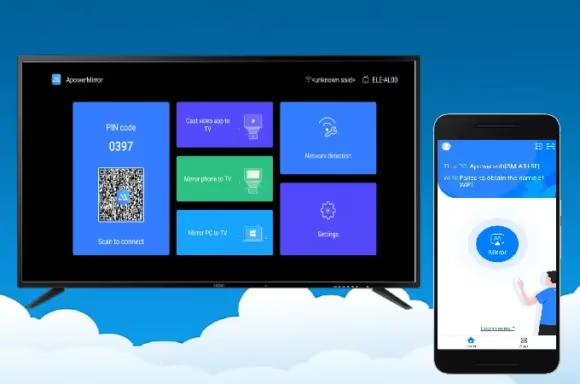
#2. ApowerMirror
ApowerMirror is a powerful screen mirroring solution that works with both iOS and Android devices. Notable features include:
- High-quality wireless mirroring
- Screen recording functionality
- Keyboard and mouse control for Android devices
- Ability to mirror to PC, Mac, and smart TVs
Download ApowerMirror for Android or iOS.
#3. Screen Mirroring App for iPhone
This app, specifically designed for iOS devices, offers:
- High-quality mirroring to smart TVs
- Low latency for smooth performance
- Easy setup and user-friendly interface
You can find this app on the App Store.
#4. Castto for Android
Castto is a popular screen mirroring app for Android users. Its features include:
- Easy mirroring to smart TVs
- Support for various media types
- User-friendly interface
Download Castto from the Google Play Store.
#5. AirBeamTV
AirBeamTV offers free screen mirroring for Android devices to smart TVs. Key features:
- No additional hardware required
- Support for multiple TV brands
- Easy setup process
Get AirBeamTV for Android or iOS.
#Best Camera Mirror Apps
#1. Mirror Plus
Mirror Plus stands out with its advanced features:

- High-quality camera mirror
- 3D feature for multi-angle viewing
- Compare mode for before-and-after images
- Progress tracking over time
Download Mirror Plus from the Google Play Store.
#2. Real Mirror
Real Mirror is a free, no-frills camera mirror app for Android. It offers:
- Simple, intuitive interface
- Basic mirror functionality
- No ads or in-app purchases
Get Real Mirror from the Google Play Store.
#Comparing Free vs. Paid Mirror Apps
When choosing between free and paid mirror apps, consider the following:

Free Apps:
- Basic functionality
- May include ads
- Limited features
Paid Apps:
- Ad-free experience
- Advanced features (e.g., screen recording, remote control)
- Better performance and reliability
Choose a paid app if you need professional-grade features or use mirror apps frequently. Free apps are suitable for occasional, basic use.
#How to Choose the Right Mirror App
Consider these factors when selecting a mirror app:
- Compatibility: Ensure the app works with your device and intended display. For example, some apps are specifically designed for Google Pixel or Huawei devices.
- Features: Determine which features are essential for your needs, such as full-screen mirroring.
- User Reviews: Check ratings and reviews for real-world performance insights.
- Price: Weigh the cost against the features offered.
- Support: Look for apps with good customer support and regular updates.
#Tips for Using Mirror Apps Effectively
- Ensure a strong Wi-Fi connection for the best performance.

- Close unnecessary background apps to improve mirroring quality.
- Use a wired connection when possible for screen mirroring to reduce lag.
- Keep your apps updated for the latest features and bug fixes.
- For camera mirror apps, ensure good lighting for the best results.
#Expanding Your Mirroring Options
While most people think of mirroring to TVs or computers, there are other possibilities:

- Casting to Chromebooks: Perfect for educational settings or when you need a larger screen for productivity.
- Mirroring to PS4: Great for gamers who want to use their phone’s screen on their gaming console.
- Mirroring to car screens: Useful for navigation or entertainment during long drives.
#FAQs About Mirror Apps
- Are mirror apps safe to use? Most mirror apps from reputable sources are safe. Always download from official app stores and read user reviews.
- Can I use mirror apps for video calls? While some mirror apps offer this feature, it’s generally better to use dedicated video calling apps for this purpose.
- Do I need Wi-Fi to use a camera mirror app? No, camera mirror apps typically don’t require an internet connection to function.
- Can I mirror my phone to a non-smart TV? You may need additional hardware like a Chromecast or Apple TV to mirror to a non-smart TV.
- Will using a mirror app drain my battery quickly? Screen mirroring can be battery-intensive. It’s a good idea to keep your device plugged in during extended mirroring sessions.
#Conclusion
Mirror apps have revolutionized how we use our smartphones, offering convenient solutions for both personal and professional needs. Whether you’re looking for a screen mirroring app to share content on a larger display or a camera mirror app for quick touch-ups, there’s an option out there for you. Consider your specific needs, device compatibility, and desired features when choosing the best mirror app for your smartphone in 2026.