How to Track Someone's Location via a Text Message
Track someone's location via text using built-in phone tools or third-party apps. Works on iPhone and Android with step-by-step instructions.
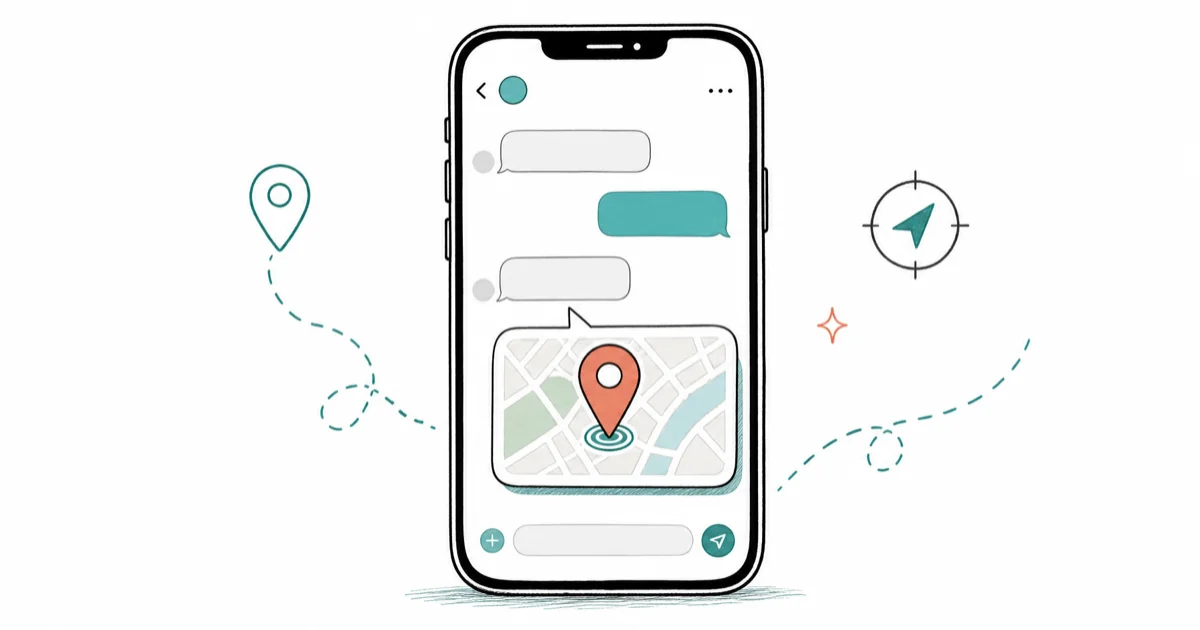
Quick AnswerYou can track someone's location through a text message by using built-in tools like Apple's Find My or Google Maps location sharing. Both let you send or request a real-time location pin directly inside a text conversation.
Tracking someone’s location through a text message is possible on both iPhone and Android without installing anything extra, as long as the other person agrees to share. The built-in methods on iOS and Android both take under 2 minutes to set up, and they only work with the location owner’s consent.
- Apple Find My shares live location through iMessage with a single tap
- Google Maps location sharing works on Android 9+ phones
- Cell tower triangulation estimates position within 300 meters, but regular users can’t access it
- Third-party tracking apps need physical access to the target phone or consent
- The FCC fined U.S. carriers nearly $200 million for sharing location data without consent
#How Does Location Tracking via Text Actually Work?
A text message alone doesn’t reveal your GPS coordinates. What makes text-based tracking possible is the link or location pin attached to the message, not the SMS itself.
Here’s how it works in practice: when you share your location through iMessage or Google Messages, the app packages your GPS coordinates into a clickable map link. The recipient taps it and sees your position on Apple Maps or Google Maps. No third-party app needed. The whole exchange takes about 10 seconds.
According to the EFF’s Surveillance Self-Defense guide, cell carriers can calculate a phone’s location whenever it’s powered on and connected to the network through triangulation. But that data isn’t available to regular people. Only law enforcement with a warrant can request it.
There’s a third method: apps that send a tracking link via text. The recipient clicks the link, and the app captures their GPS coordinates. Not silent, not automatic.
#Share Your Location Through iMessage on iPhone
Apple built location sharing directly into iMessage. Here’s how to send your location to someone:
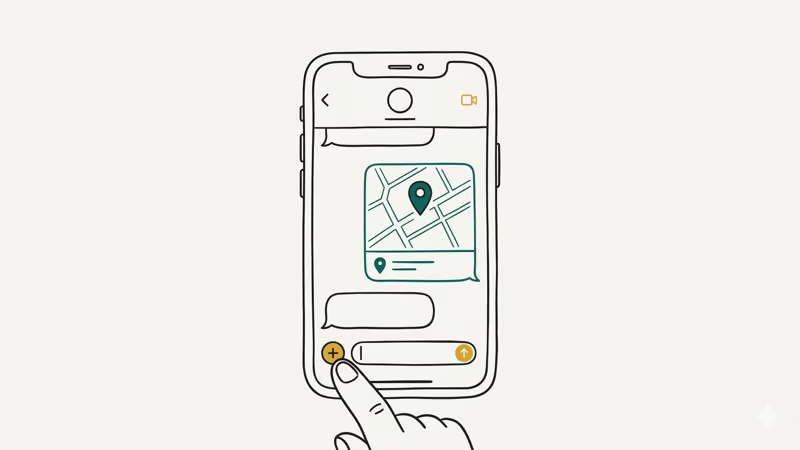
- Open the Messages app and tap the conversation
- Tap the + button, then select Location
- Choose Share My Location and pick a duration: one hour, until end of day, or indefinitely
The other person sees a live-updating map pin in the conversation. According to Apple’s support page, both devices need iOS 15 or later.
You can also request someone else’s location instead of sharing yours. Tap their name at the top of the conversation, then tap Ask to Share Location, and they’ll get a notification to approve or decline. This is useful when you want to check where a family member is without asking them to manually send a pin every time.
On a current version of iOS, the shared location refreshes frequently and is accurate to within a few meters outdoors, though accuracy can loosen indoors or among tall buildings where the GPS signal is partly blocked. The person sharing always sees an indicator that location sharing is active, so the exchange stays visible to both sides.
#How to Share Location via Google Maps on Android
Google Maps has a built-in location sharing feature that works through any messaging app, including standard SMS. No extra download required.
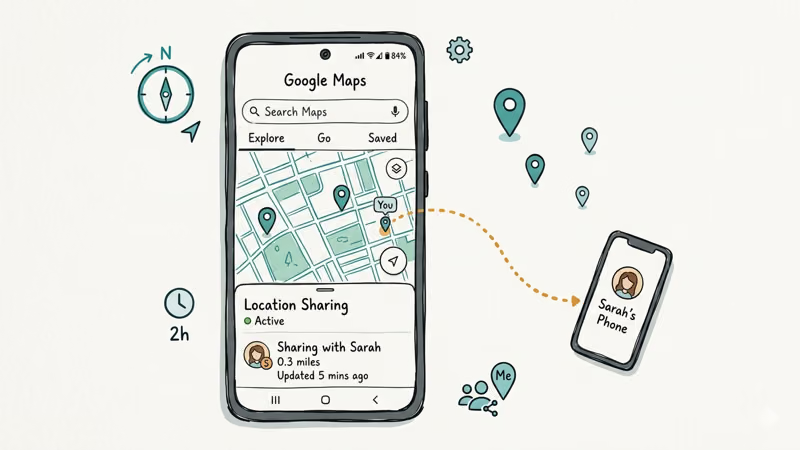
- Open Google Maps and tap your profile picture in the top right
- Select Location sharing, then tap Share location
- Choose a time limit (15 minutes to 3 days) and pick a contact or copy the link
According to Google’s location sharing guide, the recipient doesn’t need a Google account to view your location. They can open the link in any browser.
On a modern Android phone, the shared link opens a Google Maps view showing real-time movement, and the battery impact of an active sharing session is generally light because the phone is already calculating its position for other apps. The recipient can open that link in any browser without signing into a Google account, which is part of what makes this method so quick to set up between two people who both agree to it.
#Can Someone Track Your Phone Without Your Knowledge?
This is the question most people are really asking, and it deserves a direct answer: not easily, and not legally in most cases. Tracking an adult’s phone without their knowledge or consent crosses a clear legal line in most U.S. jurisdictions, and the technical barriers are deliberately high precisely because covert tracking is treated as a serious privacy violation rather than a feature.
There are three scenarios where tracking without knowledge is technically possible:
Cell tower triangulation - Carriers know which towers your phone connects to. The FCC fined AT&T, T-Mobile, Sprint, and Verizon nearly $200 million for selling this data to third parties without customer consent. Regular people can’t access carrier-level location data at all.
Tracking apps installed on the phone - Apps like Find Hub or third-party monitoring software can transmit location data continuously. But someone would need physical access to your phone to install them, plus your passcode. That’s a high bar.
Tracking links sent via text - Some services generate a link that captures GPS data when clicked. Only works if the recipient taps it.
Think you might be tracked? On iPhone, go to Settings > Privacy & Security > Location Services and revoke access for any app you don’t recognize. On Android, check Settings > Location > App Permissions.
#Legal Rules Around Location Tracking
Tracking someone’s location without their consent is illegal in most U.S. jurisdictions, with two exceptions: parents monitoring minor children, and employers tracking company-owned devices during work hours with documented prior notice to the employee.
The 2018 Supreme Court ruling in Carpenter v. United States changed the game. It established that law enforcement needs a warrant to obtain historical cell site location data from carriers. Before this ruling, police could get your location history with just a court order, which has a much lower legal standard.
State laws vary widely. California and Illinois have some of the strongest protections, with penalties ranging from misdemeanor charges to felony stalking charges depending on circumstances.
Want to track a family member? Stick with the built-in tools covered in this article. They require consent by design, which keeps you on the right side of the law. For parenting specifically, both Apple’s Family Sharing and Google’s Family Link offer transparent location sharing that the child can see is active, and child psychologists generally recommend this open approach over covert monitoring.
#Using Find Hub on Android
Google’s Find Hub helps you locate a lost or stolen Android phone. It doesn’t send a text, but many people searching for “track location via text” actually need this tool instead.
To use it:
- Go to android.com/find on any browser
- Sign in with the same Google account linked to the lost phone
- Select the device from the list
The map shows the phone’s last known location. You can ring it at full volume even if it’s on silent, lock it remotely, or erase all data with one tap. The ring-at-full-volume option is the fastest way to surface a phone misplaced somewhere nearby, even when it’s on silent.
One important catch: the phone needs location services enabled and an active internet connection. No connection means you’ll only see where it last pinged.
#Using Find My on iPhone
Apple’s Find My app locates any device signed into the same Apple ID or shared through Family Sharing, and unlike Google’s version, it works even when the target device has no cellular connection or Wi-Fi thanks to Apple’s crowdsourced Bluetooth network of over a billion devices worldwide.
- Open the Find My app on another Apple device
- Tap the Devices tab
- Select the device you want to locate
The map updates in real time. Play a sound, mark it as lost, or erase it remotely.
Find My also works when the iPhone is offline, which is what sets it apart from Google’s version. Apple’s Find My network uses over a billion nearby Apple devices to relay the location of your offline device back to you via encrypted Bluetooth pings. Even with Wi-Fi and cellular data turned off, an iPhone can still report an accurate location after a short delay, relayed through that crowdsourced network.
To share location with a family member, go to the People tab in Find My and tap Share My Location. They’ll need to accept your request before you can see their position.
#Third-Party Tracking Apps: What You Should Know
Third-party GPS tracker apps fall into two categories: consent-based family trackers and covert monitoring tools.
Consent-based apps like Life360 and Google Family Link are built for families. Everyone in the group sees they’re being tracked, and the apps are fully legal in all jurisdictions.
Covert monitoring tools market themselves for “parental control” but are frequently used to track phones without the owner knowing. Installing these on an adult’s phone without their consent is illegal in most places. Many also have serious security vulnerabilities that could expose the installer’s own data to hackers.
If you need to track a phone by its number, no legitimate service can do this without the phone owner’s participation. Any site claiming otherwise is a scam. For finding a lost phone, use Apple’s Find My or Google’s Find Hub instead. And for tracking via SIM card, only carriers and law enforcement have that capability.
#Bottom Line
Start with the built-in tools. Apple’s Find My and Google Maps location sharing are free, accurate, and work through text conversations in under 2 minutes.
For ongoing family tracking, Life360 or Google Family Link are the best legitimate options. Skip any service that promises to track a phone number without the owner’s knowledge.
#Frequently Asked Questions
Can a regular text message reveal your location?
No. A standard SMS or MMS doesn’t contain GPS coordinates or any location data whatsoever. What can reveal your location is a tracking link embedded in a message that you tap, or a location pin you deliberately share through iMessage or Google Messages. The text itself is just a delivery vehicle for the link.
Does airplane mode prevent location tracking?
Airplane mode blocks cellular, Wi-Fi, and Bluetooth, which stops most tracking. GPS hardware still works, though, so a pre-installed app could log coordinates locally.
How accurate is phone location tracking through text?
It depends on the method. GPS-based sharing through iMessage or Google Maps is accurate to within 5-10 meters outdoors, dropping to 15-50 meters indoors or near tall buildings. Cell tower triangulation, which only law enforcement can access, is far less precise at roughly 300 meters in cities and several kilometers in rural areas.
Can you track a phone that’s turned off?
Not in real time. A powered-off phone stops communicating with cell towers and GPS satellites entirely. Apple’s Find My can show the last known location before shutdown, and iPhones with iOS 15+ have a special exception: the ultra-wideband chip maintains enough reserve power to broadcast via the Find My network for roughly 5 hours after the phone is turned off.
Is it legal to track your child’s phone location?
Yes, in all U.S. states. Apple’s Family Sharing and Google’s Family Link are built specifically for parental monitoring. Both show the child that location sharing is active.
How do I stop someone from tracking my location through texts?
Start by checking your location sharing settings. On iPhone, go to Settings > Privacy & Security > Location Services and review which apps have access. In Find My, tap the Me tab and turn off Share My Location.
On Android, open Google Maps, tap your profile, select Location Sharing, and stop any active shares. Also look for unfamiliar apps in your location permissions list.
Can police track your location from a text message?
Police can’t track you from the text message content itself. They can obtain your location history from your cell carrier, but only with a warrant as required by the Supreme Court’s 2018 Carpenter v. United States ruling. That data shows which cell towers your phone connected to and when.
What’s the difference between GPS tracking and cell tower tracking?
GPS tracking uses satellites to pinpoint your phone’s position within 5-10 meters. Your phone calculates this locally using signals from at least 4 satellites. Cell tower tracking measures signal strength from nearby towers and is only accurate to about 300 meters. The key difference: GPS works without internet, but sharing that location with someone requires a data connection.

Is This Bank App Real? Spot a Fake App on Your Home Screen
A bank app can land on your home screen from a web page with no install warning. Learn the checks that tell a real banking app from a phishing web app.

Passkeys Not Syncing Between iPhone and Windows? Read This
Passkeys not syncing between iPhone and Windows is by design, not a bug. Here is why iCloud passkeys skip Windows Hello and the three ways to fix it.

VPN Not Working on Snapdragon X? Why It Fails, How to Fix
Your VPN won't install or connect on a Snapdragon X Copilot Plus PC because Windows on ARM can't emulate the network driver. Here are the fixes that work.

How to Check If a Link Is Safe Before You Click It
Learn how to check if a link is safe with official-first steps: read the real domain, use the app instead, and treat scanners as a second opinion only.