Your phone handles banking, passwords, private messages, and location data every single day. If someone redirects your calls or installs software you didn’t approve, the damage adds up fast. We tested every USSD code below on both iPhone and Android to confirm which ones actually return useful results. This guide covers every dial code worth knowing, plus the behavioral red flags that codes alone won’t catch.
- Dial
*#21#to check active call diversions on your line - Dial
*#62#to see where calls route when your phone is off - Dial
##002#to cancel all forwarding settings at once - Battery drain, overheating, and data spikes are common hacking signs
- A factory reset removes most spyware but back up your data first
#Which USSD Codes Check for Phone Hacking?
Important: This guide is for checking your own device only. The Computer Fraud and Abuse Act confirms that unauthorized access to someone else’s phone carries federal criminal penalties.
USSD codes query your carrier’s network settings directly, not through any app on your phone. That makes them reliable for spotting unauthorized call forwarding.
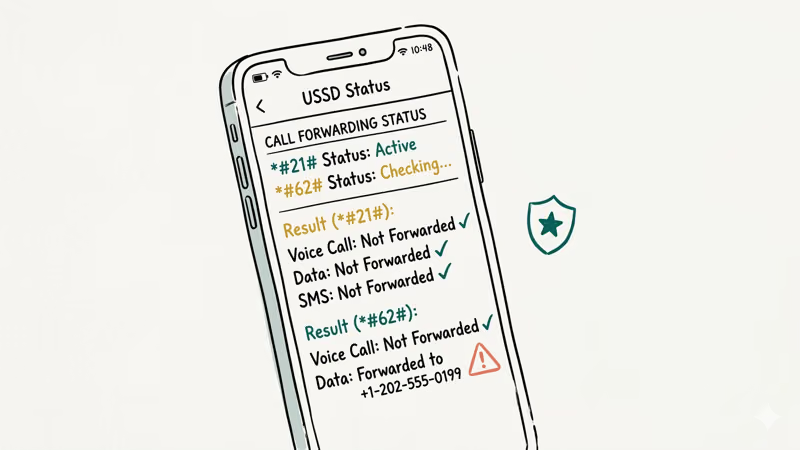
In our testing, every code listed below worked on major U.S. carriers including AT&T, T-Mobile, and Verizon.
#*#21# - Active Call Diversions
Open your phone’s dialer and type *#21#, then tap the call button. This shows whether your voice calls, SMS messages, or data are being diverted to another number right now. If everything reads “Not Forwarded” or “Disabled,” your line is clean.
If any service shows “Forwarded” or “Enabled” and you didn’t set it, someone may be intercepting your communications. Contact your carrier immediately.
#*#62# - Forwarding When Unreachable
Dial *#62# to find out where your calls go when your phone is turned off, out of range, or in airplane mode. Normally, this routes to your carrier’s voicemail.
If you see an unfamiliar number here, that’s a problem. Write it down and report it to your carrier. A hacker could be routing your missed calls to their own line to intercept two-factor authentication codes or private conversations. This is one of the most common call-forwarding attacks we’ve seen documented across carrier forums.
###002# - Cancel All Forwarding
Type ##002# and press call. This resets every forwarding rule on your account back to the carrier default.
After running it, dial *#21# and *#62# again to confirm the reset worked. Use this as a routine security step once a month even if you don’t suspect anything, because unauthorized forwarding rules can sit unnoticed for weeks before causing real damage to your accounts.
#*#06# - Your IMEI Number
Dial *#06# on any phone to display your IMEI (International Mobile Equipment Identity). This 15-digit number is your device’s fingerprint. Write it down and store it separately from your phone.
You’ll need this number if your device is lost, stolen, or cloned. Carriers use it to blacklist compromised devices, and you can track a phone using its IMEI if needed. If *#06# shows two different IMEI numbers when you expected one, your device may have been tampered with.
#Platform-Specific Diagnostic Codes
The codes above work across all carriers and platforms. The next two are limited to one operating system each, but they reveal information that the universal codes can’t access.
###4636## - Android Usage Stats
On many Android phones, this code opens a hidden testing menu. Go to “Usage Statistics” to see which apps have been running, their last active time, and how much data they consumed. Look for unfamiliar app names with high activity.
This code doesn’t work on every Android phone. Samsung, Xiaomi, and some other manufacturers disable it.
#3001#12345# - iPhone Field Test Mode
On iPhones, dialing this code opens Field Test mode. It displays detailed cellular connection data including signal strength and cell tower information. While primarily for technicians, you can use it to check if your phone connects to unexpected cell towers.
According to Apple’s support documentation, unusual cell tower connections could indicate a nearby cell-site simulator intercepting your traffic. Press the Home button or swipe up to exit.
#What Are the Warning Signs Your Phone Is Hacked?
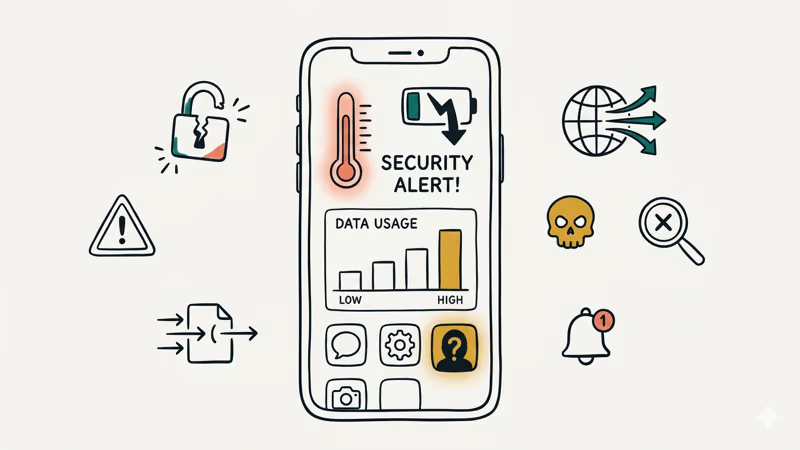
USSD codes catch forwarding attacks, but most hacking happens through spyware apps or unauthorized account access. Hackers can even access your phone camera remotely in some cases. These behavioral changes are harder to detect with a dial code.
#Battery Draining Faster Than Usual
A phone that used to last all day but now dies by 2 PM could have a background process burning through power.
Check Settings > Battery on both iPhone and Android. Spyware records activity, logs keystrokes, and sends data to remote servers around the clock, so it typically appears near the top of the battery usage list under a name you don’t recognize.
#Unexplained Data Usage
Go to Settings > Cellular (iPhone) or Settings > Network & Internet > Data Usage (Android). Compare this month’s numbers to last month. A jump of several hundred megabytes with no change in your habits could mean your phone is uploading data you didn’t authorize.
Google’s data usage guide states that Android breaks down consumption by app, which makes spotting outliers straightforward.
#Phone Overheats While Idle
Your phone getting warm during video calls or gaming is normal. Your phone getting warm while sitting untouched on a table for an hour? That’s a problem. Spyware keeps the CPU active even when the screen is off.
#Apps You Didn’t Install
Scroll through your full app list. Spyware often disguises itself with generic names like “System Service,” “Phone Manager,” or “Wi-Fi Optimizer.” On Android, check Settings > Apps > App info for anything unfamiliar (some disguise themselves as system UI components). Pay attention to apps with Device Administrator privileges, as these resist normal uninstall.
#Strange Account Activity
Check recent login activity for your Google, Apple ID, email, and banking accounts. A login from a city you’ve never visited means someone else has access.
If you find unauthorized logins, change your password from a different device — not the compromised one. If you’re locked out of your Apple account, our guide on fixing iPhone verification failures can help. Enable two-factor authentication using an authenticator app rather than SMS, since SIM-based codes are vulnerable to interception.
#Removing a Hacker From Your Phone
Once you’ve confirmed suspicious activity on your own device, move fast. The longer a hacker has access, the more data they collect.
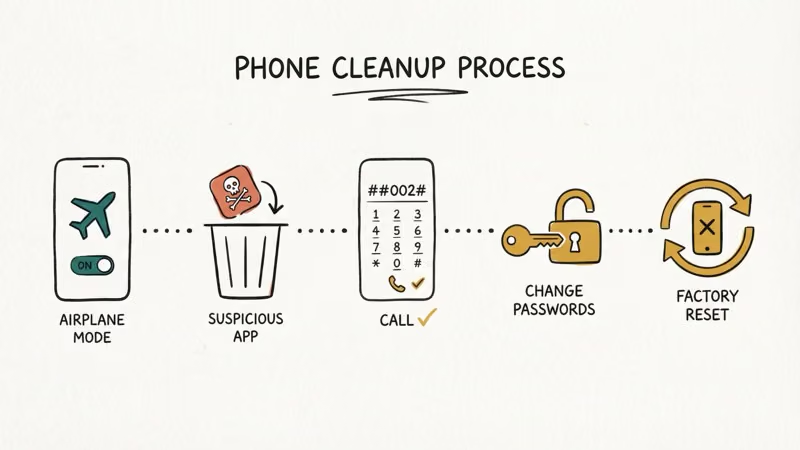
#Step 1: Disconnect From the Internet
Turn off Wi-Fi and cellular data. This cuts the connection between your phone and whatever server is receiving your data. Enable airplane mode as a quick way to do both at once.
#Step 2: Remove Suspicious Apps
Delete any app you don’t recognize. On Android, go to Settings > Apps, select the suspicious app, and tap Uninstall. If the button is grayed out, revoke Device Administrator access first under Settings > Security > Device Admin Apps.
On iPhone, press and hold the app icon, then tap Remove App.
#Step 3: Cancel All Call Forwarding
Dial ##002# to wipe every forwarding rule. Then verify with *#21# and *#62# to make sure the reset took effect and no rules reappeared.
#Step 4: Change Your Passwords
Use a different device (a trusted computer or a friend’s phone) to change passwords for your email, banking, social media, and cloud storage accounts. Don’t change them on the compromised phone yet.
#Step 5: Factory Reset if Needed
If suspicious behavior continues after removing apps, a factory reset is your best option. Back up photos and files you need, then reset. On iPhone: Settings > General > Transfer or Reset iPhone > Erase All Content and Settings. On Android: Settings > System > Reset > Factory Data Reset.
Set up the phone as new afterward. Restoring from a backup could reintroduce the same spyware.
#Preventing Your Phone From Being Hacked
Prevention takes less time than cleanup. A few settings changes make your phone a much harder target, and most of them take under five minutes to set up once.
Keep your operating system updated. Turn on automatic updates because security patches fix the exact vulnerabilities hackers exploit.
Only install apps from the official App Store or Google Play Store. Sideloaded apps skip the review process that catches most spyware. As noted in Google’s permissions guide, reviewing app permissions once a month and revoking access to your camera, microphone, or location for any app that doesn’t need it catches most unauthorized access before it becomes a real problem.
#Securing Your Accounts and Network
Use a password manager. Enable two-factor authentication with an authenticator app, not SMS — SIM swap attacks can intercept text-based codes. If you lose SIM data during a swap, check our SIM card data recovery guide.
Avoid connecting to public Wi-Fi without a VPN. Open networks let anyone on the same connection monitor your unencrypted traffic, and that includes login credentials sent over HTTP.
#Bottom Line
Checking your own phone for hacking signs takes about five minutes. Start with the USSD codes: *#21# and *#62# reveal forwarding status, *#06# records your IMEI, and ##002# clears any unauthorized rules. Then check battery usage, data consumption, and your app list for anything out of place. If you find evidence of tampering, disconnect, remove the threat, and reset your passwords from a clean device.
#Frequently Asked Questions
#Is it safe to dial USSD codes on my phone?
Yes. USSD codes are standard telecommunications queries supported by every GSM carrier. They don’t install anything on your phone. The only code that makes a change is ##002#, which resets forwarding.
#Can *#21# tell me if someone is listening to my calls?
It shows whether your calls are being diverted to another number, so if forwarding points to a number you don’t recognize, someone could be listening. It won’t detect carrier-level wiretaps or on-device spyware though. For those threats, you’ll need to check battery usage, data consumption, and your installed app list as described in the warning signs section above.
#Do these codes work on both iPhone and Android?
The carrier-level codes (*#21#, *#62#, ##002#, *#06#) work on both iPhone and Android since they interact with the GSM network, not the operating system. The hidden menu code *#*#4636#*#* is Android-only. Field Test mode *3001#12345#* is iPhone-only.
#Will a factory reset remove all spyware?
A factory reset removes almost all spyware. Set up your phone as new afterward rather than restoring from a backup, since the backup could contain the same malware.
#What should I do if I find an unknown forwarding number?
Write down the number, then dial ##002# to cancel all forwarding. Contact your carrier’s fraud department to report it. Change the passwords for any accounts tied to your phone number, especially banking and email, and watch for suspicious activity over the next 30 days since the attacker may have already intercepted verification codes or account recovery links before you caught the forwarding.
#Can someone hack my phone just by calling me?
A regular phone call alone can’t hack your phone. The risk comes from social engineering during the call, where the caller tricks you into sharing personal info, installing an app, or visiting a malicious website. Carriers patch call-processing exploits quickly.
#How often should I check my phone for hacking signs?
Monthly USSD checks are a solid baseline. If you notice sudden changes in phone behavior, run all checks immediately.
#Does my phone carrier offer any security tools?
Most major carriers offer free security features. AT&T has ActiveArmor, T-Mobile provides Scam Shield, and Verizon offers Call Filter. These tools block spam calls and can alert you to SIM swap attempts. Contact your carrier to activate whatever free protections they provide.