Fly GPS for Pokémon Go: Risks, Legal Methods, What Works
Fly GPS for Pokémon Go explained: why Niantic bans location spoofers, how Adventure Sync replaces most use cases, and legal alternatives to the bypass.
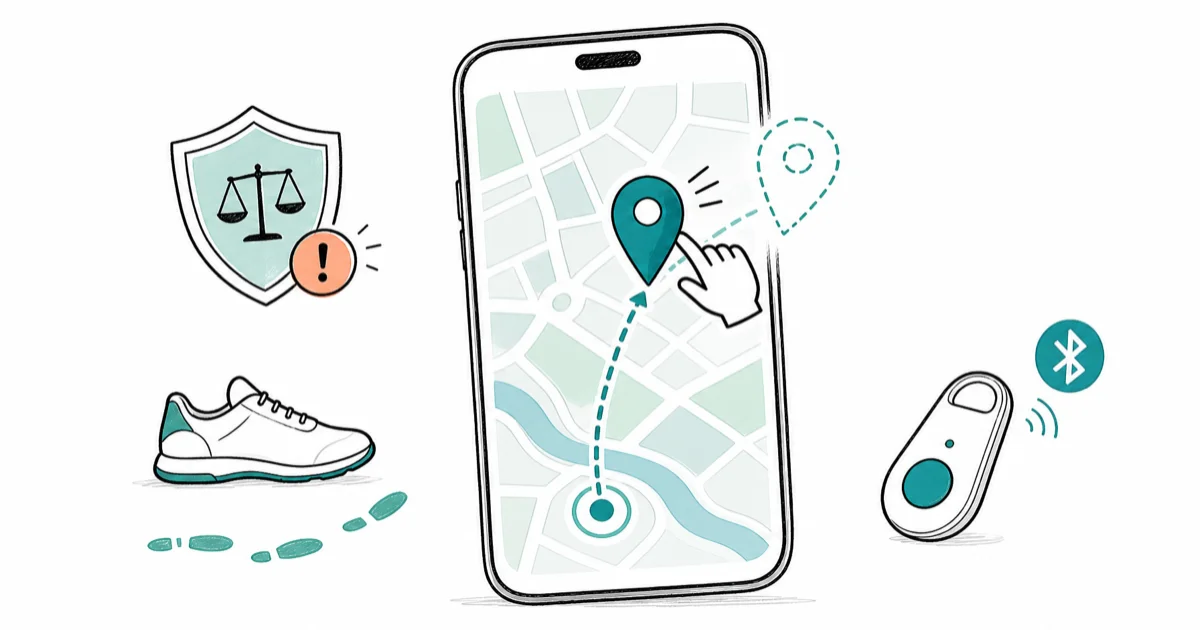
Quick AnswerFly GPS is an Android mock-location app some players use to fake GPS coordinates in Pokémon Go, but doing so violates Niantic's Terms of Service and triggers a three-strike ban on your own account. Adventure Sync and Pokémon Go Plus cover most legitimate use cases without touching the ToS.
Fly GPS is an Android mock-location app that can feed selected coordinates to apps that read the system location, including Pokémon Go.
The trade-off nobody puts in the headline: this is a Terms of Service violation against Niantic, and enforcement falls on the account you own. This guide documents what the app does, how Niantic responds, and which official features cover the same ground without ToS risk.
- Fly GPS runs on Android only because iOS sandboxes mock-location APIs; any iOS “Fly GPS” listing is unrelated software or a sideloaded clone.
- Niantic’s Terms of Service explicitly prohibit falsifying GPS location, and the Three-Strike Policy escalates from a seven-day soft ban to a 30-day ban to permanent account termination.
- Adventure Sync is the official Niantic feature that counts steps toward egg-hatching and buddy candy while the app is closed, covering most “play without walking” use cases legally.
- Pokémon Go Plus and Poké Ball Plus are first-party hardware that auto-spin stops and catch Pokémon within a 100-meter Bluetooth radius, making passive play possible without any bypass.
- Account suspension from spoofing is tied to the Trainer account linked to your Google, Facebook, or Niantic login, not to the phone, so a reset device won’t restore a banned account.
#What Fly GPS Actually Does on Android
Fly GPS is a free mock-location app that pairs with Android’s developer-options system to override the GPS signal every app on the device reads. The app draws a map, lets you drop a pin, and once Android treats Fly GPS as the mock location app, every request for latitude and longitude returns the pin coordinates instead of the phone’s real fix.
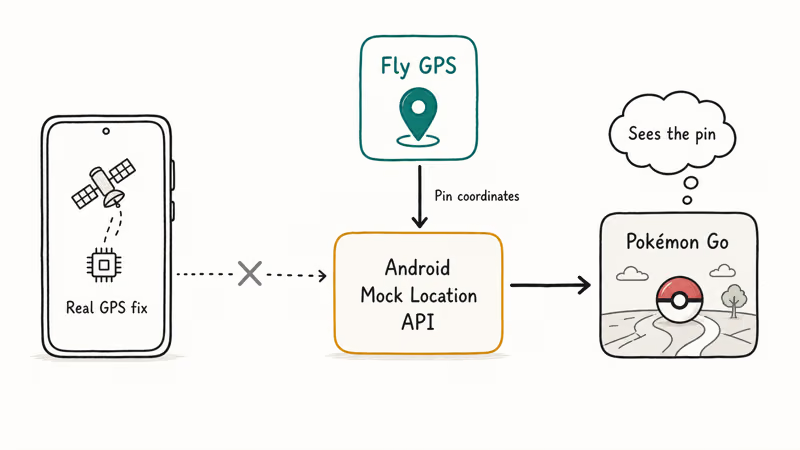
Joystick mode layers simulated movement on top of the pin so coordinates change over time rather than staying fixed.
On Android, Fly GPS depends on the operating system’s developer and mock-location controls. Those controls are intended for authorized app testing, not for feeding false coordinates to Pokémon Go.
Getting coordinates to stick isn’t the real issue. Niantic’s safeguards can start flagging a spoofing account quickly, often within the first hour, and the soft-ban window can open after just a few location changes.
#Why Setup Instructions Don’t Make It Safe
Mock settings don’t authorize game spoofing.
Developer Options and the mock-location selector have a legitimate role when you test an app you own on an authorized device. Keep that workflow in a dedicated test build. Don’t select Fly GPS as a provider for a Pokémon Go session.
Background location and system accuracy permissions affect whether any test app can receive coordinates. They don’t hide mock data from a third-party service or create permission to falsify a game location.
For a real GPS error, follow the supported fixes.
#Why This Is a Niantic Terms of Service Violation on Your Own Account
Fly GPS is the tool. The rule it breaks belongs to Niantic. According to Niantic’s Pokémon Go Player Guidelines, “falsifying your location” is cheating on par with modified clients and unauthorized account access.
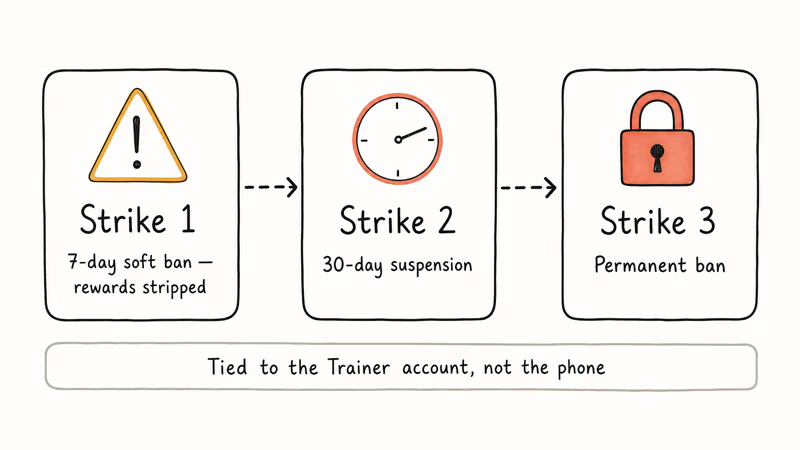
The Three-Strike Policy that Niantic announced in 2019 still governs enforcement today, and it applies the same way whether you used a free app like Fly GPS or a paid desktop tool. Niantic’s Three-Strike Policy page states that the first confirmed offense is a seven-day warning with stripped rewards, the second is a 30-day suspension, and the third is a permanent ban on the Trainer account.
Two things matter about this enforcement when you own the account you’re spoofing. The ban lives on the Trainer account, not on the phone. Factory-resetting the device, installing a new Android build, or buying a new phone won’t clear a permanent ban.
“Your own account” is still yours to lose. Playing on your own login doesn’t change the fact that progress, purchases, and Community Day badges can disappear on strike three.
We use the phrase “your own account” deliberately. This guide is written for players spoofing their own Trainer accounts at their own risk. Fly GPS on someone else’s phone, or targeting someone else’s Pokémon Go account, is a different problem: that crosses into unauthorized access and is illegal under the United States Computer Fraud and Abuse Act and equivalent laws elsewhere. Don’t do that.
#Do Adventure Sync and Pokémon Go Plus Replace the Need to Bypass GPS?
Before the spoof-or-don’t debate, the honest question is why someone wants to spoof. Across the three most common scenarios, most of the demand is covered by official Niantic features that don’t touch the Terms of Service.
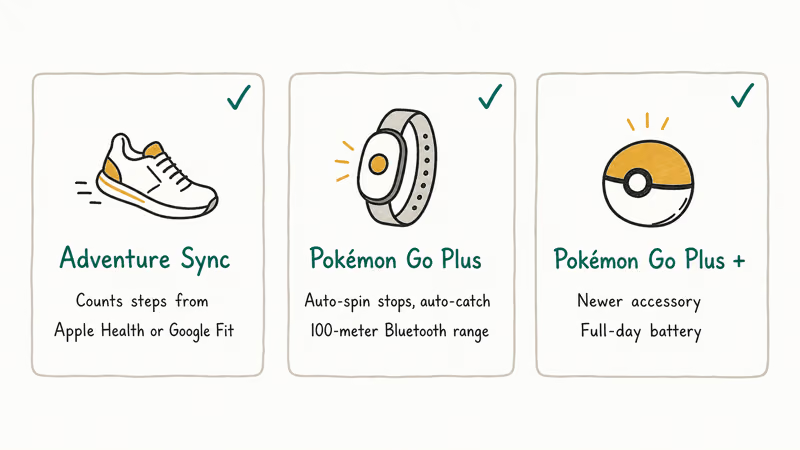
Scenario 1: Hatching eggs without walking. Adventure Sync is Niantic’s official background step counter. It reads step data from Apple Health or Google Fit to apply walking distance to egg incubators and buddy candy even when Pokémon Go is closed.
Niantic’s Adventure Sync support article confirms the feature counts walking distance collected anywhere, including at home, pacing during calls, or commute steps, so long as the fitness app logs them. If a standing desk means no steps register, the problem is Health or Fit permissions, not Adventure Sync. Our separate Adventure Sync troubleshooting guide walks through the permission chain.
Scenario 2: Traveling and wanting to play from a hotel. Moving physically doesn’t need any bypass. Your phone reports the hotel’s coordinates, and local gyms open up on arrival.
Scenario 3: Passive play during errands. Pokémon Go Plus, Poké Ball Plus, and the Pokémon Go Plus + accessory auto-spin PokéStops and catch common Pokémon within a 100-meter Bluetooth radius. The Niantic Pokémon Go Plus setup page states the accessory pairs through in-game settings and works alongside Adventure Sync for step counting. No bypass needed.
For the actual hardware comparison between accessories, the Pokémon Go Plus + is the newer unit and it lasts through a full day of errands on one charge. The original Pokémon Go Plus and the Poké Ball Plus are cheaper on the used market and pair with the same in-game feature set.
Any of the three eliminates the most common reason players reach for Fly GPS in the first place, which is the boredom of passive walking when all you want is PokéStop spins.
That list handles three of the four most common reasons players install Fly GPS. The fourth reason, accessing region-locked Pokémon without traveling there, has no official Niantic equivalent. Events rotate region locks periodically. Niantic posts the schedules, and waiting for a Community Day unlock is the only zero-risk path.
#What Fly GPS Costs You in Detection and Instability
The app’s behavior explains why accepting a ban risk does not make the method controlled or predictable. Two problems stand out.
Detection isn’t a coin flip. Niantic can evaluate the location stream and account activity that Pokémon Go receives. False coordinates can conflict with real movement and other device or session information.
A human-looking route is still false travel.
A long-distance jump is an obvious example of impossible travel, but a cooldown timer is not an official safety feature. Our soft-ban explainer covers the consequences without providing timing or movement patterns intended to reduce detection.
App stability is poor. The Play Store build of Fly GPS is prone to crashing during longer sessions. Each crash dumps mock-location authority, and Pokémon Go snaps back to real coordinates, sometimes mid-raid. That’s worse than losing a raid. A rapid real-to-fake-to-real GPS jump is exactly the “impossible travel” signature Niantic’s detection is built to catch.
#Do Paid Location Changers Reduce the Account Risk?
Every location changer used with Pokémon Go violates Niantic’s Terms of Service. None are “safe,” and a paid desktop client does not reduce the contractual or account risk.
- Some desktop tools pair with iOS or Android over USB and supply simulated coordinates to the connected device.
- Route planners and multi-spot controls are product features, not protection from Niantic enforcement.
- Cooldown timers are designed around detection avoidance and don’t make a false location legitimate.
Keep Pokémon Go outside that QA workflow.
PGSharp and iPogo are a different category. They’re modified Pokémon Go clients rather than mock-location tools. Niantic’s list of third-party services subject to banning announced that modified clients are the first category it targets for enforcement.
Each option still breaks the Terms of Service when used with the game. Stability, price, and connection method don’t make spoofing legitimate or predict how long enforcement will take.
#Fly GPS Compared to iOS Location Changers
iOS sandboxes the mock-location API at the operating-system level, which is why Fly GPS is Android-only and why no App Store app can fake Pokémon Go’s location without a tethered desktop helper. Coverage from XDA Developers on Android mock-location apps states that developer-options mock authority is exclusive to the Android platform. Our fake GPS iOS guide covers the tethered-tool approach in detail, including how Apple’s Developer Mode toggle changed the workflow in iOS 16 and later.
On Android, Fly GPS is one of several mock-location options. Interfaces differ, but choosing between a joystick and a fixed pin is not a safety decision. Niantic can act on the false coordinates and account behavior that Pokémon Go reports regardless of which client-side tool supplied them.
#Bottom Line on Fly GPS for Pokémon Go
If you’re a traveler, a remote-area player, or someone who wants to hatch eggs from a desk, Adventure Sync plus Pokémon Go Plus hardware covers the use case without risking your Trainer account.
Ownership doesn’t override Niantic’s rules.
The app is unstable, and paid desktop tools don’t create a safer legal or account position. Don’t use any of them with the game. The broader Pokémon Go spoofing landscape is useful as risk education, not as a how-to.
Pokémon GO Guide
#Frequently Asked Questions
Is using Fly GPS for Pokémon Go illegal?
Using Fly GPS on your own account isn’t illegal in most jurisdictions, but it violates Niantic’s Terms of Service and the Pokémon Go Player Guidelines. Illegality enters only if you use Fly GPS on a phone or account that isn’t yours, which becomes unauthorized access under computer-misuse laws like the United States Computer Fraud and Abuse Act. Account bans are a contractual consequence between you and Niantic, not a criminal matter.
Can Niantic actually detect Fly GPS?
Yes. Niantic can evaluate the coordinates and account activity Pokémon Go reports without treating a realistic-looking joystick pace as proof of real travel. We don’t provide the signal-matching or movement advice used to evade that review.
Does Fly GPS work on iPhone or iPad?
No. iOS blocks mock-location APIs at the operating-system level.
Is Adventure Sync a full replacement for spoofing?
Adventure Sync replaces egg-hatching and buddy-candy use cases entirely because it counts walking distance collected anywhere, including pacing at home, treadmill runs, or commute steps logged by Apple Health or Google Fit.
It doesn’t replace the catch-Pokémon-in-another-region use case because it only counts distance, not location. For passive catching and auto-spinning of PokéStops within a 100-meter Bluetooth radius of your actual position, pair Adventure Sync with a Pokémon Go Plus, Poké Ball Plus, or Pokémon Go Plus + accessory.
Will resetting my phone clear a Pokémon Go ban?
No. Bans are tied to the Trainer account, which lives on Niantic’s servers and is bound to your Google, Facebook, or Niantic login. Factory-resetting the phone, reinstalling Pokémon Go, or buying a new device won’t restore a banned account. Creating a new account to replace a banned one is itself a ToS violation.
What’s the safest legal way to play Pokémon Go from home?
Turn on Adventure Sync and pair a Pokémon Go Plus accessory.
Do paid alternatives to Fly GPS have a lower ban rate?
No. A paid desktop tool may use a different connection or interface, but it produces the same false-location violation on the Trainer account. Price and stability don’t establish a lower ban rate.
Pokemon GO GPS Signal Not Found: 7 Proven Fixes (2026)
Pokemon GO GPS signal not found? Seven ordered fixes for Android and iPhone covering precise location, permissions, mock-location, and more.
TweakBox Pokemon GO Review: Does It Still Work in 2026?
TweakBox Pokemon GO usually fails. Learn why, what Niantic's ban policy means for your account, and which official alternatives to use instead.
How to Auto Walk in Pokemon GO: Safe and Risky Methods
Learn how Pokemon GO Adventure Sync credits real activity, why fake-step and GPS tools risk account strikes, and which official options to use.
How to Find Magikarp Nests in Pokemon GO (2026 Guide)
Find Magikarp nests in Pokemon GO using community maps, water biomes, and rainy weather boosts. Plus candy farming tips to evolve Gyarados fast.