“How do I cancel Dashpass if I don’t need it anymore?
Do they charge anything for cancellations?
Can someone please explain this? Thanks in advance!”
If you want to cancel your DoorDash pass, you should follow a couple of steps. You can even unsubscribe from the service; there are a few simple actions you can do to get the process started.
This post will explain how to terminate your DoorDash subscription if you no longer want to use it.
In addition to that, we will explain other pertinent information regarding the DoorDash pass. With that, you can choose whether you should do it or not. Continue reading to learn more.
#Introduction to DoorDash Pass
Customers can get limitless deliveries from participating restaurants and grocery stores with a DoorDash Pass. They should use such a pass for orders totaling 12 USD at the least.

Customers can subscribe to the DoorDash pass subscription for an annual fee. Subscribers can choose between a month-to-month or a yearly basis DoorDash pass.
The website and app display a checkmark next to the names of approved eateries. Customers can save money and time by purchasing a DoorDash pass.
With a DoorDash pass, customers can avoid paying for delivery whenever they order food.
Besides, we will discuss how to cash out on DoorDash with Fast Pay or Cash app. If you are a dasher, can you cash out instantly?
#Reasons for Cancelling DoorDash Pass
While DoorDash Pass offers several benefits, there may be instances where you decide to cancel your subscription. Some common reasons for canceling DoorDash Pass include:
- Change in Ordering Habits: If you find yourself ordering food less frequently or no longer require the benefits offered by DoorDash Pass, canceling the subscription can help you save money.
- Cost Considerations: If the subscription fee no longer justifies the savings or advantages you receive, it might be a good idea to cancel DoorDash Pass.
- Limited Usage: If you’re not utilizing the perks of DoorDash Pass frequently, it might be more practical to cancel the subscription and opt for occasional orders.
#What is the Best Time to Cancel a DoorDash Subscription?
To avoid losing money, you must cancel the DoorDash Subscription (DashPass) with good awareness of the timing. The day before your subscription expires is the ideal time to terminate your DoorDash Subscription.
Assume that you have canceled your subscription one day before its expiry date. In that case, the subscription will last until the expiry date. However, if you cancel the subscription on the expiry date, you may have to pay for another billing cycle.
So, keep the “expiry date” factor in mind when you want to learn how to cancel the DoorDash pass.
Also, can I DoorDash in another State? Yes, you can. And there are many reasons for you to do it and earn more with DoorDash. Let’s learn more about it.
#So, How to Cancel your Dash Pass?
If you’re unhappy with a DoorDash pass, you can take a few simple steps. If not, you just want to get rid of it altogether.
Remember to unsubscribe before the upcoming renewal date if you don’t want to keep your subscription.
That said, mentioned below are the steps for those who wonder how do I cancel my Dashpass.
#Through Mobile App
If you wonder how to cancel Dashpass using the mobile app, here’s how to do it.
-
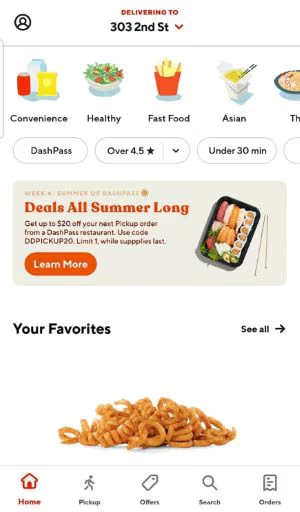
First, on your mobile device (be it Android or iOS), open DoorDash mobile app.
-
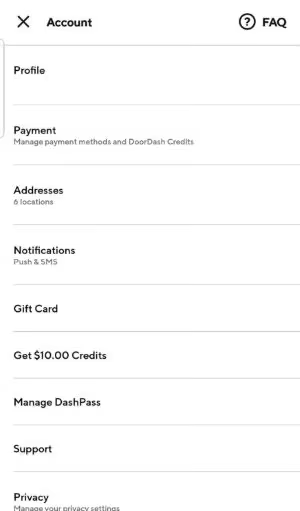
Then, you should tap on the icon dedicated to the account. It is located in the top-left corner.
-
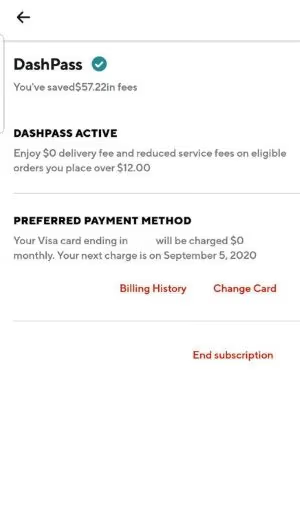
Now, you should tap on the “Manage DashPass” option.
-
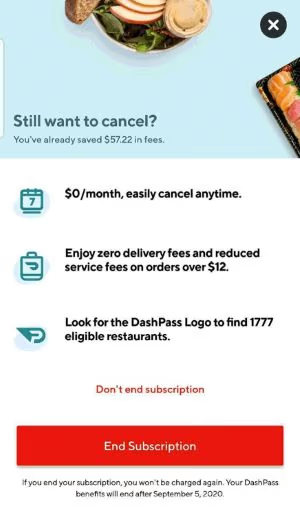
Then, tap on the “End Subscription” option.
-
After that, as a final step, just confirm the cancellation process. To do that, you should tap the “End Subscription” option.
#Through a Desktop
Do you want to know how I cancel Dashpass using a desktop or a web browser? Here’s how to do it.
-
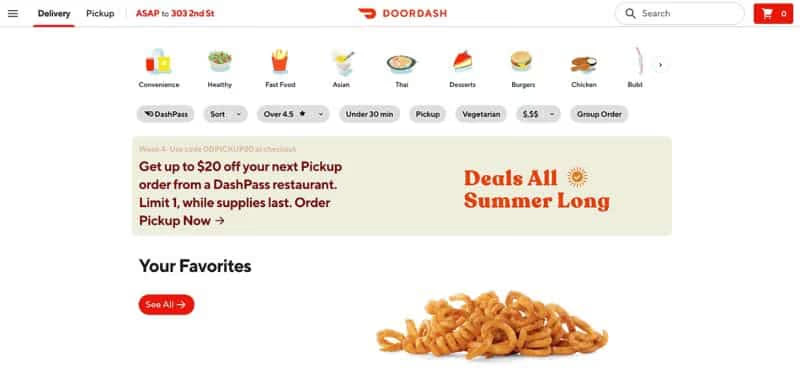
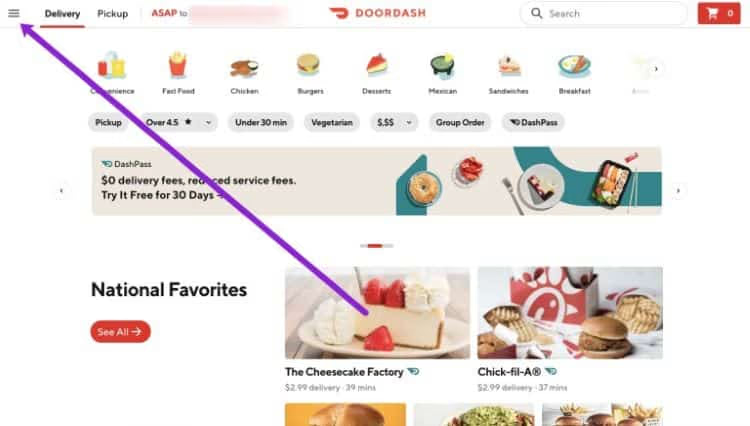
First, you should go to the DoorDash official website and sign in, providing the credentials.
-
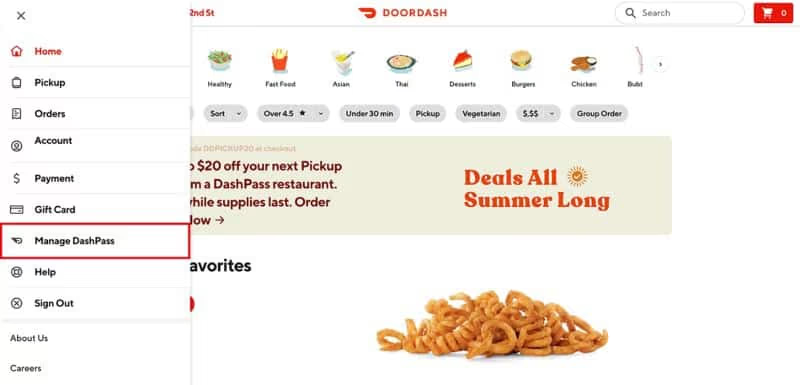
Then, click on the icon that represents the menu. It is located on the top-left side of your webpage.
-
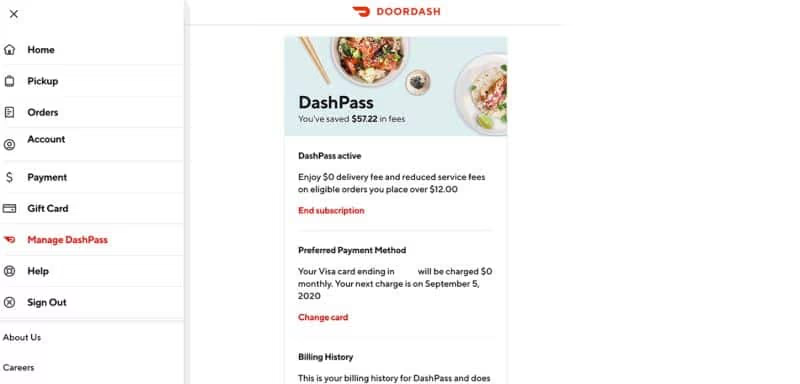
Click on the option called “Manage DashPass.”
-
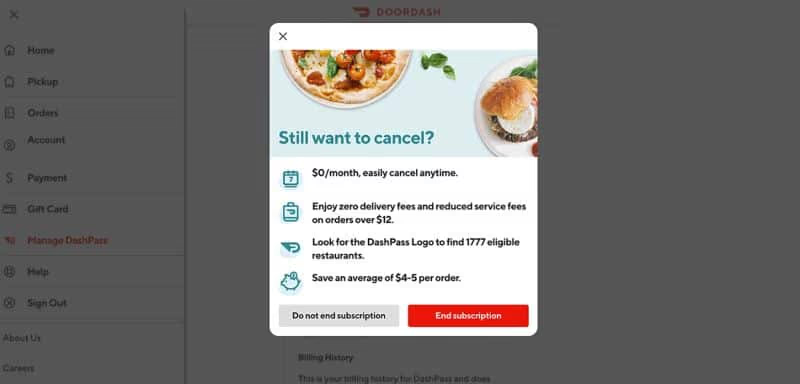
Then, click on the “End Subscription” option.
-
After that, you should confirm the cancellation. To do that, hit the button labeled “End Subscription.”
And that’s how to cancel the DoorDash pass using a desktop computer.
#Should You Go for a DoorDash Pass?
Whether or not to purchase a DoorDash pass depends on several factors. For instance, you should determine it depending on how frequently you use the app.
Also, consider how much you order on average. Having a DoorDash pass gives you access to unlimited deliveries.
DoorDash passes are worthwhile if you use DoorDash frequently. Whether you go for a monthly or yearly DoorDash pass membership, it saves you money.
DoorDash pass users save an average of $4 to $5 for every qualified order while using the service.
If you use DoorDash once in a while, you might just want to stick with the pre-delivery option.
#How Can You Remove Your Credit Card from a DoorDash Account?
Here’s how to remove a credit card from your DoorDash profile.
#Through the Mobile App
- On your Android device or iPhone, open the DoorDash mobile app.
- Then, tap on the icon dedicated to the account.
- On iOS, choose “Payment.” On Android, it should be “Payment Methods.”
- The card that should be removed should be swiped left.
- Tap on the delete button and complete the deletion.
#Through a Desktop
-
Go to the official website of DoorDash.
-
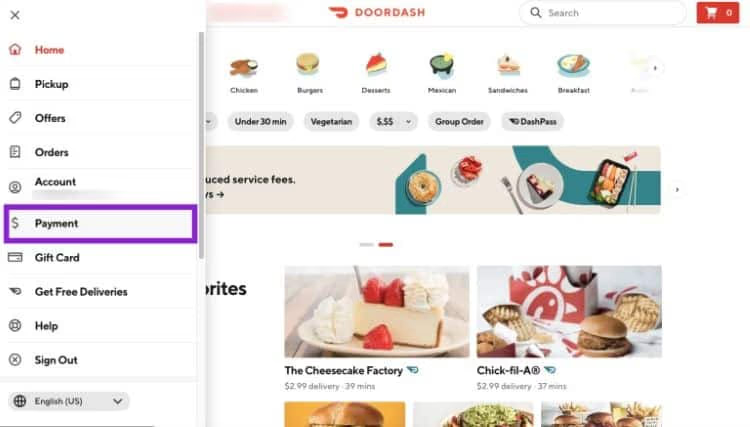
Provide your login credentials and go to “Account.”
-
Tap “Payments.”
-
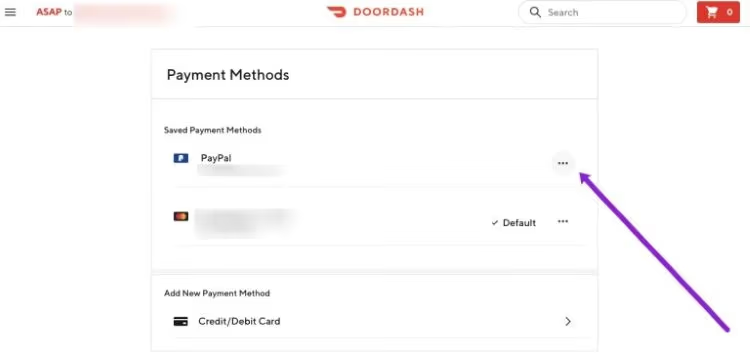
Now, tap on the icon that appears as three dots next to the card that should be removed.
-
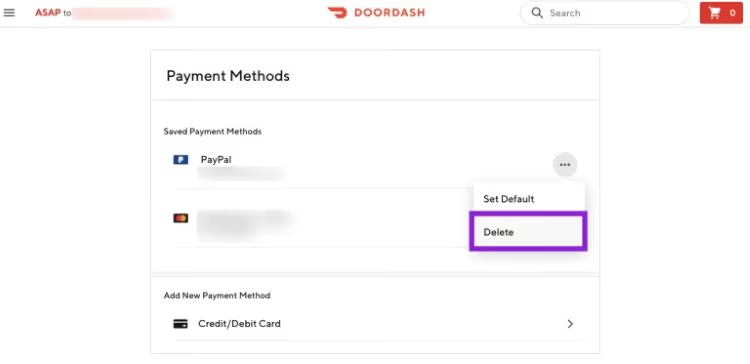
After that, you should tap the option called “Delete” to confirm the process.
#Is It Possible to Pay Using Cash for DoorDash Orders?
Yes, it is possible to pay using cash upon any DoorDash delivery. The “Dasher” (the driver) can accept cash orders so that he will receive the full amount in cash. That amount will then be deducted from his DoorDash balance.
#What is DoorDash Chase Sapphire?
Using a Chase Sapphire card to pay on Doordash entitles cardholders to various perks. The following advantages will be available to Doordash pursuit sapphire reserve and preferred customers. This feature has been available since April 1, 2022.
- Each user who uses Sapphire Reserve receives 5 USD every month.
- The credit not used in the current month will be added to the following month.
- Users can accumulate their $5 reward up to 15 USD.
#What Should Be the Appropriate Tip for Dashers?
Are you unclear about how much to tip your DoorDash driver? Remember that paying 15% to 20% of your total order value is common practice.
This means that you should offer your waiter the same proportion of tip as you would at a restaurant. Also, tips from DoorDash customers go straight to the drivers who provided the service.
#Can a DoorDash Driver See the Tips?
Yes, but it’s not quite like that. To be clear, the total amount seen in every order includes any tip you give. It is true if Dashers know how much they will make when they deliver an order.
Dashers can do the math about how much money you’ve left as a tip. It works even though it isn’t explicitly stated. Drivers can use this information to determine whether or not to accept your order.
After the delivery, Dashers are only given the breakdown of their entire earnings to aspects such as base pay. It also includes peak pay and tip.
#Changing the Tip on DoorDash
Changing a DoorDash tip before the delivery is possible on its checkout page. A tip change request must be filed with DoorDash following delivery.
You’re not certain to succeed because the tip money goes directly to the drivers.
#Does DoorDash Allow You to Deliver Food in a Different State?
The DoorDash app allows you to change your current location to a different state. To do that, you can follow a few steps as mentioned below.
There are numerous advantages to allowing dashers to work for DoorDash in different states.
Changing or altering the location of your DoorDash app is a pretty simple process. A dasher can only change locations if he or she is physically present where he or she is going. DoorDash does use GPS positioning technology for this purpose.
Please follow the steps if you’ve already arrived at where you wish to modify the location.
- First, you should open the dasher app offered by DoorDash
- You will see the “Dash Now” option if you are already in an eligible location.
- Click on “Dash Now.”
- Click okay so you can confirm it.
- That’s it. That’s how to update the location.
#Will a Dasher Deliver to a Hotel?
Of course, DoorDash does deliver to hotels in areas where their services are available. Because DoorDash delivers to hotels, you can feel comfortable that the food will be there when you arrive.
#FAQs
1. Can I cancel my DoorDash Pass subscription at any time?
Yes, you can cancel your DoorDash Pass subscription at any time. There are no specific restrictions on when you can initiate the cancellation process.
2. Will I receive a refund if I cancel DoorDash Pass before the subscription period ends?
If you cancel DoorDash Pass before the subscription period ends, you will not be eligible for a refund. However, you will continue to enjoy the benefits until the subscription expires.
3. Can I reactivate DoorDash Pass after canceling it?
Yes, you can reactivate DoorDash Pass after canceling it. Simply follow the steps mentioned earlier to subscribe again.
4. Will canceling DoorDash Pass affect my ability to use the DoorDash platform?
No, canceling DoorDash Pass will not affect your ability to use the DoorDash platform. You can continue to order food and enjoy the services provided by DoorDash.
5. Are there any alternative subscription plans available apart from DoorDash Pass?
Yes, DoorDash offers various subscription plans and programs. Check the DoorDash website or contact their customer support for more information on alternative subscription options.
#Conclusion
The DoorDash app lets customers quickly and easily place orders for grocery items and food. Customers can order from the convenience of their homes and then have those items delivered at a fee.
A DoorDash pass grants users unrestricted access to delivery on eligible orders for a monthly or yearly fee. Assume that the user wishes to cancel their DoorDash pass. So, the procedure is simple and can be accomplished with just a couple of clicks.
And that’s the answer to the question, “how do I cancel Dashpass.” Do you have other questions related to this matter? Please let us know.