How to Change Your Age on Discord & Join NSFW Servers?
Learn how to change your age on Discord to access NSFW servers. Understand age verification policies and how to submit a correction request.
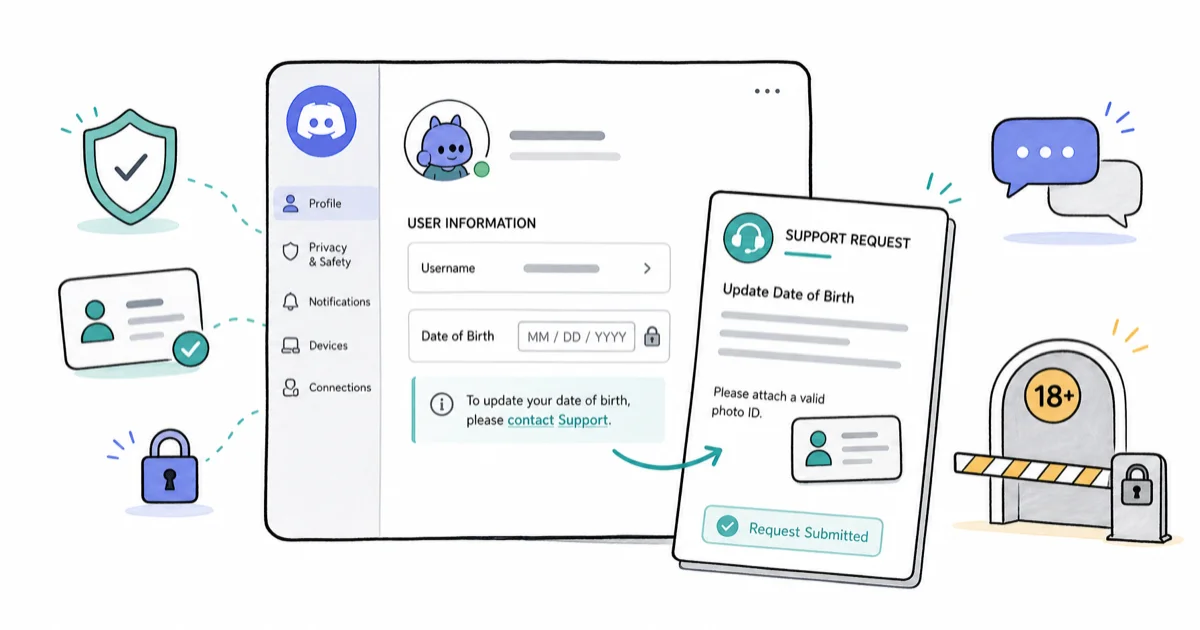
Quick AnswerYou cannot directly change your age in Discord settings. Submit an age update request to Discord Support with a valid photo ID to correct your birthdate and regain access to age-restricted servers.
Do you wonder how to change your age on Discord for some reason or another? If so, the information included in this article will be very useful for you.
This guide walks through the official correction process step by step, so even a novice can follow it.
- Discord does not allow users to edit their date of birth directly in app settings; age corrections require a formal support request with photo ID verification.
- NSFW channels are restricted to users 17 and older, and NSFW servers are limited exclusively to users who are 18 years of age or above.
- To submit an age correction, users must visit discord.com/support, go to Trust & Safety, and select “Update my Age Information” from the dropdown.
- The age update request requires a photo of yourself holding a valid government ID alongside a piece of paper displaying your Discord tag for identity verification.
- Discord reviews age update requests and applies changes only if the submitted documents are accepted as valid.
#What Are Discord’s Age Requirements for NSFW Access?
Discord has different servers dedicated to specific purposes, with many targeting specific age groups.
Some servers are restricted to users 18 or older. They carry an NSFW label, meaning not safe for work, applied automatically.
Discord automatically restricts NSFW channels based on user age verification. Under Discord’s system, users under 18 can’t access these communities regardless of parental permission. This strict enforcement protects minors from inappropriate content. According to the FTC’s COPPA guidance, online services must limit how they collect data from children under 13, and Discord’s age gates align with those rules.
Server owners get notified by Discord whenever the respective server has an impact, and they can manually label channels as NSFW from the channel settings menu whenever they need stricter access control for a community.
When a channel is marked NSFW, it’s restricted from users 17 or below.
PS: if you wonder how to change your age on TikTok, this guide is just for you.
#Common Account Setup Mistakes
Mistakes happen at setup.
For instance, one might create a Discord account providing the wrong date of birth during the initial registration process. If you created your account as a youngster (17 or below), you might need to change it to access age-restricted content.
This is particularly common when parents initially set up accounts for their children or when teenagers want to access mature content before reaching the legal age. The platform’s strict age verification system makes correcting these mistakes more complex than simple profile editing.
Without proper age verification, you can’t access NSFW channels.
According to Discord’s Community Guidelines, age verification is permanent once set, which makes the correction process more complex than simple profile editing.
The full process is below.
Besides, if you wonder how to add bots to Discord or need help with Discord roles management, those guides should help you out.
#How Do You Submit an Age Change Request?
To change the “age” value in your Discord profile, you’re supposed to send a formal request. You should request it from Discord Support directly.
Discord typically responds to most age verification requests within a few days, and you’ll be given an online form with several specific fields to complete before your appeal can be reviewed by the safety team.
You should enter the date of birth in those fields and add your ID photo by taking a clear picture while holding the identification document alongside a piece of paper with your Discord tag visible.
Submit the request and wait for Discord’s response. If you can’t provide the required information, Discord won’t process your age correction.
Also, are you looking for the most convenient Discord ID lookup methods? If so, look no further because this guide comprises the easiest methods you can try. For users concerned about account security, our Discord account age guide provides additional verification insights.
#Why Hold a Photo of Your ID?
Well, you’re supposed to hold a picture of your ID to prove that you own it. Also, it’s needed to prove your age authenticity.
Apart from the ID, you should hold a piece of paper that displays your Discord tag. Your profile won’t be verified unless you fulfill those requirements.
So, in a nutshell, here’s what you should do if you want to change your age on Discord:
- Submit the Request to Discord’s Platform
- Provide the Date of Birth Accurately
- Take a Picture of Yourself While Holding the ID and Submit It
#01. Submit the Request to Discord’s Platform
To submit a request to Discord, you’re supposed to follow this process:
Step 1: Go to the Discord Support request form to start a new ticket.
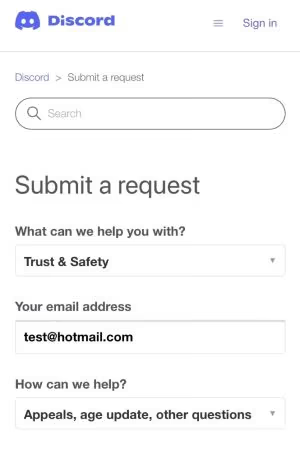
Step 2: You should go to the option ”Submit a Request,” which appears as a form. After reaching the form, you can see a question that says, ”What can we help you with?” It comes with a dropdown menu.
Step 3: Click on that dropdown and then go to ”Trust & Safety.” With “Trust & Safety,” you can see options that appeal to the account/bot, including policy updates and age verification requests. This section handles all sensitive account modifications and security concerns involving user verification, content access restrictions, community guideline violations, and various appeals processes that require manual review from Discord’s safety team.
Step 4: Provide your email.
Step 5: Select ”Appeals, age update, other questions.”
#02. Enter the Date of Birth
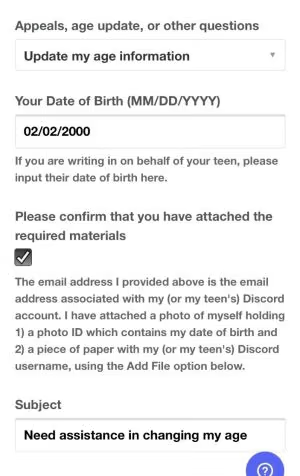
After entering the date of birth, you should select the option ”Appeals, Age Updates, Other Questions.” Then, you should scroll down that dropdown.
There are multiple options included in that dropdown, including these key choices:
- ”Appeal an action taken on my account or bot”
- ”Ask a Policy Question”
- ”I am the parent or guardian of a user”
- ”Update my Age Information”
Well, you’re reading this article wondering how to change your age on Discord. To accomplish that, go to the ”Update My Age Info” option.
After that, you should provide the date of birth (the actual one) in the designated ”Date of Birth” field. Enter the values in the correct format — for instance, if you were born on 5th May 1995, the value should be 05/05/1995.
Next, check the attachment option and type a clear subject line such as ”Re: Changing my Date of Birth.”
#03. Take a Picture of Yourself While Holding the ID and Submit It
Once you’ve entered the subject line, you can easily scroll down to see other options.
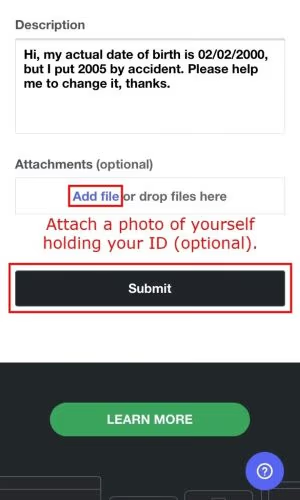
When you’re under the option ”Subject,” you can see a field called ”Description.”
Then, in that field, you can enter the issue you’re currently facing. In this case, you should explain that you intend to change the date of birth. You should also say that you mistakenly entered the current date of birth. Below is a description you can post if you need an example:
“Hello… I’ve created a Discord profile using the wrong birth year (2006) by mistake. My actual birth year is 2003. Can you please help me change it to the original date of birth? Thanks in advance.”
Also, you’ll see a field called ”Attachment” under “Description.” This option can be used to submit a picture of yours. This picture should be taken while holding your ID, along with a piece of paper that displays the Discord tag.
The above step is optional. Nevertheless, such a process is required to ease and easily change your date of birth.
After that, you should click on the option ”Add File.”
After that, you should select the picture that should be submitted. When you upload a picture, you must upload a clear one that’s easily readable. Also, sending a picture with an email address linked to the respective Discord account is very handy.
As the final step, you should hit the button called ”Submit.”
Discord’s support team usually replies within a few business days. They’ll change the age only if the documents are acceptable. And that’s how to change your age on Discord. As you can see, it’s very straightforward.
#Post-Verification Access Changes
So what changes once your appeal is approved?
If you’ve changed the details successfully and now you’re 18+, you can access their NSFW servers.
That means you have unrestricted access to such servers and can participate in age-restricted communities without limitations.
#Account Creation Alternatives for ID-Less Users
Some individuals wonder how to change their age on Discord but don’t have an ID. If you’re one of them, please note that there’s no official way to do it. The only solution you can try in this case is to create a new account in Discord.
When you create a new Discord profile, set the birth year so you’ll be 18+. The catch: you need a secondary email address for the new account.
According to Apple’s App Store guidelines, apps that handle age-sensitive content must verify users appropriately, and Discord’s appeal process aligns with that standard. Age-verification appeals generally require a government-issued photo ID, because without it Discord can’t confirm your actual age.
Once that’s done, and the new account is created, you can proceed to your favorite content. And that’s our answer to those who wonder how to change your age on Discord without ID.
If you’re experiencing other Discord-related issues, check our guides on Discord stream no sound or voice changer for Discord for additional troubleshooting help.
#What to Do If Your Age Update Is Rejected
A rejection usually comes down to document quality. The most common reasons are a blurry ID photo, a missing handwritten Discord tag in the frame, or a name on the ID that doesn’t match your appeal details.
Re-read the rejection email; it usually names the exact problem. Then resubmit with a sharper, well-lit photo showing your ID, face, and tag.
If repeated appeals fail and you have no valid ID, your remaining option is creating a new account with the correct birthdate. Keep that account’s email separate so you don’t lose access to it later.
#Bottom Line
Changing your age on Discord takes patience and the right documents. The platform’s age verification system is intentionally strict to comply with digital safety regulations, so a clean photo ID submission is the single biggest factor in whether your appeal succeeds on the first try.
Remember: Discord requires government-issued photo ID for appeals. Without it, your only path is a new account. For users dealing with Discord account security, getting this right matters even more.
We recommend keeping digital copies of your verification documents ready and following Discord’s submission guidelines exactly as outlined above.
#Frequently Asked Questions
Can I change my age on Discord Mobile?
Yes, you can change your age on Discord Mobile by navigating to ‘Settings’, clicking ‘My Account’, and editing your ‘Date of Birth’.
Why can’t I see NSFW servers on Discord?
If you’re unable to access NSFW servers on Discord, it’s likely due to age restrictions. Ensure your age on Discord is accurate and above 18.
Can Discord ban you for lying about your age?
Indeed, Discord takes its community guidelines seriously and providing false information, including age, can lead to penalties such as a temporary ban or even permanent account deletion.
Is it safe to join NSFW servers on Discord?
Joining NSFW servers on Discord can be safe as long as you follow Discord’s community guidelines and ensure that you are comfortable with the content being shared in the server.
How do I report inappropriate content on NSFW servers?
If you come across inappropriate content on an NSFW server, you can report it by clicking on the three dots next to the message and selecting “Report”.
What are the age restrictions for NSFW servers on Discord?
NSFW servers on Discord are restricted to users who are 18 years and older.
#Conclusion
Discord application doesn’t necessarily let you alter the date of birth through the app. That is due to the safety precautions of the users themselves.
Also, if you’re below 18, you can’t access NSFW channels or servers on Discord. In that case, you’re supposed to wait until 18 to reach such channels.
There can be some individuals who may have used the wrong birth year accidentally. In that case, knowing how to change your age on Discord can be handy. The instructions above will help you with how to do that.
Also, we provided a solution to those who wonder how to change their age on Discord without ID. In that case, you have no option to create a new account on Discord.
Also, if you have other queries related to this matter, please let us know.

Google Messages Error 3100: Why RCS Is Broken on Galaxy
Google Messages RCS error 3100 hits Galaxy owners after phone or carrier switches. Google told 9to5Google a fix is coming. Here's what actually helps.

Is This Bank App Real? Spot a Fake App on Your Home Screen
A bank app can land on your home screen from a web page with no install warning. Learn the checks that tell a real banking app from a phishing web app.

Apps Crashing After iOS 27 Update? Fix Order (2026)
Apps crashing after the iOS 27 update? Update the app in the App Store first, then offload and reinstall to clear stale cache, then restart. The fix order.

Do AI Translation Earbuds Work Offline? What to Know
Do AI translation earbuds work offline? A few do with downloaded language packs, but most need the cloud. Here's what works offline and what you give up.