How to Delete a TikTok Story: A Complete Guide (2026)
Learn how to delete a TikTok Story before it expires. Step-by-step instructions for removing Stories on iPhone and Android with expert tips.

Quick AnswerOpen TikTok, tap your profile photo to view your active Story, swipe up, tap Delete, then tap Delete again to confirm.
TikTok Stories are an ephemeral way to share moments with followers, but sometimes you’ll post one you’d rather take back. Deleting a Story takes about three taps once you know the menu path. The flow is the same on iPhone, Android, and the desktop web app, and this guide walks you through every step.
- TikTok Stories disappear automatically after 24 hours, but you can remove them at any time from the Story controls.
- The deletion flow is identical on iPhone and Android: open the Story, swipe up, tap Delete, and confirm.
- Deleted Stories can’t be recovered, so screen-record any clip you want to keep before tapping Delete.
- TikTok doesn’t notify followers when you remove a Story, so the cleanup is silent.
- All reactions, shares, and view counts are erased the moment a Story is deleted.
#What are TikTok Stories and how long do they last?
According to TikTok’s Stories help page, Stories let you share photos and videos for 24 hours, and people can send replies and reactions to them.
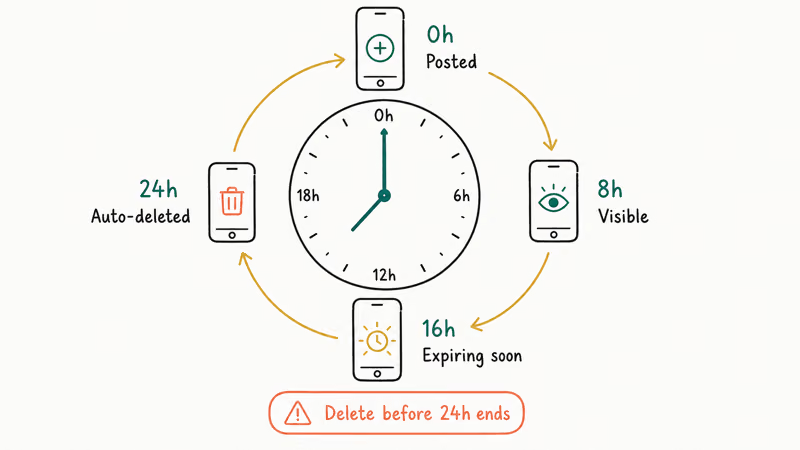
A few quick facts that shape how you should handle them:
- Stories last exactly 24 hours from the moment of posting.
- They show up with a blue Story icon on your profile and on follower feeds.
- They’re visible only to your followers, not on the public For You page.
- Viewers can react and share, but they can’t comment.
- There’s no daily cap on how many Stories you can publish.
Stories give you a more casual channel than regular TikTok posts. That casualness is also what makes the delete button so important. A throwaway post is easy to regret a few hours later.
#How do you delete a TikTok Story on iPhone or Android?
The mobile flow is the same on both platforms. TikTok’s Stories help page says to open your Story from the profile photo, swipe up, tap Delete, and tap Delete again to confirm; it also notes that the Share button at the bottom of a Story can expose the same Delete action. Some app builds also show a three-dot menu that leads to the same confirmation step.
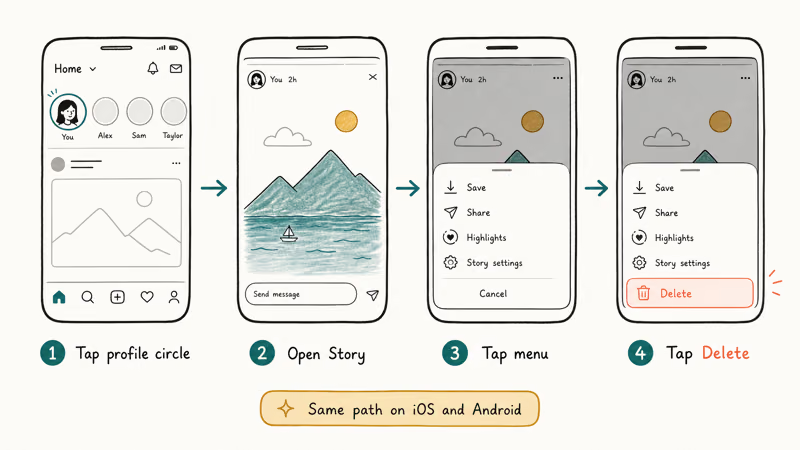
On iPhone:
- Open the TikTok app and tap the Profile icon in the bottom right.
- Tap your profile picture at the top of the page to open your active Stories.
- Swipe up on the Story to open its controls.
- Tap Delete, then tap Delete again to confirm.
On Android:
- Open TikTok and go to the Profile tab.
- Tap your profile photo to view your Stories.
- Swipe up on the Story to open its controls.
- Tap Delete, then confirm.
The removal is usually near-instant on a stable Wi-Fi connection, and you can delete several Stories in sequence without hitting a throttle. The Story disappears instantly from your follower’s feed without any “deleted” placeholder in its place.
Want a copy first? Our TikTok screen recording walkthrough and Apple’s Screen Recording guide both work.
#Deleting a TikTok Story from a web browser
Not everyone wants to grab their phone for cleanup work. The web app handles deletion too, though the layout is a bit different.
- Go to TikTok.com and sign in.
- Click your profile photo in the top-right corner.
- Select View Story.
- Click the three dots on the Story.
- Choose Delete and confirm.
The menu renders identically on Chrome and Safari desktop builds. There’s no extra browser permission to grant. TikTok only needs you signed into the same account that posted the Story.
#Troubleshooting common deletion issues
Most users won’t hit any snags, but a few situations make the Delete option act strangely.
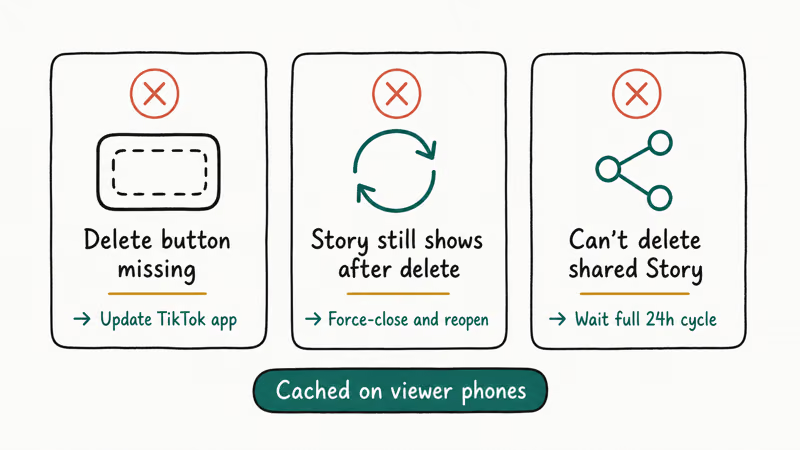
The Delete option doesn’t appear. If the three-dot menu only shows Share or Save, the Story has likely already passed its 24-hour window and TikTok is showing you a cached preview. Pull down to refresh your profile and the entry should clear on its own.
The app freezes during deletion. Force-close TikTok, reopen it, and try again. TikTok recommends keeping the app on its latest build, and stale versions are a common cause of menu glitches. If the freeze repeats after a fresh launch, restart the phone, then check the App Store or Play Store for an update. Beta builds tend to be more prone to this kind of issue, so switch back to the public release if you’re enrolled.
The Story keeps showing on your profile after delete. This is almost always a caching delay. Wait two to five minutes, then refresh. If it persists, log out and back in. That forces TikTok to re-pull your Stories list from the server.
You’re seeing a “Try again later” error. Accounts under temporary action limits can hit short-term restrictions on edits and deletions. These usually clear within a few hours.
#Understanding TikTok Story features
Knowing how Stories work helps you decide what’s worth posting in the first place.
- 24-hour lifespan: Stories self-delete on a strict 24-hour clock from publish time.
- Engagement: Followers can react with stickers and share to friends, but comments are disabled.
- Visibility: Stories surface only to followers, never on the For You algorithm feed.
- Creative tools: You can layer text, stickers, sounds, and effects, similar to regular TikTok videos.
- No archive: Unlike Instagram’s archive feature, TikTok doesn’t preserve your old Stories anywhere.
TikTok’s watching Stories help page states that Stories can be watched from Inbox, public profiles, the Following feed, and the For You feed. It also warns that creators can see you viewed their Story even if your account is private or profile view history is turned off.
If your regular TikToks aren’t reaching followers either, our breakdown of why TikTok might not be showing your videos to your followers covers the algorithm-side fixes.
#Best practices for managing TikTok Stories
A handful of habits keep your Story feed feeling intentional rather than chaotic.
- Plan your beats: Use Stories to support your main content, not replace it.
- Reply to reactions: TikTok’s built-in reaction stickers are a low-friction way to start DMs with engaged followers.
- Post in clusters: Two or three Stories spaced through the day usually outperform a single morning dump.
- Save before deleting: Screen-record anything you might want for a future compilation.
- Check your privacy settings: You can restrict who sees Stories from the same panel that controls regular videos.
- Delete sparingly: Constant cleanup can signal that you’re unsure of your content. Let weak Stories age out on their own when possible.
To keep things tidy on the wider profile, you can also organize your saved videos into folders so cleanup feels less overwhelming.
#Bottom Line
Three taps. Open your Story from the profile tab, tap the three dots, then confirm Delete. The flow is the same on iPhone, Android, and the web app, and followers won’t get any notification. The one decision that actually matters is whether to screen-record the Story first, because once you confirm Delete, TikTok holds no recovery path for the clip, the reactions, or the view count.
TikTok Tips & Tricks
#Frequently Asked Questions
Can deleted TikTok Stories be recovered?
No. Once you confirm the deletion, TikTok removes the Story from its servers and there’s no archive or undo option for that clip.
Do followers get notified when I delete a Story?
TikTok doesn’t push any notification when you remove a Story. The Story simply disappears from their feed the next time it refreshes, with no “deleted” tombstone left behind. Unless someone was actively watching at the moment of deletion, they won’t notice the change at all, and even active viewers just get bumped to the next Story in the queue.
Is there a limit on how many Stories I can post or delete each day?
TikTok hasn’t published a hard daily cap. In normal use you can comfortably post and delete several Stories from a single account in a short span without hitting throttles.
What happens to reactions, shares, and view counts when I delete a Story?
They’re erased along with the Story itself. View counts, reaction stickers, and share counts disappear from the deleted entry, and none of those numbers carry over to a future Story. If you’ve been tracking engagement for a campaign, screenshot the metrics dashboard before tapping Delete so you have a record, because the data is gone the moment you confirm.
Can I delete a Story after the 24 hours are up?
Stories auto-delete at the 24-hour mark, so there’s nothing to remove manually after that point.
How do I delete a TikTok Story from a desktop computer?
Sign in at TikTok.com, click your profile picture, select View Story, then click the three dots on the Story you want gone. Choose Delete and confirm. The desktop flow works identically in Chrome, Safari, and Firefox.
Where can I see my reposts after cleaning up Stories?
Reposts live in a separate tab on your profile. Our guide on how to see your reposts on TikTok shows the exact path, and cleaning up Stories doesn’t affect any reposts you’ve already made.
Can I change my profile picture after deleting a Story?
Yes. Stories and profile pictures live in completely separate parts of your account, so deleting one doesn’t touch the other. If you’d like a fresh look at the same time, our quick guide on how to remove your TikTok profile picture covers the steps in under a minute. The change syncs across devices in seconds, and your followers will see the new avatar the next time they refresh your profile or scroll past one of your videos in their feed.
How to Block TikTok on iPhone and Android: Parent Guide
Block or limit TikTok on your child's iPhone or Android using Screen Time, Family Link, and router settings. Step-by-step parental control guide.
TikTok Parental Controls: Setup Guide for Families
Set up TikTok parental controls using Family Pairing, Restricted Mode, and privacy settings. Step-by-step guide to protect your child on TikTok.

How to Get a TikTok Stream Key for OBS and Streamlabs
Get a TikTok stream key to broadcast from OBS or Streamlabs. Covers the 1,000-follower requirement, CarterPulse application, and OBS setup steps.

How to Make a Joint TikTok Account With Friends (2026)
Set up and manage a joint TikTok account with friends. Covers shared login setup, content planning, security tips, and the Collaboration Post alternative.