iOS 27 New Features: Every Confirmed and Expected Change
iOS 27 lands in September 2026. Here are the confirmed features from Apple, plus what credible reports expect, clearly labeled as confirmed or expected.
Quick AnswerApple confirmed iOS 27 at WWDC 2026 on June 8, including a major Siri redesign, third-party AI Extensions, new accessibility tools like VoiceOver Image Explorer, and Photos editing features. Developer betas are seeding now, with a public release expected in September 2026.
iOS 27 is coming this September, and Apple has already started showing its hand. This guide compares Apple’s official statements with pre-WWDC reporting so the picture stays split: confirmed on one side, credibly expected on the other.
- Apple officially confirmed new accessibility features for iOS 27 via a May 2026 Newsroom post, including VoiceOver Image Explorer and a natural-language Voice Control upgrade.
- Apple confirmed a complete Siri redesign at WWDC 2026, including a dedicated Siri app and Dynamic Island integration, matching Bloomberg’s earlier reporting.
- Apple confirmed third-party AI assistants like Claude, Gemini, and Grok through the new Extensions framework, ending OpenAI’s exclusive arrangement.
- Apple confirmed a dedicated Siri mode in Camera, plus new Extend and Spatial Reframing tools in Photos.
- Apple revealed the full iOS 27 feature list at WWDC 2026 on June 8, and developer betas are now seeding ahead of a public release expected in September.
#What Apple Confirmed Before WWDC
Apple started its iOS 27 preview with accessibility. In May 2026, Apple’s Newsroom announced a set of upcoming accessibility features for iOS 27, iPadOS 27, macOS 27, and other platforms. The June 8 keynote then expanded the official list well beyond accessibility.
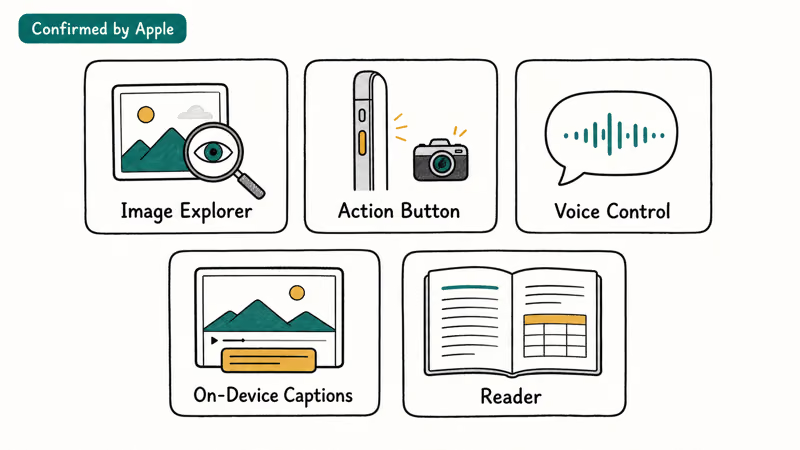
Here’s what Apple confirmed:
VoiceOver Image Explorer generates detailed descriptions of images system-wide, from photos to scanned bills. It’s VoiceOver backed by on-device AI.
Action button visual intelligence lets VoiceOver users ask natural-language questions about what the camera sees.
Voice Control natural language upgrade means users can describe on-screen elements in their own words instead of relying on precise labels. If a button’s label doesn’t match what you see, you can describe what you see instead.
Automatic captions for personal videos will be generated on-device for recorded videos, received clips from friends, and streamed content. Apple confirmed this runs entirely on the device, with no data sent to external servers.
Accessibility Reader expansion will handle more complex layouts, including tables, multi-column text, and images, using AI to interpret and present the content more clearly.
Apple confirms that these features are coming “later this year,” timed to the iOS 27, iPadOS 27, and macOS 27 release cycle. The on-device processing Apple describes here matches the privacy model used for iOS 26’s Apple Intelligence features.
#The Major Changes Apple Confirmed at WWDC
The following features were first reported by Bloomberg, 9to5Mac, and MacRumors ahead of the keynote. Apple’s Siri AI announcement confirmed the major ones on June 8, including the Siri redesign and Dynamic Island integration. Apple also confirmed third-party AI Extensions at WWDC, and the features are now seeding in developer betas.
Developer and public iOS 27 betas are available now.
The beta cycle has also added interface polish. Notable touches include a Notification Center wallpaper cutout that appears on swipe-down, a Liquid Glass transparency slider, and black Lock Screen Control Center icons that read better against lighter wallpapers.
#How Does the Dedicated Siri App Work?
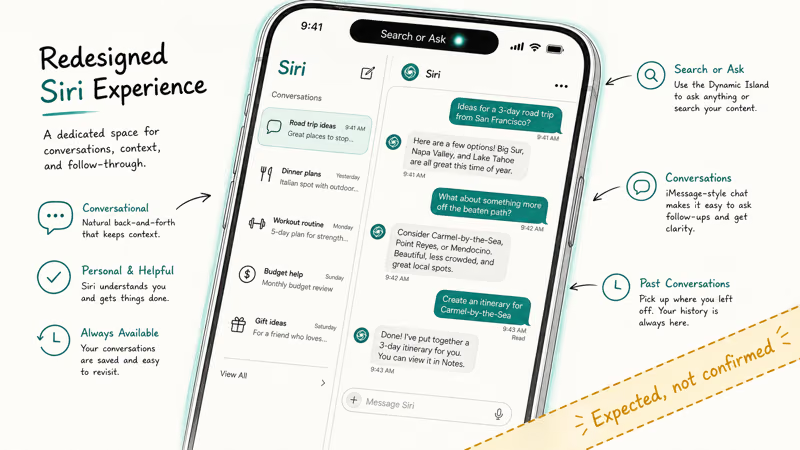
Bloomberg’s Mark Gurman reported the most significant Siri overhaul since the assistant launched in 2011, and Apple confirmed its central outline at WWDC 2026. The shape:
A dedicated Siri app brings past conversations into one place, lets you start and pin chats, and privately syncs history through iCloud across Apple devices. You can still invoke Siri from elsewhere in iOS, but the app gives longer conversations a persistent home.
Dynamic Island integration is confirmed. Apple says iPhone users can swipe down from the Dynamic Island to start a Siri AI conversation and get an in-depth answer.
Pre-WWDC reports also said Siri might replace Spotlight search on iPhone. Apple didn’t announce that. Its official materials describe Siri AI integration with Spotlight on iPad and Mac, so an iPhone Spotlight replacement remains unconfirmed.
Apple’s announcement confirms the app and Dynamic Island behavior; only the iPhone Spotlight replacement remains unconfirmed.
#Third-Party AI Assistants Through a New Extensions System
Before WWDC, 9to5Mac and MacRumors both reported that iOS 27 test builds contained an Extensions framework with an internal Apple description reading: “Extensions allow you to access generative AI capabilities from installed apps on demand, through Apple Intelligence features such as Siri, Writing Tools, Image Playground and more.”
Apple confirmed the framework at WWDC. It lets supported requests use installed providers such as Claude, Gemini, or Grok through Siri, Writing Tools, and Image Playground, ending OpenAI’s exclusive position as Siri’s external AI partner.
Confirmed at WWDC after multiple outlets surfaced the same internal build strings.
#Photos Editing and Camera Changes
According to Apple’s iOS 27 preview, Photos adds Extend, Spatial Reframing, and an enhanced Clean Up tool. Extend expands a shot beyond its original borders, while Spatial Reframing recomposes it after capture. Pre-WWDC reports named a separate Enhance tool, but Apple doesn’t list that tool in its published preview.
Apple also confirmed a dedicated Siri mode in Camera. Tap it to let Siri see through the viewfinder, answer questions about what’s in front of you, and take actions such as returning nutritional information. For the deeper layout and control changes landing with that redesign, see our iOS 27 camera customization guide.
Extend, Spatial Reframing, and Siri mode in Camera are official. The separately reported Enhance name remains absent from Apple’s preview.
#iOS 27 and the Foldable iPhone
Apple is widely expected to launch its first foldable iPhone later in 2026. iOS 27 would include optimizations for that form factor, potentially bringing an iPad-like interface capable of running two apps side-by-side when the device is unfolded.
Unconfirmed. The foldable faces reported production delays.
#Writing Tools, Shortcuts, and Smaller Additions
Apple confirmed expanded Writing Tools in iOS 27. Siri AI can draft text from scratch, revise it from a natural-language instruction, match a user’s tone in Mail and Messages, and proofread across most third-party apps.
AI-powered Shortcuts are confirmed. The new Describe a Shortcut feature lets you explain an automation in plain language, then connects actions across apps to build it.
Image Playground is also confirmed to add photorealistic styles and natural-language image edits through a “describe a change” workflow.
All three areas are now part of Apple’s published iOS 27 preview rather than test-build reporting alone.
#Does iOS 27 Focus on Performance?
Pre-WWDC coverage described iOS 27 as a “Snow Leopard” year, a reference to Mac OS X Snow Leopard from 2009. Apple’s WWDC26 release confirmed the underlying performance focus: Apple says apps launch up to 30 percent faster, photos load up to 70 percent faster after capture, and AirDrop transfers are up to 80 percent faster in its prerelease tests.

The label remains media shorthand. Apple’s performance work and rebuilt search are official.
Across iOS 26 point releases, incremental updates have steadily trimmed background app reload times and improved Face ID unlock speed. If that pattern continues, the “Snow Leopard” framing has real substance behind it.
#iOS 27 Compatibility and Supported Devices
Apple hasn’t announced the iOS 27 compatibility list yet. The cutoff is expected to stay close to iOS 26. Check iOS 27 compatible iPhones for the latest device reports.
Timing your upgrade around the beta? The iOS 27 beta release date page tracks both the developer and public beta schedules. And before you install, should you install the iOS 27 beta is a fast decision guide covering device risk, backup status, and whether you actually need early access or just want it.
Current baseline: see iOS 26 supported devices.
According to Apple’s iOS 26 announcement, iOS 26 matched iOS 25’s list almost exactly. Apple hasn’t been aggressive about dropping older hardware recently.
#How Does iOS 27 Compare to iOS 26?
iOS 26 introduced the Liquid Glass design system and brought Live Translation, visual intelligence updates, and Workout Buddy on Apple Watch. Apple’s iOS 26 release was its biggest visual redesign in years. iOS 27 focuses less on another visual overhaul and more on what Siri can do with the context of your conversations and installed apps.
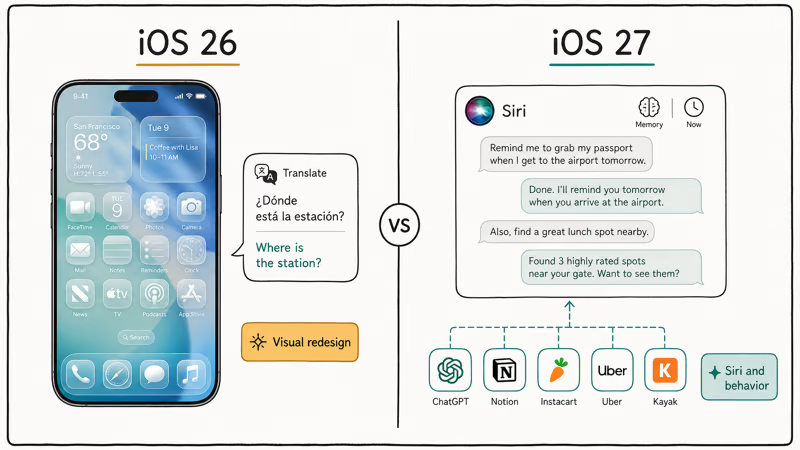
The confirmed Siri overhaul changes how iPhone handles queries at a structural level, not just cosmetically. iOS 26 gave Siri better individual answers. iOS 27 adds conversation history, a dedicated app interface, deeper app actions, and access to third-party AI models. That’s a fundamentally different product.
Need to roll back? The downgrade iOS 27 beta to iOS 26 guide has the full process.
#Bottom Line
Apple has now confirmed much more than accessibility. The official list includes Siri AI, the dedicated Siri app, Dynamic Island access, third-party AI Extensions, Siri mode in Camera, Photos editing tools, expanded Writing Tools, Image Playground, Shortcuts, and performance improvements.
The remaining report-only items in this guide are narrower: an iPhone Spotlight replacement, a separate Photos Enhance tool, foldable-iPhone adaptations, and some interface details. They’re labeled as reported or unconfirmed where they appear.
WWDC ended June 8. Developer and public iOS 27 betas are available now; the stable release follows this fall.
Use the beta release-date guide linked above to check the current build before installing it on an iPhone you rely on.
#Frequently Asked Questions
Has Apple officially confirmed iOS 27 features?
Yes. Apple first confirmed five accessibility features in May, then used its June 8 WWDC keynote to announce Siri AI, the dedicated Siri app, third-party AI Extensions, Photos and Camera tools, Writing Tools, Shortcuts, Image Playground, and performance improvements.
When will iOS 27 be released?
Apple says iOS 27 is coming this fall but hasn’t published a specific date. Its pattern from iOS 24, 25, and 26 points to September 2026. Developer betas began after the June 8 keynote, and the public beta has been available since July.
Will iOS 27 support my current iPhone?
Not announced yet. Based on iOS 26’s cutoff, expect iPhone 11 and later to be eligible. The compatible iPhones page linked above tracks the latest.
Is the Siri redesign in iOS 27 confirmed?
Yes. Apple confirmed the Siri redesign at its WWDC 2026 keynote on June 8, including the dedicated Siri app, Dynamic Island integration, and a chat-style conversational interface. Bloomberg’s Mark Gurman had reported the shape of the overhaul accurately in the months before the announcement.
What is the iOS 27 third-party AI Extensions feature?
Confirmed at WWDC 2026. The Extensions framework lets Claude, Gemini, Grok, and other third-party AI models be used through Siri, Writing Tools, and Image Playground. 9to5Mac and MacRumors first surfaced it from strings in iOS 27 test builds before Apple confirmed it on stage on June 8.
Will iOS 27 work on the foldable iPhone?
Not confirmed. Apple hasn’t announced the foldable iPhone or its iOS 27 software adaptations.
Should I install the iOS 27 beta?
Developer and public betas are available now, but daily-use iPhone users should still wait for the stable release. If you install a beta, back up first and expect bugs, battery drain, or app failures. The downgrade guide linked above walks through going back to iOS 26.
Will iOS 27 be a major update or a focused one?
Focused, not sweeping. Apple confirmed performance, stability, and targeted AI features rather than another visual overhaul. The Siri redesign is the defining change: a behavioral upgrade, not a cosmetic one.
Mac mini M6 vs M5 Pro: Which Model Should You Buy?
Mac mini M6 vs M5 Pro compared on price, memory, ports, displays, and real workloads. Find the better 2026 Mac mini for your desk and budget.
Apple Siri Settlement: Who Qualifies and How to Claim
Apple's $250 million Siri settlement covers iPhone 15 Pro and iPhone 16 models bought June 2024 to March 2025. See who qualifies and how claims work.

iOS 26.6.1 Security Update: What Apple Fixed and Who Gets It
Apple released iOS 26.6.1 on August 17 with 29 security fixes, including an IPSec interception bug. See what it patches, who gets it, and how to update.
iPhone Adaptive Power: How It Works and When to Use It
Learn how iPhone Adaptive Power works, which models support it, what it changes, and when Low Power Mode is still the better battery-saving choice.