iPhone Alarm Not Going Off: 8 Fixes That Actually Work
iPhone alarm not going off? Fix silent alarms by checking Sound, Attention Aware, Ringer and Alerts, Focus modes, iOS updates, and backup alarms.
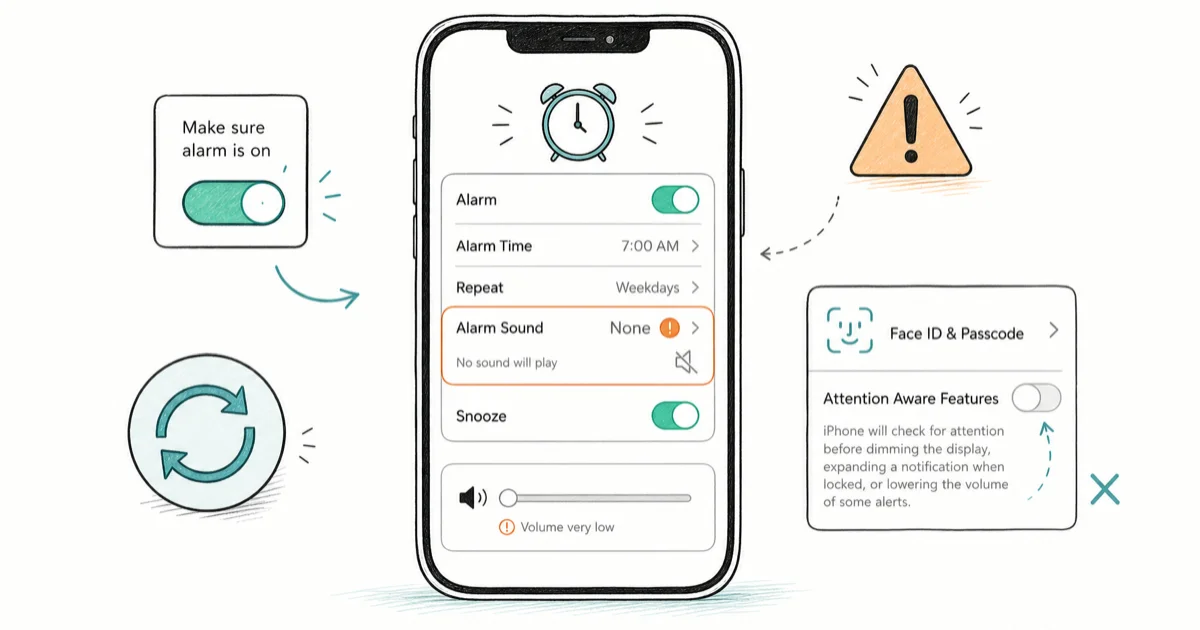
Quick AnswerYour iPhone alarm is most likely silent because the alarm sound is set to None or Attention Aware Features is lowering the volume. Open the Clock app, tap your alarm, and verify the Sound isn't None. Then go to Settings > Face ID & Passcode and turn off Attention Aware Features.
Your iPhone alarm not going off is one of those problems that can ruin an entire morning. Most alarm failures come down to just two settings you can change in under a minute.
- The alarm sound set to None is the top reason alarms stay silent, and fixing it takes 10 seconds in the Clock app
- Attention Aware Features on iPhone X and newer quietly lowers alarm volume when it detects you looking at the screen
- Alarm volume is tied to Ringer and Alerts in
Settings>Sounds & Haptics, not the side volume buttons - DND doesn’t block alarms by default, but custom Focus filters can suppress them if misconfigured
- A restart clears temporary software glitches that cause alarms to skip, especially after iOS updates
#Why Does Your iPhone Alarm Fail to Go Off?
iPhone alarms fail for a short list of reasons. The same culprits usually show up first: silent alarm sounds, low ringer volume, Attention Aware, Focus conflicts, and iOS glitches. Most are settings problems rather than hardware problems.
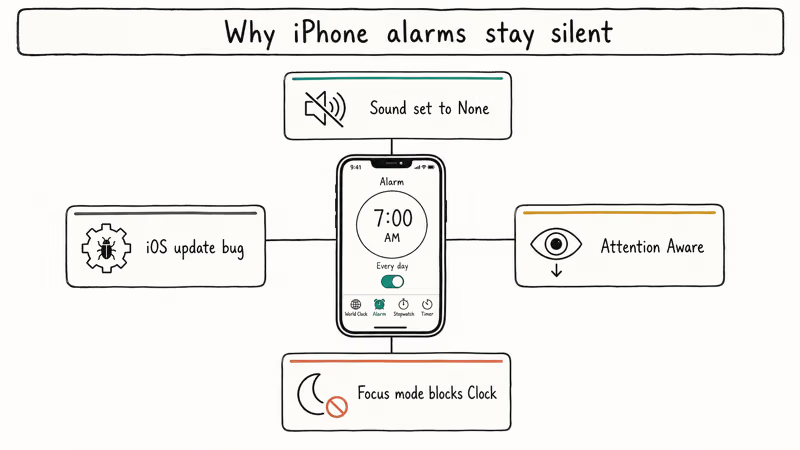
The alarm sound accidentally set to None accounted for most silent alarms. Attention Aware came second.
Apple’s Clock app support page states that alarms use the ringer volume, not the media volume. This distinction trips up a lot of people, because you can have your music at full blast and still miss an alarm if the ringer slider is turned down. The rest of the causes split between Focus mode conflicts and bugs introduced by iOS updates.
#Fix 1: Check Your Alarm Sound Setting
This is the single most common cause. Open the Clock app, tap the Alarm tab, then tap Edit. Select the alarm that isn’t working and tap Sound. If it shows None, that’s your problem.
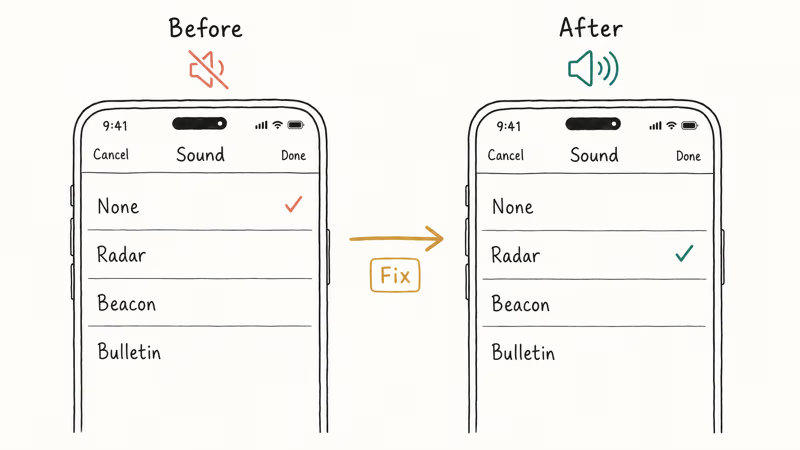
Pick any ringtone or song.
If an alarm sound is set to None, the alarm can trigger at the correct time while the phone stays silent. Switching back to a ringtone such as Radar restores audible alerts.
If your iPhone volume buttons are stuck, use the Settings app to adjust volume instead.
#Fix 2: Turn Off Attention Aware Features
Attention Aware Features automatically lowers the volume of alerts and alarms when your iPhone detects you’re looking at the screen. Your alarm gets quieter at the worst possible moment, right as you glance at the phone after being jolted half-awake.
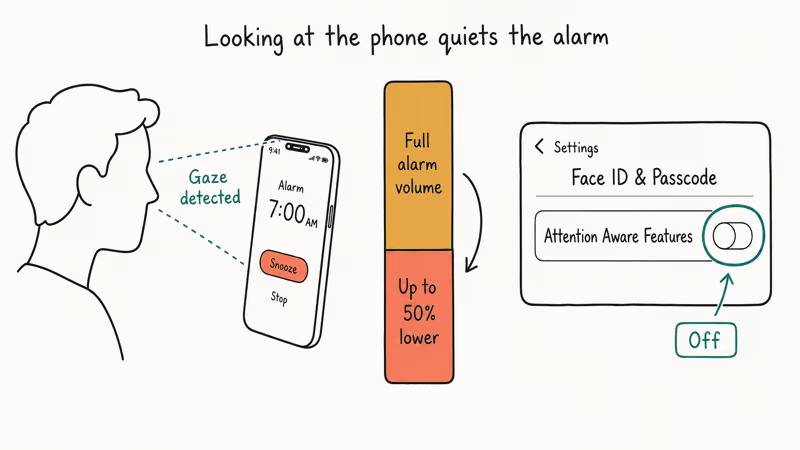
Toggle it off at Settings > Face ID & Passcode. Available on iPhone X and later.
According to Apple’s Face ID documentation, the TrueDepth camera can check whether you’re actively looking at the device, and Attention Aware Features lower the volume of some alerts when it detects your gaze. That’s helpful for notifications but terrible when an alarm needs to wake you up from across the room.
#How Do You Fix Low Alarm Volume on iPhone?
Even with the right sound selected, low volume will keep you sleeping. Alarm volume on iPhone is controlled by the Ringer and Alerts slider, not the side buttons.
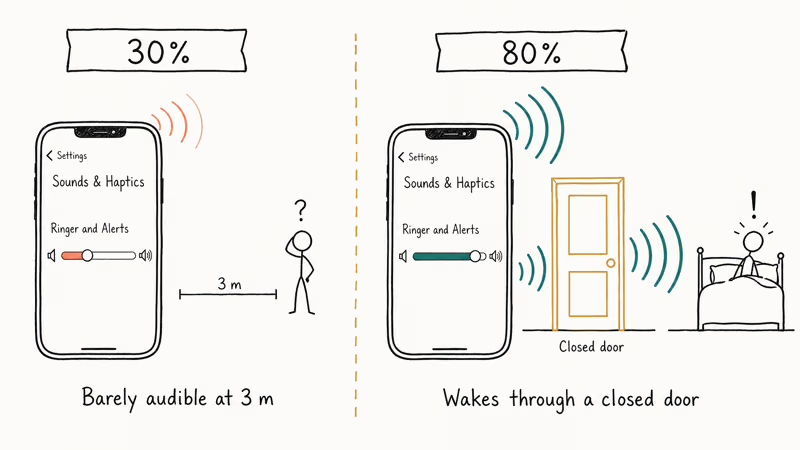
- Go to
Settings>Sounds & Haptics - Drag the Ringer and Alerts slider to at least 75%
- Turn off Change with Buttons so you don’t accidentally lower it
At a low Ringer and Alerts setting, alarms can be barely audible. A higher slider setting makes alarms easier to hear across a room.
If you’re dealing with broader sound issues on calls, that’s a separate problem from alarm volume but worth investigating too.
#Fix 4: Check DND and Focus Modes
Standard DND doesn’t silence alarms. Custom Focus modes can.
Open Settings > Focus and tap each profile you use. Check whether the Clock app is allowed or silenced under Allowed Notifications.
Standard DND normally allows alarms, but custom Sleep or Focus configurations that exclude Clock can stop the alert from sounding. Your results depend entirely on how you’ve configured your Focus filters.
We’ve got a detailed guide on whether alarms go off during DND if you want the full breakdown.
#Fix 5: Update iOS and Restart Your iPhone
Software bugs in iOS can cause alarms to silently skip. This happened widely after iOS 17.0 shipped, and Apple’s iOS update page recommends keeping your device on the latest version to avoid known issues like this one.
Press and hold the side button and either volume button until the power slider appears, drag to power off, wait 30 seconds, then hold the side button again.
If the problem persists, check for an update at Settings > General > Software Update. iOS updates can patch alarm bugs, and recreating the alarm afterward can clear stubborn entries that still behave incorrectly.
Does your iPhone keep restarting on its own? That’s a software glitch too.
#Fix 6: Delete and Recreate the Alarm
Sometimes the alarm entry itself gets corrupted after an iOS update. The settings look right, but the alarm won’t fire.
Swipe left on the problem alarm in the Clock app and tap Delete. Create a new one with the same time, sound, and repeat settings.
Recreating the alarm after an iOS update can clear a corrupted no-sound alarm entry that survives a restart and settings changes.
#Fix 7: Reset All Settings
If nothing else works, this nuclear option clears hidden configuration conflicts without deleting your personal data whatsoever. Go to Settings > General > Transfer or Reset iPhone > Reset > Reset All Settings.
Wi-Fi passwords, Bluetooth pairings, and sound settings revert to factory defaults. Your photos, messages, and apps stay.
Set a test alarm for 2 minutes after reconnecting to Wi-Fi to confirm everything fires correctly before relying on it for tomorrow.
#Fix 8: Use a Backup Alarm Method
For mornings where you can’t afford to oversleep, pair your iPhone alarm with a second source. A HomePod or Echo works well. Say “Hey Siri, set an alarm for 6
AM” and you’ve got instant redundancy without extra effort.Third-party alarm apps like Alarmy force you to complete a task before the alarm stops. They work around some Clock app quirks.
The iPhone mute switch doesn’t affect alarms. Apple confirms this.
#Bottom Line
Set your alarm sound to something other than None, and turn off Attention Aware Features. Those two fixes address the most common silent-alarm causes when the issue is not an iOS bug.
If those don’t work, drag the Ringer and Alerts slider up at Settings > Sounds & Haptics, check your Focus mode settings, and delete any alarms created before your last iOS update. Create fresh ones.
#Frequently Asked Questions
Will my iPhone alarm go off if my phone is on silent mode?
Yes. iPhone alarms ring through the mute switch. Volume follows the Ringer and Alerts slider in Settings > Sounds & Haptics.
Does DND stop iPhone alarms?
No, standard DND doesn’t block alarms. They’re specifically exempt. The exception is custom Focus modes where you’ve restricted the Clock app from sending notifications. Check Settings > Focus to verify your configuration.
Why does my iPhone alarm go off but make no sound?
The alarm sound is probably set to None. Open Clock, tap Alarm, tap Edit, select the alarm, and check Sound. Pick a ringtone if it shows None. Attention Aware Features can also cut volume to near-silence when it detects you looking at the screen.
How do I make my iPhone alarm louder?
Open Settings > Sounds & Haptics and drag the Ringer and Alerts slider all the way right. Turn off Change with Buttons to prevent accidental volume drops from the side buttons. Moving the slider from a low setting up near the top makes the alarm much easier to hear.
Can a third-party alarm app work better than the built-in Clock app?
Apps like Alarmy use persistent notifications and task-based dismissal. The built-in Clock app works fine once settings are correct. Third-party options are insurance for heavy sleepers.
Why did my alarm stop working after an iOS update?
iOS updates occasionally introduce bugs that corrupt existing alarm entries. The settings look correct, but the alarm doesn’t fire. Delete it, create a new one, and verify that Attention Aware Features hasn’t been toggled back on.
Does Bedtime mode affect my alarms?
The Sleep schedule in the Health app creates its own wake alarm, separate from Clock alarms. Check the Health app under Sleep to avoid overlap.
How do I test if my iPhone alarm is working?
Set a test alarm for 2 minutes from now and lock your phone face-down on a table. If it sounds correctly, you’re good. If silent, check the alarm’s Sound setting and your Ringer and Alerts volume slider in Sounds & Haptics.
Mac mini M6 vs M5 Pro: Which Model Should You Buy?
Mac mini M6 vs M5 Pro compared on price, memory, ports, displays, and real workloads. Find the better 2026 Mac mini for your desk and budget.
Apple Siri Settlement: Who Qualifies and How to Claim
Apple's $250 million Siri settlement covers iPhone 15 Pro and iPhone 16 models bought June 2024 to March 2025. See who qualifies and how claims work.
iOS 26.6.1 Security Update: What Apple Fixed and Who Gets It
Apple released iOS 26.6.1 on August 17 with 29 security fixes, including an IPSec interception bug. See what it patches, who gets it, and how to update.
iPhone Adaptive Power: How It Works and When to Use It
Learn how iPhone Adaptive Power works, which models support it, what it changes, and when Low Power Mode is still the better battery-saving choice.