One UI 8.5 Problems: 2026 Fix Guide for Galaxy Phones
One UI 8.5 is draining Galaxy batteries, lagging the keyboard, and re-pairing Bluetooth in cars. Here are the per-issue fixes that work in 2026.

Quick AnswerMatch the fix to the symptom: update Samsung Keyboard for keyboard-linked drain, stop a stuck WhatsApp backup, or re-pair Bluetooth. Install the August security patch promptly when your Galaxy offers it.
One UI 8.5 reached stable Galaxy phones in May 2026, followed by reports of battery drain, keyboard stutter, overheating, and car Bluetooth dropouts. Most fixes are app-level, and this guide assumes the Galaxy is a phone you own.
- One UI 8.5’s most-reported battery drain has been traced to the Samsung Keyboard, and Samsung shipped a Galaxy Store patch that fixes it without a full OS update
- Stable One UI 8.5 began rolling out on May 6, 2026 to the Galaxy S25 series first, then the S24 line and foldables, so your fix may already be queued for your region
- Keyboard burst-typing and dropped letters usually clear after clearing the Samsung Keyboard cache and updating it through the Galaxy Store
- Bluetooth-to-car dropouts after One UI 8.5 need the old pairing deleted on both phone and head unit, then a fresh re-pair from discovery mode
- Samsung’s August bulletin lists 38 Google CVEs plus 18 Samsung items; reports through August 27 cover named S26, S25, S24, Fold 7, Flip 7, Flip 6, and Fold 6 models
#What Is Breaking in One UI 8.5 Right Now
The short list is battery drain, keyboard lag, overheating, and Bluetooth re-pairing. Those four cover most of what Galaxy owners are posting.

According to Samsung’s official newsroom, One UI 8.5 began its stable rollout on May 6, 2026, leading with the Galaxy S25 series before expanding to older flagships. That matters because the early-rollout window is exactly when post-update bugs cluster and exactly when the first hotfixes land.
The single biggest complaint has a known cause. Sammy Fans reported that Samsung tracked a major battery drain back to the Samsung Keyboard and pushed a fix through the Galaxy Store rather than waiting on a full firmware update. So if your S25 is bleeding charge after the update, your first move is a keyboard update, not a panic restore.
Samsung also acknowledged two related reports. Sammy Fans noted that the company was investigating lag and overheating during the beta cycle. That report doesn’t establish a fix for Bluetooth, WhatsApp, or every stable-build complaint.
Pick the one issue that’s actually hurting you. Most owners only need a single fix.
#Why Is My Galaxy Battery Draining After One UI 8.5?
Start here, because this is the loudest complaint of the cycle.
Some drain is normal for the first 48 to 72 hours while the media indexer, Google Photos re-scan, and Play Services finish their post-update work. If your phone is past that window and still dying fast, start by checking for one app that won’t sleep.
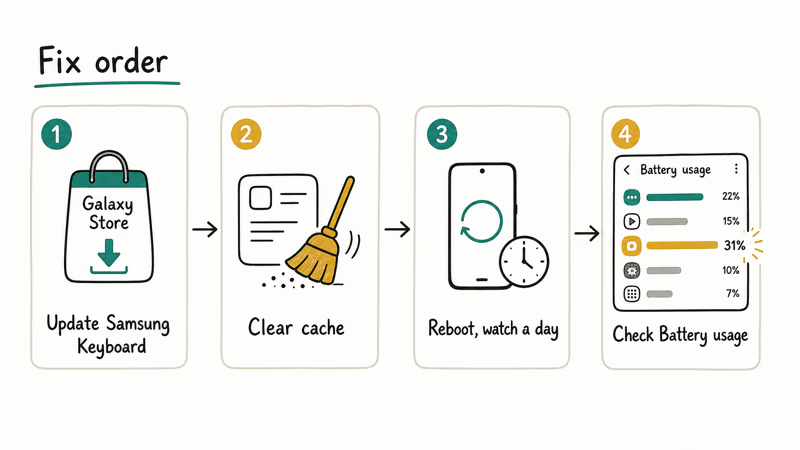
The known culprit this cycle is the Samsung Keyboard. Before you go hunting, do this:
- Open the Galaxy Store, tap your profile, choose Updates, and update Samsung Keyboard if a new version is listed.
- Then clear its cache:
Settings>Apps>Samsung Keyboard>Storage>Clearcache. - Reboot and watch a full day.
If drain continues, open Settings > Battery and device care > Battery > Battery usage and look for any app eating 20 percent or more on a phone you’ve barely touched. Force stop it, clear its cache, and reboot. Two One UI 8.5 behaviors are worth checking directly: Always-On Display set to “Show always” instead of “Tap to show,” and 5G Standalone mode causing wake locks in weak-signal areas (switch Network mode to LTE for a day to test).
For the deeper drain checklist that applies across Galaxy models, our guide on a Samsung Galaxy battery draining fast walks through the heavier diagnostics. The Android system battery drain walkthrough covers the OS-level cases.
#July 2026 Update: WhatsApp Backup Loop Hits S24 and S25 Ultra
The July 2026 security patch kicked off a second, separate drain wave, and this one isn’t the keyboard.
Galaxy S25 Ultra and S24 Ultra owners started reporting sharp idle drain, overheating, and slower charging within days of installing the July update. 9to5Google reported on July 30 that affected phones were losing 5 to 7 percent per hour while sitting untouched, and Samsung Members threads filled with the same pattern.
The trigger looks specific. According to Android Authority’s breakdown, users traced the heat and drain to WhatsApp getting stuck in a loop during its encrypted backup after the update. The report describes repeated backup attempts that keep the phone active and drain the battery faster; Samsung hadn’t confirmed that diagnosis at publication time.
The workaround takes one minute:
- Open WhatsApp and go to
Settings>Chats>Chatbackup. - If a backup shows as running or stuck, cancel it.
- Force stop WhatsApp (
Settings>Apps>WhatsApp>Forcestop), then reboot. - Re-run the backup manually later on Wi-Fi and confirm it completes.
Users who cancelled the stuck backup saw idle drain return to normal right away. If your backup keeps jamming on the retry, our WhatsApp backup stuck guide covers the deeper fixes. Owners tracking other post-update quirks on the S25 line can cross-check our Galaxy S25 common problems roundup.
Samsung hadn’t publicly acknowledged the issue as of July 31, so keep the backup on manual. The next section covers what August’s patch did and didn’t bring.
#Which Galaxy Phones Have the August 2026 Patch?
This article was updated August 28 with arrival reports verified through August 27. The late-August wave includes recent Galaxy S phones and foldables, but “rolling out” doesn’t mean every country or carrier has the file. Samsung says delivery time varies by model and region, and an OS upgrade can delay a monthly patch.
These are media-observed arrivals, not a Samsung promise of worldwide availability. SamMobile’s August patch tracker listed the following wave by August 27:
| Report date | Galaxy models in this wave | What the report establishes |
|---|---|---|
| August 26 | Galaxy S26, S26+, S26 Ultra | Rollout reported; availability still varies by market |
| August 26 | Galaxy S25, S25+, S25 Ultra, S25 FE | Rollout reported; the FE arrived in a separate package |
| August 26 | Galaxy S24, S24+, S24 Ultra | Rollout reported; not confirmation for every carrier build |
| August 26 | Galaxy Z Fold 7, Z Flip 7, Z Flip 6 | Rollout reported; check the phone rather than assuming it's global |
| August 27 | Galaxy Z Fold 6 | Reported one day after the Flip 6, not in the same first batch |
The table records SamMobile’s S26, S25, S25 FE, S24, Fold 7, Flip 7, Flip 6, and Fold 6 arrival reports through August 27.
The Fold 6 timing is easy to misread. According to a separate SamMobile arrival report, the Galaxy Z Fold 6’s South Korean rollout began August 27. That was one day after its Flip 6 report, so the Fold 6 wasn’t missing from the reported rollout; it followed in a separate wave.
#What does Samsung’s official bulletin actually fix?
According to Samsung’s August 2026 security bulletin, the bulletin lists 38 applied Google CVEs: 8 rated Critical and 30 rated High. Samsung adds 18 Samsung Vulnerabilities and Exposures, bringing the bulletin’s headline count to 56 items.
That 56 needs a caveat. Samsung says some SVE items may be absent from a device package when they were already included in an earlier maintenance release. Each flaw also has its own affected Android versions and components, so “56 new fixes on every Galaxy” is too broad.
The Samsung-specific fixes include two High-severity issues. One tightens access control in Weaver to stop a local attacker from making a device inoperable; the other fixes input validation in Galaxy Themes that could let someone with physical access launch an arbitrary activity. The disclosed Moderate items cover Contacts, Dialer, clipboard authorization, AppLock, media codecs, and cellular-radio libraries. Samsung withholds details for some SVE items until disclosure is safe.
#Should you install it now or wait?
Install it promptly when your phone offers the official OTA. Eight Critical Android CVEs are enough reason, and this is a maintenance patch rather than a feature upgrade. You don’t need to wait for every carrier and country to receive the same build first.
Don’t sideload firmware for another region just to move up the queue. If the update isn’t listed, wait for your model, carrier, and region. Check again every few days:
- Open
Settings>Softwareupdate > Download and install. - After installation, go to
Settings>Aboutphone > Software information. - Confirm Android security patch level reads August 1, 2026 or later.
If Software update says you’re current but the patch level is older, your variant may still be waiting or may use a quarterly schedule. Samsung doesn’t publish one universal OTA order.
One last boundary matters for battery drain: Samsung’s public August bulletin doesn’t mention the reported wakelock or promise a battery fix. That’s an absence in the notes, not proof that the drain is unchanged. Install August for security, then keep the WhatsApp backup workaround above until Samsung or a device-specific changelog confirms the battery behavior has changed.
#Samsung Keyboard Lag and Dropped Letters
The keyboard does two annoying things on One UI 8.5. It lags, and it skips letters before dumping a queued burst all at once.
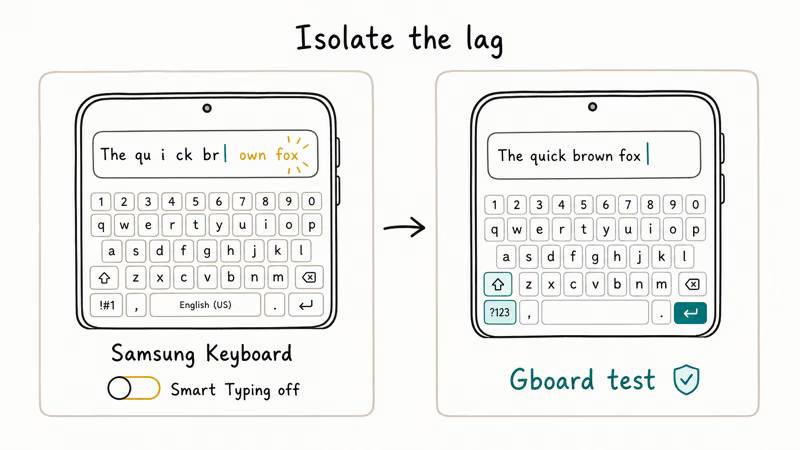
Keyboard lag can share the same app-update path as the reported keyboard-linked drain, but the cited battery report doesn’t prove every lag case has the same root cause.
Check the Galaxy Store first because app updates arrive separately from firmware.
If lag persists after the update and a cache clear:
- Open Samsung Keyboard settings and turn off Smart Typing predictions for 48 hours. Watch whether the stutter clears. If it does, the bug is in the prediction engine and the next patch should resolve it.
- As a control test, install Gboard from the Play Store, set it as default in
Settings>Generalmanagement > Keyboard list and default, and type for an hour. - If Gboard is smooth, the issue is the Samsung Keyboard build. If even Gboard lags, the cause is system-wide and points back to the overheating-app problem above.
Our standalone walkthrough for Samsung Keyboard has stopped errors covers the deeper repair path if the cache wipe and prediction toggle don’t hold, and the broader Samsung Keyboard keeps stopping guide handles the crash variant.
#Bluetooth in the Car Keeps Disconnecting
This carries over from the One UI 8 cycle and stays a problem on 8.5.
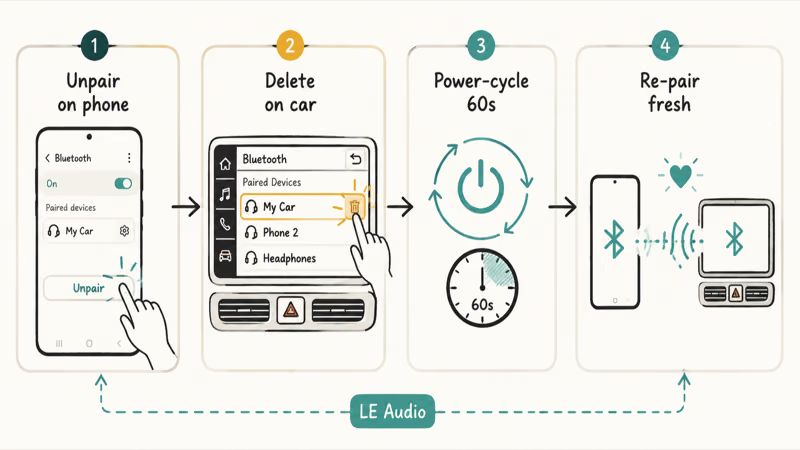
There isn’t a cited Samsung notice here that establishes one universal Bluetooth-stack cause for these car disconnects. Start with a clean re-pair on both ends because it’s reversible and clears stale pairing state without changing the phone’s firmware.
Sequence to try:
- On the phone, go to
Settings>Connections>Bluetooth, tap the gear next to the car, and choose Unpair. - On the head unit, open the Bluetooth menu and delete the phone entry.
- Power-cycle both: engine off, wait 60 seconds, restart.
- Put the phone into Bluetooth discovery mode and start a fresh pairing from the car with the engine running.
- Allow contacts and message access when prompted.
If it still drops, clear the system Bluetooth cache through Settings > Apps > three-dot menu > Show system apps > Bluetooth > Storage > Clear cache, then reboot. Our Android Bluetooth troubleshooting guide covers the general cache step. The same reversible re-pair sequence also appears in our One UI 8 problems guide.
#Overheating and Lag Samsung Already Confirmed
Some heat is normal for the first day while indexing finishes. Sustained heat is not.
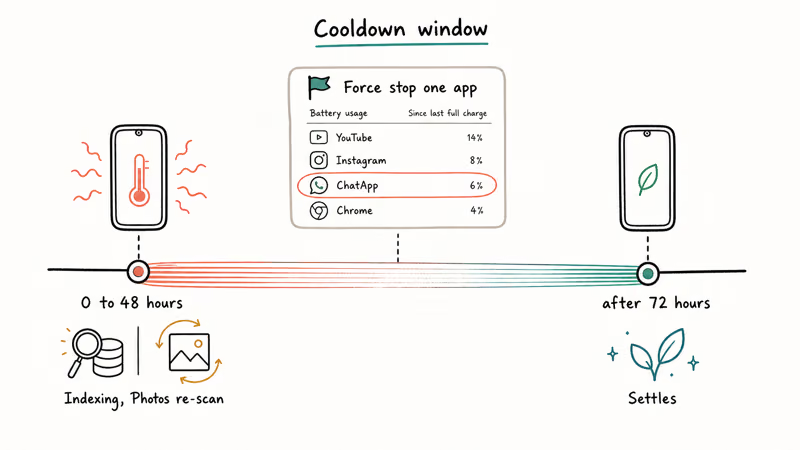
Sammy Fans found that Samsung acknowledged lag and overheating reports during the One UI 8.5 beta. That confirms the reports existed, but it doesn’t prove every stable-build case was fixed in a later maintenance patch.
Start by waiting out the first 48 hours, then check Settings > Battery and device care > Battery > Battery usage for a single app that never sleeps. Force stop it, clear its cache, and reboot before blaming the OS.
#One UI 8.5 Fixes for Earlier One UI 8 Bugs
Some, but not all.
SamMobile’s rollout coverage found that the wider worldwide rollout began just 5 days after the May 6 Korea launch, landing on May 11, 2026 and reaching the Galaxy S24 generation and foldables on a staggered schedule. The Samsung Keyboard fix arrived separately through the Galaxy Store, not as proof that every firmware build contained it.
What 8.5 has been observed to address:
- The reported Samsung Keyboard-linked drain, addressed through a Galaxy Store update.
- Keyboard prediction latency, which may improve after the same app update.
- Lag and overheating reports that Samsung investigated during beta; the cited report doesn’t confirm every later case is resolved.
If you’re on an early stable 8.5 build and one of the above is your issue, avoid a factory reset while official app and firmware updates are still arriving. Open Settings > Software update > Download and install every few days, since the staggered schedule means your fix may land after a neighbor’s.
The Samsung Members forum is where the unfiltered per-build data lives. Search your specific device model and build number before assuming a bug is universal.
#Bottom Line
For One UI 8.5, update the Samsung Keyboard through the Galaxy Store before anything else. That can address the reported keyboard-linked drain and keyboard lag; if either persists, check Battery usage for another app that won’t sleep.
For Bluetooth in the car, delete and re-pair on both sides, then clear the system Bluetooth cache if it still drops. For overheating, find the runaway app in Battery usage and force stop it. For everything else, check Settings > Software update every few days until your region gets the next maintenance patch.
Skip the factory reset at first. Isolate a runaway app and install the offered Galaxy Store and firmware updates before treating One UI itself as the cause.
#Frequently Asked Questions
Is One UI 8.5 causing battery drain on Galaxy phones?
Some post-update drain reports are real, but don’t assume One UI itself is always the cause. A widely reported case involved Samsung Keyboard, so update it, clear its cache, then check Battery usage for another app. If drain persists beyond 72 hours, use the deeper diagnostics linked above.
How do I update the Samsung Keyboard to fix the One UI 8.5 drain?
Open the Galaxy Store, tap your profile icon, choose Updates, and install any pending Samsung Keyboard update. Then reboot and watch battery life for a day.
Did One UI 8.5 fix the One UI 8 bugs?
Some. The reported Samsung Keyboard-linked drain was addressed through a Galaxy Store app update, not proof of a fix inside every One UI 8.5 firmware build. Samsung investigated lag and overheating during beta, but the cited report doesn’t confirm every later case is resolved.
When did One UI 8.5 roll out?
Samsung began the stable rollout on May 6, 2026, leading with the Galaxy S25 series. The worldwide wave followed on May 11.
Why does my Galaxy keyboard lag after One UI 8.5?
Start with the Samsung Keyboard app because that update carries little risk, not because every lag case has one proven root cause. Update it through the Galaxy Store and clear its cache. If it still stutters, turn off Smart Typing predictions for 48 hours as a test.
How do I fix Bluetooth car issues after One UI 8.5?
Delete the pairing on the phone, delete it on the head unit, power-cycle both, then re-pair from scratch with the phone in Bluetooth discovery mode. If it still drops, clear the system Bluetooth cache. This is a reversible first check; it doesn’t prove the car or One UI is the root cause.
Should I roll back from One UI 8.5 to fix problems?
Almost never. Back up first and ask Samsung support whether an official rollback path exists for your exact model and region; don’t flash cross-region or unofficial firmware. Try the lower-risk app updates, cache clears, and offered maintenance patches above first.
Should I wait before installing the August 2026 security patch?
No. Install it when Software update offers it for your Galaxy. The bulletin includes eight Critical Android CVEs, and the update doesn’t require you to wait for every carrier or country to receive the same build.
If it isn’t offered, don’t sideload another region’s firmware to jump the queue. Check again every few days because Samsung says timing varies by model and region.

Pixel 11 vs Pixel 10: What Changed and Who Should Upgrade
Pixel 11 vs Pixel 10: same screen and camera resolution, new Tensor G6, 25W wireless, and Gemini Intelligence. Here is who should actually upgrade.

Verizon Not Receiving Texts? How to Fix It in 9 Steps
Verizon not receiving texts? Fix it in 9 steps: check Message Blocking in My Verizon, reset network settings, deregister iMessage, and call support.
Pixel Battery Drain: What Google's July Fix Really Covers
Google marked the Pixel idle battery drain bug fixed in July, but only some phones got the patch. Here is who is covered, who is not, and what to try.
iPhone Stuck on EDGE? How to Get 5G or LTE Back (2026)
iPhone stuck on EDGE with crawling data? Here's why the E icon appears, which settings force 5G or LTE back, and when the problem is your carrier.