PPV on Firestick: The Legitimate 2026 Guide for Pay-Per-View
Watch PPV on Firestick legally in 2026 with Paramount+, DAZN, Peacock, and Prime Video. Compare UFC access, current prices, setup steps, and risks.
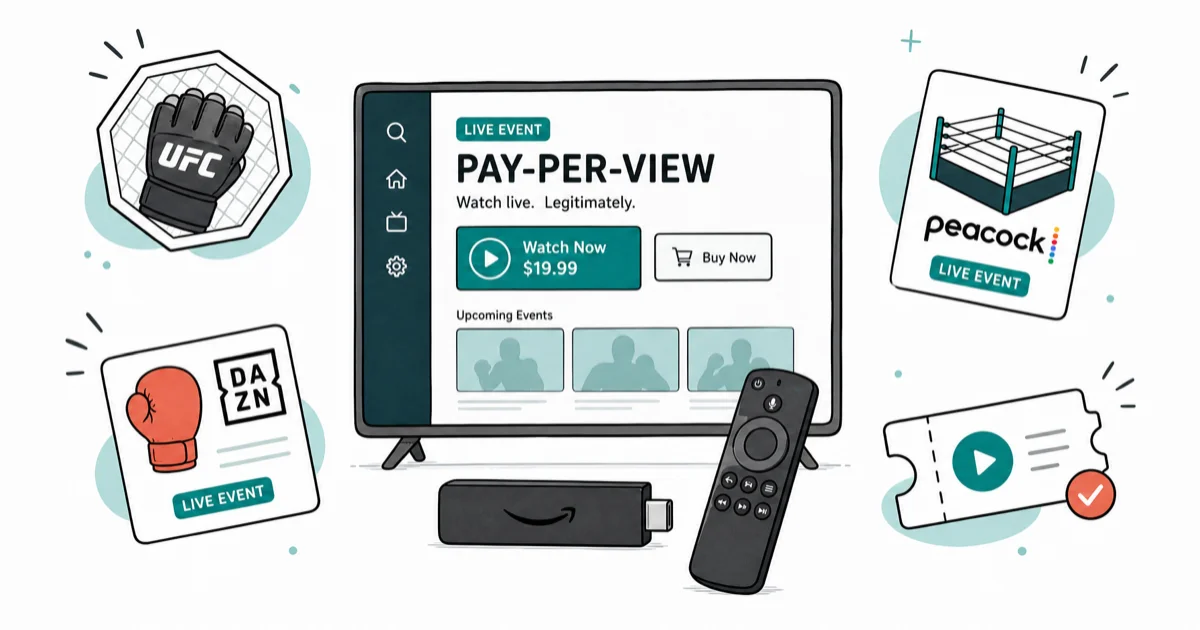
Quick AnswerTo watch PPV on Firestick legally in 2026, install the official app for your event. Use Paramount+ for UFC, DAZN for boxing, Peacock for WWE Premium Live Events, or Prime Video Channels for select cards.
PPV on Firestick is straightforward in 2026, as long as you stick to the official apps Amazon ships in the Appstore. Seven licensed services on current Firestick hardware cover the major events, and every UFC, boxing, WWE, and Bellator card you are likely to want is bookable inside one of them without sideloading. The catch is knowing which app holds which sport, because the rights are split across providers.
This guide assumes the Firestick is yours and the payment method belongs to you. Buying PPV access through someone else’s account or reselling a licensed stream violates platform terms and US copyright law.
- Paramount+ includes UFC numbered events and Fight Nights for US subscribers: Essential costs $8.99/month and Premium costs $13.99/month, with no separate event fee.
- DAZN runs most major boxing PPVs and select MMA, $24.99/month or $224.99/year, with event prices added at checkout.
- Peacock holds every WWE Premium Live Event (WrestleMania, SummerSlam, Royal Rumble) inside the $9.99/month Premium tier with no extra PPV charge.
- Prime Video Channels and the Fire TV Store tab sell one-off PPV access (boxing, MLB Network specials) directly to your existing Amazon account.
- Free PPV apps, “IPTV PPV unlocked” sideloads, and Kodi sports builds are unlicensed under 17 USC 506 and the 2020 Streaming Anti-Piracy Act, and Amazon now actively removes them from sideload repositories.
#Legitimate PPV Apps That Run on Firestick in 2026
The Amazon Appstore in May 2026 carries every PPV-capable service below. None require sideloading. All of them keep Fire TV remote control intact, while the sideloaded “free” apps usually break voice search and the Alexa button.
Here are the licensed services worth installing, with current US pricing from each provider’s checkout page as of August 2026.
#Paramount+ for UFC Numbered Events and Fight Nights
Paramount+ is the US home for UFC numbered events and Fight Nights in 2026. Paramount’s UFC media-rights announcement confirms that it replaced the pay-per-view model and makes premium events available to US Paramount+ subscribers at no additional cost.
Paramount+‘s UFC pricing page lists two monthly options:
- Essential: $8.99/month. A numbered event costs $8.99 + $0 event fee = $8.99 total for that month.
- Premium: $13.99/month. A numbered event costs $13.99 + $0 event fee = $13.99 total for that month.
- Plan difference: $13.99 - $8.99 = $5.00/month. Both tiers include numbered events and Fight Nights.
Open Paramount+, find the current UFC event, and select it. A US subscriber should not see a separate “Buy PPV” charge because the event is included with either plan.
Through 2025, ESPN+ required a subscription and separate US numbered-event purchase.
#DAZN for Boxing, MMA, and Combat Sports
DAZN carries most major boxing PPVs in the US (Canelo, Matchroom cards) plus Bellator MMA. The Firestick app is in the Appstore and supports 4K HDR on the Fire TV Stick 4K Max.
Pricing as of May 2026:
- Monthly: $24.99 (no commitment).
- Annual: $224.99 paid upfront (saves about $75 vs. monthly).
- Annual paid monthly: $19.99/month for 12 months.
- Major PPV cards: $39.99-$89.99 added at the event page.
DAZN’s biggest gotcha is regional licensing. A Canelo card sold in the US version of the app sometimes shows “not available in your region” if your Amazon account billing address mismatches your IP. Fix it in the official Settings menu under My Account before the buy attempt, not after.
#Peacock for WWE Premium Live Events
Peacock holds every WWE Premium Live Event. The slate includes WrestleMania, SummerSlam, Royal Rumble, Survivor Series, Money in the Bank, Elimination Chamber, and themed cards. NBCUniversal’s renewed WWE deal confirms that all PLEs stay on Peacock through 2031, and there’s no separate PPV upcharge — the Premium tier covers them all.
Pricing as of May 2026:
- Premium (with ads): $9.99/month or $99.99/year.
- Premium Plus (ad-free, downloads): $13.99/month or $139.99/year.
The Peacock Firestick app handles the live PLE stream and the post-show replay library. A wired Ethernet adapter keeps 4K HDR playback stable from the bell through the replay archive on a Fire TV Stick 4K Max.
#Prime Video Channels and the Fire TV Store Tab
Amazon’s own Fire TV “Store” tab sells one-off PPV access tied to your Amazon account. Prime Video Channels hosts a rotating set of premium add-ons that occasionally drop boxing or MLB Network PPV-style events. According to Amazon’s Prime Video help center, Channels purchases bill straight to your default Amazon payment method with no second account needed.
Real examples that have sold through this flow:
- Top Rank Boxing PPV cards (when not on ESPN+): $74.99-$84.99.
- Bellator championship cards via PPV.com Channel: $39.99-$59.99.
- NFL Thursday Night Football: included with Prime, no PPV.
The advantage is one-click checkout. The disadvantage is that Amazon’s Channels lineup shifts every quarter, so the same Bellator card might be on Prime in March and on DAZN in June.
#UFC Fight Pass for Library Plus Select Live Prelims
UFC Fight Pass isn’t a numbered-PPV replacement, but the Firestick app is worth installing if you watch UFC year-round. It carries the Fight Pass Prelims of every numbered card (the early prelims before ESPN takes over), the Contender Series, and the full UFC archive back to UFC 1.
Pricing as of May 2026:
- Monthly: $9.99.
- Annual: $95.99.
This pairs well with Paramount+ for UFC fans. Use Fight Pass for its library and eligible prelims, and Paramount+ for current US numbered events and Fight Nights.
#Triller TV for Independent Boxing and MMA
Triller TV picked up the FITE catalog after the 2023 acquisition. It now hosts independent boxing promotions (BKFC, ProBox), regional MMA, and pro wrestling indie PPVs (NJPW, AEW special events). The Firestick app is in the Appstore.
Pricing as of May 2026:
- Triller+ subscription: $29.99/month (includes most live events).
- Per-event PPV: $14.99-$59.99 for premium cards.
The buy flow for a BKFC card on Triller TV’s Firestick app works but runs slower than ESPN’s. The player can rebuffer at 4K, and dropping to 1080p in the official Stream Quality settings menu stabilizes it.
#How Do You Buy and Watch a PPV on Firestick?
The flow is identical across the licensed apps above. Start to stream takes only a few minutes once the app is installed and signed in.
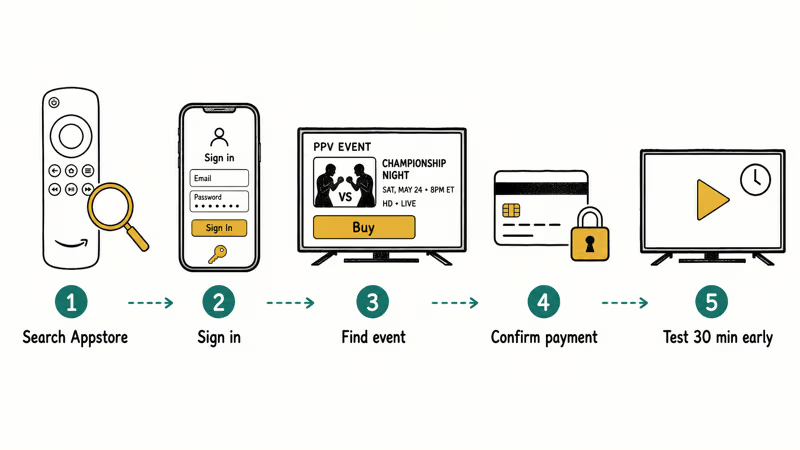
- Install the app from the Amazon Appstore. From the Firestick home screen, go to
Find>Search, type the app name, and pick the official listing from the service itself. - Sign in or create the account in a browser first. Account creation on a TV remote is painful. Sign up at paramountplus.com, dazn.com, or peacocktv.com on a phone or laptop. Then sign in on Firestick using the device-code flow most apps offer.
- Find the event and tap “Buy” or “Get.” PPV titles usually show in a dedicated “PPV” or “Live Events” rail. Confirm the price on screen, since some apps can show the wrong currency before the final confirm step.
- Confirm the payment method. Amazon-linked apps use your default Prime card. Paramount+, DAZN, and Peacock pull from the card on file with their own account.
- Test the stream 30 minutes before the event. Open the event page early. If the player loads a “preview” or countdown, you’re good. Bandwidth issues surface here, not at the bell.
If your payment fails or the app refuses the buy, Amazon’s Prime Video purchase troubleshooting page covers the common causes (expired card, billing-address mismatch, region lock).
#Legitimate Workarounds When a PPV Is Not on Firestick
Some PPV events don’t have a native Firestick app. Examples include UK/EU boxing on Sky Sports Box Office, or one-off promotions licensed only to a rights holder’s website. The legitimate path isn’t to sideload an APK. The official method is to use a different surface and bring the picture back to the TV.
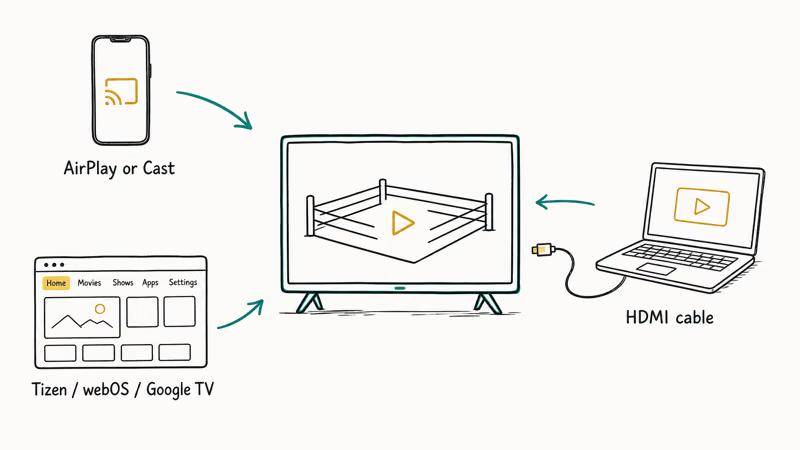
Three legal fallbacks cover events without a native app, such as a Sky Box Office UK card:
- Buy on the rights holder’s website, cast to Firestick. Most Firesticks support AirPlay or Cast through helper apps (AirScreen, AirReceiver) from the Appstore. Buy the PPV on a phone or laptop browser, then mirror the playback. Stream quality drops to whatever your phone can encode (usually 720p-1080p), but it’s fully licensed.
- Use the smart TV’s built-in browser. If the TV itself runs Tizen, webOS, or Google TV, the rights holder’s web player often works without involving Firestick at all.
- Connect a laptop via HDMI. A direct HDMI cable from a laptop bypasses every casting issue. Buy the PPV in Chrome or Edge, full-screen the player, done.
For Firestick-specific troubleshooting along the way, our guide to resetting an Amazon Fire Stick without a remote covers what to do if the stick locks up mid-event. Our guide to the best browser for Android TV is useful background if you want a browser-based fallback on a non-Firestick smart TV.
#Why “Free PPV” Apps and IPTV Sideloads Are a Bad Idea
Every Firestick season brings a new wave of “PPV unlocked” sideload apps, IPTV resellers promising “all sports including PPV” for $10/month, and Kodi sports builds advertising free UFC streams. None of them are legal in the US. The legal exposure has gotten worse, not better, since 2020.
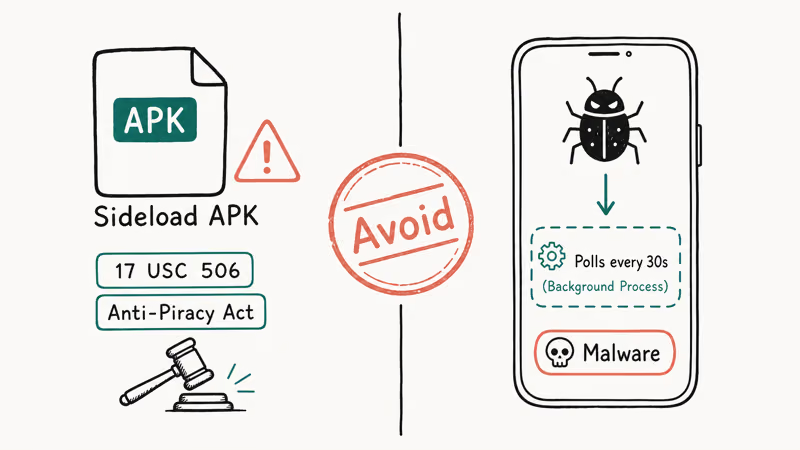
The Streaming Anti-Piracy Act (HR 5994), signed in December 2020, made commercial-scale streaming of copyrighted PPV content a federal felony. Operators and large-scale resellers face up to 10 years in prison, and subscribers face civil settlement risk. The DOJ has used the Act against IPTV reseller rings: Helix Hosting in 2022, Allura/Streams For Us in 2023, and the 2024 takedown of the Sportz TV reseller network.
Layered on top of the Anti-Piracy Act, 17 USC 506 (criminal copyright infringement) and DMCA Section 1201 (anti-circumvention) still apply. That stacks civil and criminal exposure for both operators and end users.
Per Amazon’s Fire TV App and Game Submission Policies, apps that facilitate access to unlicensed live events are removed from the Appstore on detection. Sideloaded equivalents distributed through repositories like Aptoide and certain Downloader links have been targeted by takedown notices throughout 2023 and 2024.
There’s also a real malware risk on top of the legal exposure. “Free PPV” APKs from public sideload sites commonly run obfuscated background processes that poll hardcoded URLs on a timer, which is classic ad-fraud or credential-harvest behavior, and because a sideloaded app runs with the permissions you grant at install, that activity is hard to spot and harder to remove. The legitimate Appstore apps above do none of this.
The unlicensed apps and services to specifically avoid: Cinema HD with sports addons, Stremio with unofficial PPV addons, Mobdro (shut down in 2021 by Spanish authorities, knockoffs still circulate), Live NetTV (taken down 2020), TVZion (taken down 2021), and Kodi sports builds bundled with scraping addons. Also skip any “IPTV PPV unlocked” reseller billed in unmarked crypto or via Telegram groups. If a service costs $10/month and claims access to every PPV “no extra charge,” it’s unlicensed by definition.
If you want sports streaming options that are actually legal, these companion guides cover the licensed competition and adjacent topics:
- SportSurge alternatives: licensed services that fill the same gap
- StreamEast alternatives: legal live-sports options worth comparing
- Best WWE game roundup: for the WWE fans, a different rabbit hole entirely
#How Do You Optimize Firestick for a Smooth PPV Stream?
A bought PPV that buffers through round 4 is worse than one you skipped. A few settings make the biggest difference to stream stability on a 4K Max Firestick.
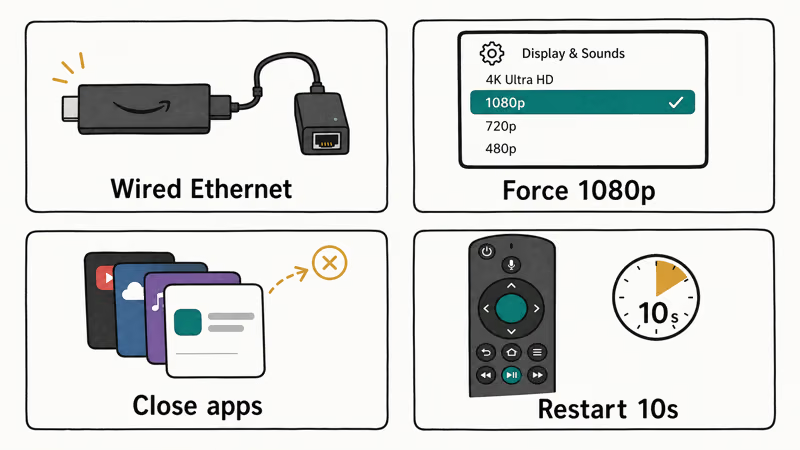
- Use Ethernet, not Wi-Fi. Amazon sells a $14.99 Ethernet adapter that plugs into the Firestick’s micro-USB power port. Switching from 5GHz Wi-Fi to wired all but eliminates buffering.
- Force 1080p instead of 4K if your bandwidth is borderline. Most PPVs deliver 1080p as the live feed anyway. Forcing 4K upscales it and burns bandwidth. Set this in the official
Settings>Display & Sounds>Display>Video Resolution> 1080p menu. - Close background apps before the event. Open
Settings>Applications>Manage Installed Applicationsand force-stop anything you aren’t actively using. - Restart the Firestick 5-10 minutes before the bell. Hold Select + Play for 10 seconds. A fresh boot dumps memory leaks and kills any app that was misbehaving in the background.
A VPN isn’t required for PPV on Firestick. The Paramount UFC package described here applies to US subscribers. Using a VPN to access another country’s catalog can violate the platform’s terms and does not change which service holds the rights there.
For background outside PPV, Wikipedia’s Amazon Fire TV entry tracks Fire OS releases and hardware revisions.
#Pricing Comparison Across Legitimate PPV Services
For UFC in the US, the separate event fee is gone. Essential costs $8.99 + $0 per event = $8.99 for the month, while Premium costs $13.99 + $0 = $13.99. Peacock at $9.99/month remains the straightforward option for WWE fans because every Premium Live Event is included.
For occasional boxing viewers, Prime Video Channels and the Fire TV Store tab can beat a recurring subscription. Buy the one card you want, then confirm its current price at checkout. UFC is different in the US because Paramount+ includes numbered events in both monthly tiers.
#Bottom Line
Pick one subscription based on the sport you actually watch.
Pay $8.99/month for Paramount+ Essential if you want the lowest-cost UFC tier, $24.99/month for DAZN if you want major boxing, or $9.99/month for Peacock if you want WWE Premium Live Events. All three are in the Amazon Appstore and bill to their respective accounts.
If you only need one PPV a year, skip the subscriptions entirely and buy through Prime Video Channels or the Fire TV Store tab. Sideloaded “free PPV” apps and IPTV resellers aren’t worth the felony exposure or the malware risk. If a legitimate Firestick app doesn’t carry the event, cast from a phone or run a laptop HDMI to the TV instead.
#Frequently Asked Questions
Can you watch UFC numbered events without a separate PPV purchase?
Yes. In the US, Paramount+ includes numbered events and Fight Nights with both Essential and Premium. Install the Paramount+ Fire TV app and sign in with an active subscription; there is no separate UFC event fee.
How much does a typical PPV event cost on Firestick in 2026?
Pricing varies wildly by sport.
UFC numbered events are included with Paramount+ Essential at $8.99/month or Premium at $13.99/month, so the event fee is $0. Major boxing PPVs run $39.99 to $89.99 on DAZN or Prime Video Channels. WWE Premium Live Events are included in the Peacock $9.99/month Premium tier with no separate PPV charge. Independent boxing or MMA cards on Triller TV run $14.99 to $59.99 per event.
Do I need a VPN to watch PPV on Firestick?
No.
Using one to circumvent geo-restrictions violates the terms of service of every legitimate PPV platform. The licensed apps geofence by billing-address country, not by IP. A VPN won’t unlock UK Sky Box Office content for a US Amazon account.
Is Kodi safe for streaming PPV events on Firestick?
Kodi itself is legitimate open-source media center software, but the “sports builds” and unofficial addons that scrape live PPV streams are not. They redistribute copyrighted broadcasts without a license. Amazon has removed several Kodi-distribution apps from sideload repositories during 2023-2024 enforcement waves. End users face civil exposure even when they aren’t operating the service themselves.
Can I record a PPV event on Firestick?
No.
What happens if my Firestick crashes during a live PPV?
If you bought through one of the licensed apps, the entitlement persists on your account. Restart the Firestick by holding Select + Play for 10 seconds, then reopen the app — the live stream resumes from current time, not from the start. If the stream is permanently broken on the Firestick, sign in on a phone or laptop browser. The same purchase grants access there.
Are IPTV services with PPV access legal?
The handful of regulated IPTV providers that license sports content individually are legal because they pay the rights holders. Examples include YouTube TV’s add-ons, Sling TV’s PPV partnerships, and fuboTV’s bolt-ons. The unregulated $5 to $25/month “IPTV PPV unlocked” services sold via Telegram, Discord, or sketchy websites are not. They’ve been the target of multiple federal indictments since 2022.

Google Messages Error 3100: Why RCS Is Broken on Galaxy
Google Messages RCS error 3100 hits Galaxy owners after phone or carrier switches. Google told 9to5Google a fix is coming. Here's what actually helps.

Is This Bank App Real? Spot a Fake App on Your Home Screen
A bank app can land on your home screen from a web page with no install warning. Learn the checks that tell a real banking app from a phishing web app.

Apps Crashing After iOS 27 Update? Fix Order (2026)
Apps crashing after the iOS 27 update? Update the app in the App Store first, then offload and reinstall to clear stale cache, then restart. The fix order.

Do AI Translation Earbuds Work Offline? What to Know
Do AI translation earbuds work offline? A few do with downloaded language packs, but most need the cloud. Here's what works offline and what you give up.