As a content creator or viewer on YouTube, you may have come across the term “unlisted” when dealing with video privacy settings. But what exactly does unlisted mean on YouTube, and how does it differ from other privacy options? This comprehensive guide will explore everything you need to know about unlisted YouTube videos, their features, benefits, and limitations.
#Understanding YouTube Video Privacy Settings
Before diving into the specifics of unlisted videos, it’s essential to understand the three main privacy settings available on YouTube:

- Public videos: These are visible to everyone and can appear in search results, on your channel page, and in recommendations.
- Private videos: These are only visible to specific users you invite and cannot be found through search or on your channel.
- Unlisted videos: These occupy a middle ground between public and private, offering unique features and benefits.
It’s worth noting that YouTube offers different licensing options for your content, such as Standard YouTube License vs. Creative Commons, which can affect how others can use your videos.
#Key Features of Unlisted YouTube Videos
Unlisted videos on YouTube have several distinctive characteristics:
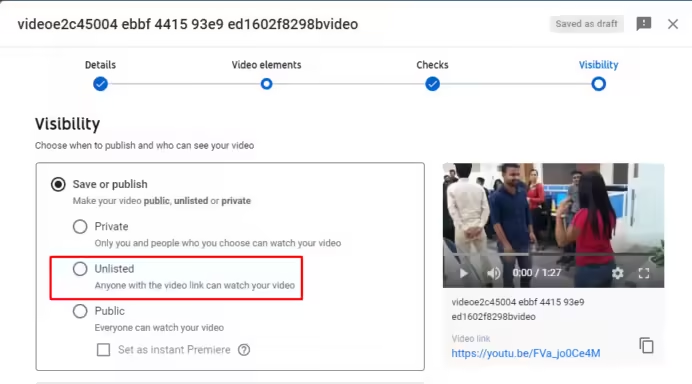
- Limited visibility: They don’t appear in YouTube’s search results, on your channel page, or in the platform’s recommendations.
- Shareable via link: Anyone with the direct link to the video can view it.
- No account required: Viewers don’t need a YouTube account to watch unlisted videos.
- Not in search results: Unlisted videos are hidden from YouTube’s search function.
- No notifications: Subscribers aren’t notified when you upload an unlisted video.
These features make unlisted videos a versatile option for content creators who want to share their work selectively without making it fully public.
#Benefits of Using Unlisted Videos
Unlisted videos offer several advantages:

- Selective sharing: You can control who views your content by only sharing the link with specific individuals or groups.
- Content testing: Test new video ideas or formats with a limited audience before making them public.
- Gathering feedback: Share videos with a select group to get constructive criticism before a wider release.
- Internal communications: Use unlisted videos for company training or sharing information within an organization.
- Exclusive content: Offer special videos to Patreon supporters or newsletter subscribers as a reward.
#How to Make a YouTube Video Unlisted
Follow these steps to set a video as unlisted:
- Sign in to YouTube Studio
- Click on “Content” in the left sidebar
- Find the video you want to make unlisted
- Click on the “Visibility” dropdown menu
- Select “Unlisted“
- Save your changes
To change an existing public or private video to unlisted:
- Go to YouTube Studio and find the video
- Click “Edit“
- Under “Visibility,” choose “Unlisted“
- Save your changes
If you’re experiencing issues with YouTube, such as YouTube keeps pausing or YouTube not working on Android, make sure to troubleshoot these problems before changing your video settings.
#Unlisted vs Public Videos: Key Differences
Understanding the differences between unlisted and public videos is crucial:
Aspect
Unlisted Videos
Public Videos
Visibility
Only accessible via direct link
Visible to everyone
Discoverability
Not searchable on YouTube
Appear in search results
Audience Reach
Limited to those with the link
Potentially unlimited
Engagement
May have lower engagement
Higher potential for views and interaction
Sharing
Manual link sharing required
Easily shareable through YouTube
Ideal Use
Controlled distribution
Maximum exposure
For public videos, you might want to consider disabling YouTube Shorts if you prefer traditional video formats.
#Unlisted vs Private Videos: A Comparison
Unlisted and private videos also have distinct characteristics:
Feature
Unlisted Videos
Private Videos
Access Control
Anyone with the link
Only invited users
Account Requirements
No YouTube account needed
Viewers must have a Google account
Sharing Limitations
No limit on shares
Limited to 50 people
Visibility in Playlists
Can be added to public playlists
Cannot be added to public playlists
Best Applications
Broader sharing, feedback gathering
Confidential content, personal videos
#Common Uses for Unlisted YouTube Videos
Unlisted videos are versatile and can be used in various scenarios:
- Content previews: Share upcoming videos with loyal fans or supporters.
- Gathering feedback: Get opinions from a trusted audience before public release.
- Internal training: Share company videos without making them publicly accessible.
- Event promotion: Offer exclusive sneak peeks to build anticipation.
- Portfolio samples: Share work samples with potential clients or employers.
- Collaborative projects: Share works-in-progress with team members.
- Educational resources: Provide supplementary materials to students or workshop attendees.
#Limitations and Considerations for Unlisted Videos
While unlisted videos offer many benefits, they also have some limitations:
- Potential for unintended sharing: Anyone with the link can redistribute it, potentially reaching unintended audiences.
- Limited discoverability: Unlisted videos won’t benefit from YouTube’s recommendation algorithms or search features.
- Impact on channel metrics: Views on unlisted videos don’t contribute to public view counts or watch hours.
- Monetization restrictions: Unlisted videos may have limited monetization options compared to public videos.
- Security considerations: While more private than public videos, unlisted videos are not as secure as truly private videos.
It’s important to note that if you’re considering converting YouTube videos to other formats or using YouTube to MP3 converters, you should be aware of the legal implications and respect copyright laws.
#Frequently Asked Questions About Unlisted YouTube Videos
- Can unlisted videos be monetized? Yes, unlisted videos can be monetized, but they may generate less revenue due to lower view counts.
- Do unlisted videos affect my channel’s overall view count? Views on unlisted videos do count towards your channel’s total view count, but they don’t appear in public-facing metrics.
- Can I change an unlisted video to public later? Yes, you can change the privacy settings of your video at any time.
- Will my subscribers be notified when I upload an unlisted video? No, subscribers are not notified about unlisted video uploads.
- Can unlisted videos be added to playlists? Yes, unlisted videos can be added to both public and private playlists.
#Key Takeaways on Unlisted YouTube Videos
- Unlisted videos offer a balance between privacy and accessibility.
- They’re ideal for selective sharing and gathering feedback.
- Unlisted videos don’t appear in search results or on your channel page.
- Anyone with the link can view an unlisted video, no account required.
- They have some limitations in terms of discoverability and metrics.
Understanding the nuances of unlisted YouTube videos allows content creators to leverage this feature effectively, balancing privacy with the desire to share content selectively. Whether you’re testing new content, sharing exclusive videos, or managing internal communications, unlisted videos provide a flexible solution for many YouTube users.
For those looking to expand their reach beyond YouTube, consider exploring other platforms and strategies, such as becoming one of the top TikTok influencers. This can help diversify your content and audience across multiple social media channels.