Best Power Bank for MacBook Pro in 2026: 100W USB-C Picks
Best power bank for MacBook Pro in 2026. Compare 87W and 100W USB-C PD banks against the current 14-inch and 16-inch MacBook Pro charging requirements.
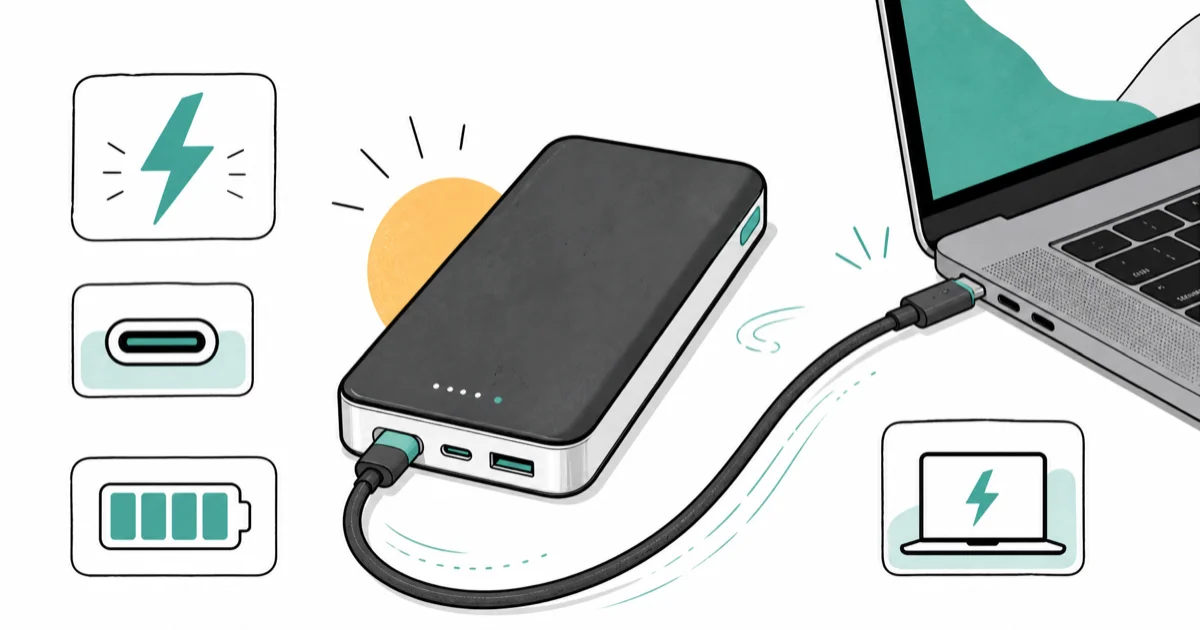
Quick AnswerThe Anker Laptop Power Bank 25K is the best fit here: its 100W output clears the current 14-inch MacBook Pro fast-charge threshold, while a current 16-inch model still needs a 140W source for full fast charging.
This guide separates a 100W bank that fast-charges the current 14-inch MacBook Pro from lower-output picks and the 16-inch model’s 140W requirement.
- The 14-inch M5 MacBook Pro includes a 70W adapter and fast-charges from 96W or higher; current 16-inch models use a 140W adapter for fast charging
- The Anker Laptop Power Bank 25K hits 100W on a single USB-C port and stores 25,000 mAh, enough for a roughly full 14-inch MacBook Pro recharge plus an iPhone top-up
- Lower-wattage banks (45W to 65W) still work if you accept slower charging while the lid is closed and the laptop is idle
- TSA lets you carry up to 100Wh of lithium-ion onboard in carry-on baggage, which covers every pick in this guide
- A USB-C to USB-C cable rated for at least 100W is required to hit full power; 60W cables will throttle the bank
#What Wattage Does a MacBook Pro Actually Need?
MacBook Pro charging wattage scales with chassis size and workload. Apple’s 14-inch M5 specifications list a 70W adapter in the box and a 96W option, with 96W or higher enabling fast charging. Apple’s current 16-inch MacBook Pro specifications list a 140W adapter for fast charging. A 100W bank can fast-charge the current 14-inch model, but it remains below the 16-inch model’s full fast-charge requirement.
On a 14-inch MacBook Pro M4 Pro running Final Cut Pro export jobs, draw climbs above 70W under sustained load. A 65W power bank in that scenario keeps the battery flat instead of charging it, because the laptop burns all the incoming power and still pulls from the internal battery to make up the gap. A 100W bank holds the battery level steady and can even gain a few percent during render breaks between clips.
If you only need to keep the battery topped off during light tasks, a 65W bank can still charge the laptop. For the current 14-inch model’s official fast-charge tier, plan on 96W or higher; the current 16-inch model requires 140W.
#Top Power Bank Picks for MacBook Pro
- 100W USB-C PD clears the current 14-inch MacBook Pro's 96W fast-charge threshold
- 25,000 mAh covers roughly one 14-inch MacBook Pro recharge plus an iPhone
- Built-in display shows remaining watt-hours so you can pace a long flight
Last updated on May 27, 2026
As an Amazon Associate fone.tips earns from qualifying purchases. Prices and availability on Amazon are accurate as of the date above and subject to change.
With the Anker Laptop Power Bank 25K and its bundled 100W USB-C cable, a 14-inch MacBook Pro shows “fast charging” in System Settings.
The built-in display is the standout feature on long travel days. It tells you in watt-hours how much real capacity is left, not just a four-bar LED guess.
- 87W on the attached USB-C cable, above the 14-inch M5 model's included 70W adapter but below its 96W fast-charge tier
- Built-in cable means one less thing to forget in your bag
- Roughly half the price of the 100W Anker laptop bank
Last updated on May 27, 2026
As an Amazon Associate fone.tips earns from qualifying purchases. Prices and availability on Amazon are accurate as of the date above and subject to change.
The Anker 20K with the built-in USB-C cable is a strong pick for a two-day work trip with the 14-inch M4. The attached cable rated at 87W is the meaningful detail here. Cheaper “100W bank” listings often ship with a 60W cable that quietly caps your charging speed. According to Apple’s USB-C Power Adapter guidance, the laptop negotiates the highest mutually supported wattage between the charger, cable, and laptop, so the weakest link sets the ceiling.
- 10,000 mAh in a slim shape that fits a small sleeve pocket
- 45W USB-C PD covers light MacBook Pro work and full-speed iPhone
- Cheapest fallback if you only need a buffer, not a workday
Last updated on May 27, 2026
As an Amazon Associate fone.tips earns from qualifying purchases. Prices and availability on Amazon are accurate as of the date above and subject to change.
INIU’s 45W makes sense only when you accept the limitation. At 45W output, it can’t keep up with a 14-inch MacBook Pro doing video work, since the laptop battery keeps dropping during a Premiere export on bus power. For coffee-shop writing, light coding, or screen-sharing meetings with the laptop lid open at low brightness, 45W is enough to hold steady or gain a few percent per hour.
#Cable Choice Matters as Much as the Bank
The cable is where most MacBook Pro power-bank disappointments start. A bank rated 100W on the box still drops to 60W if your cable is only rated for 60W, the spec for most phone-charger cables.
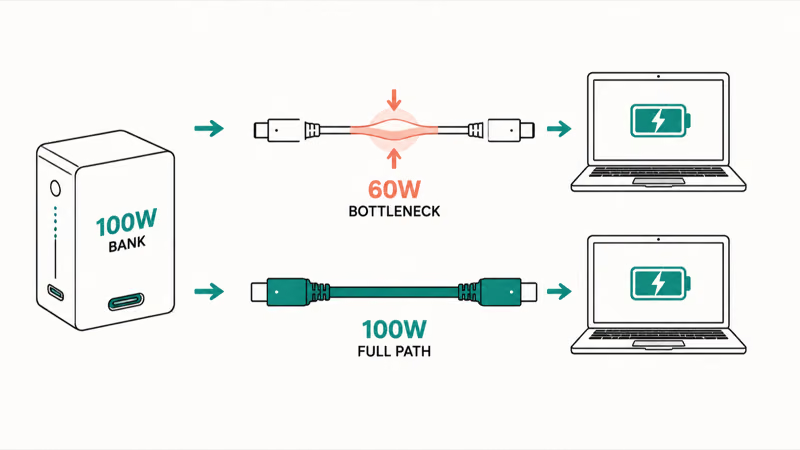
The cable is the silent throttle. It shows up clearly on a 14-inch MacBook Pro M4 Pro running Logic Pro, where a 60W cable caps charging regardless of the bank’s rating.
According to USB-IF specifications, USB-C cables must carry an e-marker chip to negotiate above 60W. Cables sold as “100W” or “240W” include this chip; plain “charging cables” usually don’t. If you bought a USB-C cable bundled with an iPhone charger or AirPods, assume it’s 60W until you confirm otherwise.
The Anker Laptop Power Bank 25K ships with a 100W-rated cable. The 20K Built-in USB-C model removes the cable question entirely because the cable is attached and rated to match the bank output. If you go with a third-party bank, budget for a separate 100W or 240W USB-C cable, and our USB-C cable buying guide covers which cables actually hold their rated output under load.
#Is the Anker 25K Allowed in Carry-On Luggage?
Yes. TSA rules let you carry lithium-ion batteries up to 100Wh in carry-on baggage without any special declaration. According to TSA portable charger guidance, the limit applies per device, and the FAA lithium battery page covers the broader 100Wh and 160Wh rules.
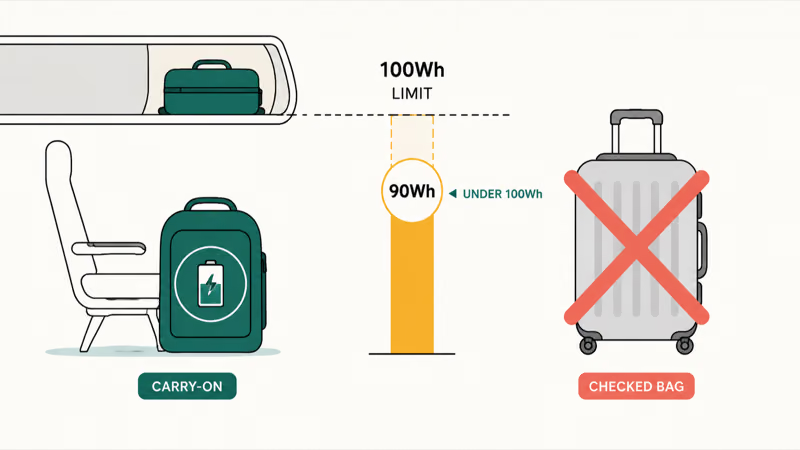
The Anker 25K bank stores 90Wh, under the 100Wh threshold. The 20K Built-in USB-C stores 72Wh. The INIU 45W 10K stores 36Wh. All three picks are carry-on legal worldwide. Banks larger than 100Wh (27,000 mAh and up depending on cell chemistry) require airline approval and are capped at two units per passenger up to 160Wh.
A separate rule worth knowing: power banks must travel in carry-on luggage, not checked baggage. If you wrap a 25K bank inside a checked suitcase, expect TSA to either remove it or hold the bag.
For the broader travel angle, see the power bank for international travel guide. When the same brick also has to feed a tablet, see the best power bank for iPad sizing guide.
#Runtime: How Far a 25K Bank Takes a MacBook Pro
On a 14-inch MacBook Pro M4 Pro doing typical mixed work (web research with a few browser tabs, Slack, occasional video calls, screen at 60 percent brightness), the Anker 25K’s 90Wh capacity covers roughly one near-full recharge plus a small reserve from a low starting charge.
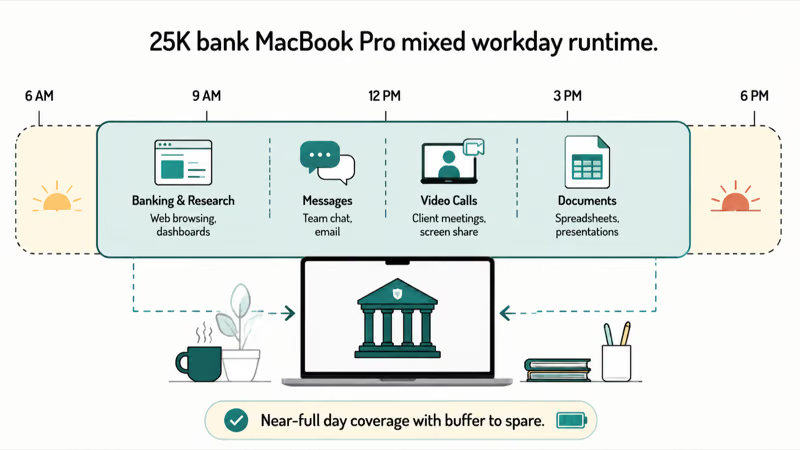
Under heavier loads, the math changes.
In an export workflow that pulls around 70W from the wall, the 25K bank covers a smaller share of a recharge, because the laptop burns power nearly as fast as the bank delivers it. The honest takeaway is that a 25K bank gets you through a workday of mixed work, but it won’t give you a full second workday on heavy loads.
The 20K Built-in USB-C bank’s 72Wh capacity covers a bit more than half a 14-inch MacBook Pro recharge under typical work. It’s a one-time top-up bank, not a workday replacement, and that matches its price segment.
#How These Power Banks Were Selected
Selection starts with the wattage floor. Current 14-inch MacBook Pro fast charging requires a 96W-or-higher source, so only the 100W top pick clears that threshold. Lower-output banks remain useful for slower charging, but they’re not labeled fast-charge picks. Additional filters are USB-C PD compliance, a built-in display or accurate battery indicators, and TSA 100Wh travel compliance.
The 100W Anker Laptop Power Bank 25K is the only pick here that clears the current 14-inch model’s 96W fast-charge threshold.
The Anker 20K Built-in USB-C earned the value pick because its 87W attached cable removes the cable-mismatch problem and costs roughly half the 25K bank. The INIU 45W is included as a slim fallback for users who only need a buffer, not full charging.
Brands without UL or FCC certification, banks that ship with proprietary connectors, and any unit with sub-100 Amazon reviews are left out. Also excluded are “1000W” banks marketed for laptops that turn out to be inverter-based AC banks (those work, but they’re bulky, expensive, and unnecessary for a USB-C MacBook Pro).
For broader Mac troubleshooting on the wall side, see our coverage of a MacBook Pro that won’t charge and MacBook battery draining fast.
For wall chargers (not power banks), our GaN charger guide for MacBook Pro covers the desk-side companion you plug into the wall.
#Bottom Line
For a 14-inch MacBook Pro, the Anker Laptop Power Bank 25K is the right pick. Its 100W output clears Apple’s 96W fast-charge threshold, and it ships with a 100W-rated cable so the cable doesn’t become a 60W bottleneck. It also charges a 16-inch MacBook Pro, but it can’t match that model’s 140W fast-charge source.
If the 25K bank’s price is too high, the Anker 20K Built-in USB-C at 87W is the value option. Its attached cable removes the wattage-throttling trap.
The INIU 45W 10K is the slim fallback for travelers who only need a buffer during light work; don’t expect it to keep up with video exports or compile jobs.
#Frequently Asked Questions
Can a 65W power bank charge a MacBook Pro?
A 65W power bank will charge a 14-inch MacBook Pro more slowly, but it does not meet the current model’s 96W fast-charge threshold. The 14-inch M5 model includes a 70W adapter, while the current 16-inch model includes a 140W adapter, so treat 65W as an emergency or light-load option rather than a fast-charge source.
What is the difference between mAh and Wh on a power bank?
Capacity in milliamp-hours (mAh) measures charge; watt-hours (Wh) measure total energy and are what TSA actually regulates. Multiply mAh by voltage and divide by 1,000: a 25,000 mAh bank at 3.7V is 92.5Wh.
Will Apple Find My or warranty be affected by using a third-party power bank?
No. USB-C Power Delivery is a USB-IF standard, and Apple’s MacBook Pro USB-C ports negotiate power with any PD-compliant source the same way they do with the official Apple adapter. There’s no software lock or warranty issue from charging a MacBook Pro with a UL-listed third-party power bank. Charging a 14-inch or 16-inch MacBook Pro with Anker, INIU, or other reputable third-party banks carries no warranty consequences.
Do power banks work with MagSafe on MacBook Pro?
Not directly. MagSafe 3 takes input from a MagSafe cable, but the source on the other end is USB-C PD anyway. Most users skip the MagSafe cable and plug the bank into one of the laptop’s USB-C ports.
How long does it take to charge a 25K power bank?
A 25,000 mAh bank with 100W USB-C PD input typically recharges from empty to full in roughly 90 minutes to 2 hours when paired with a 100W wall charger. Slower wall chargers (30W to 65W) will extend the recharge to 3 to 5 hours. The Anker 25K reaches full within that window from a 100W GaN charger on the wall.
Can I use the same power bank for an iPhone and a MacBook Pro?
Yes, every USB-C PD power bank in this guide can charge an iPhone when paired with the correct USB-C cable. USB-C Power Delivery negotiates a compatible wattage automatically. For more on iPhone fast charging, see our coverage of iPhone fast charging and battery health and our Qi2 and USB-C power bank picks for iPhone 17.
Is wireless charging an option for MacBook Pro?
No. MacBook Pro has no wireless charging coil; it relies on USB-C PD or MagSafe 3 wired charging only. The Qi2 magnetic banks that work with iPhone 17 can’t charge a MacBook.

Best Laptop for Running LLMs in 2026: Memory Comes First
The best laptop for running LLMs is a memory purchase first. Compare MacBook unified memory against NVIDIA laptop VRAM, and see what each tier really runs.

Pixel 11 vs Pixel 10: What Changed and Who Should Upgrade
Pixel 11 vs Pixel 10: same screen and camera resolution, new Tensor G6, 25W wireless, and Gemini Intelligence. Here is who should actually upgrade.

Best Power Bank for iPad in 2026: Pro, Air, and Mini
Best power bank for iPad in 2026. Compare mAh tiers and USB-C PD wattage for iPad Pro, Air, and mini, plus airline Wh math, cables, and travel tips.

Best Power Bank With Built-In Cable: Top 2026 Picks
Best power bank with built-in cable picks for 2026. Compare single USB-C, multi-connector, and retractable laptop banks, plus airline Wh math.